plugSaaS Orchestration with Third-Party Vault

Connect external vaults to store cards

Merchants using Hyperswitch SaaS can still integrate an external PCI-compliant vault. This setup is ideal for merchants who already have existing token infrastructure (e.g., VGS, Tokenex and more).

Key Highlights:

  • Combines the scalability of SaaS orchestration with external vault flexibility.

  • Supports Vault Proxy APIs for tokenization/de-tokenization.

  • Merchant retains token portability across platforms.

Third party vault integration options

Hyperswitch SDK and external vault

In this approach, the Hyperswitch SDK is used to capture card details, but card storage and tokenization are handled by an external vault

Hyperswitch SDK loading external vault SDK

The External Vault SDK is loaded onto the Hyperswitch Unified Checkout SDK. The card data is captured and tokenized using the external vault SDK

External vault SDK and storage

The merchant directly integrates with the external vault SDK and card data is captured and tokenized using the external vault SDK

Configuring External Vault on Hyperswitch

For External Vaults to work with Hyperswitch you need to configure the required API credentials on the Hyperswitch dashboard. You can do this by navigating to Orchestrator > Connector > Vault Processor and entering the required details.

1. Hyperswitch SDK and external vault

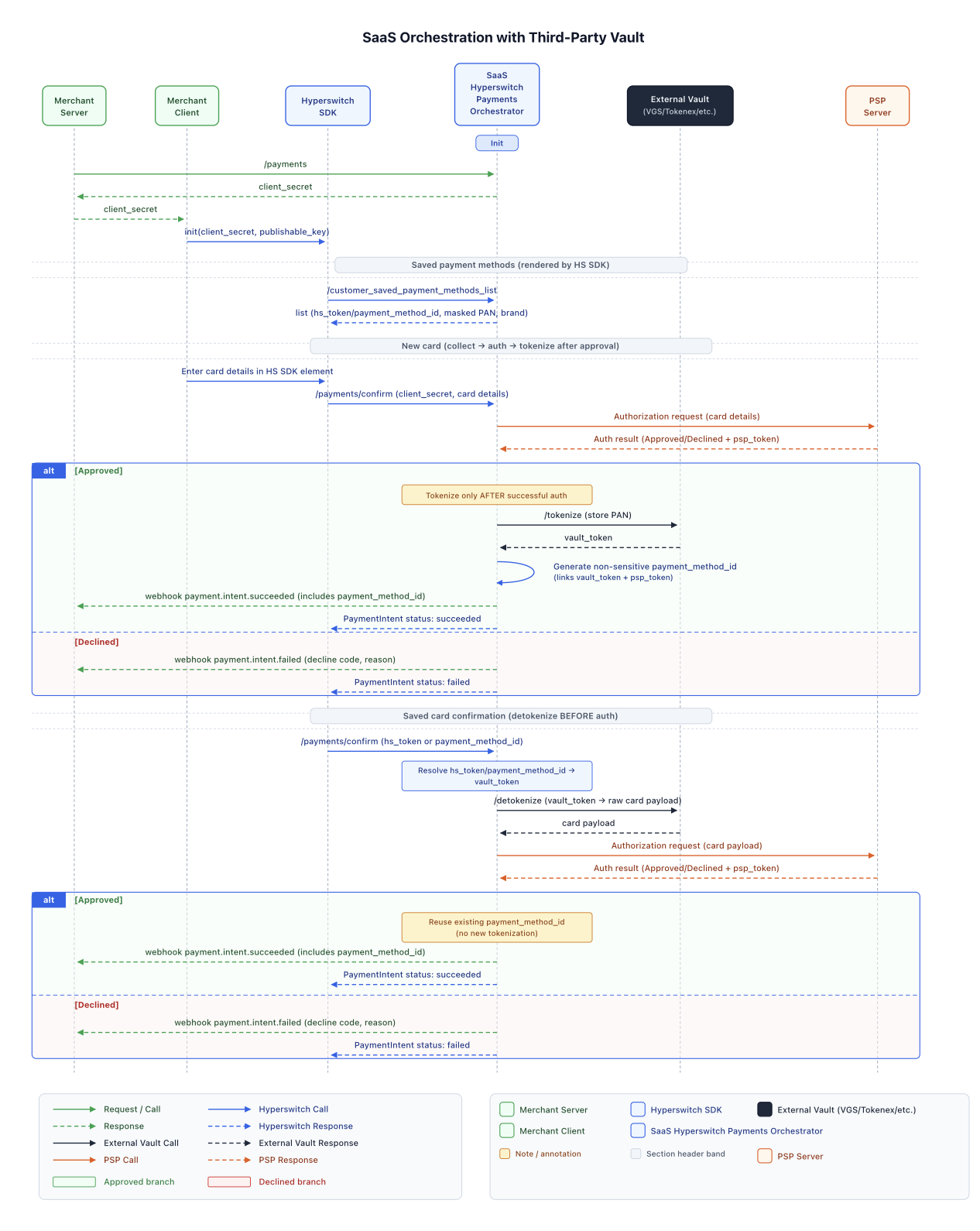
In this approach, the Hyperswitch SDK is used to capture card details, but card storage and tokenization are handled by an external vault. Hyperswitch backend orchestrates payments using tokens issued by the external vault.

New user payments flow

  1. Load the Hyperswitch Payments SDK via Payments Create API request arrow-up-right. The end-user enters their payment credentials for the selected payment option

  2. The Payment Confirm API requestarrow-up-right containing the payment method is sent to the PSP from Hyperswitch

  3. Once the PSP responds with the outcome approved or declined along with the PSP token, Hyperswitch then proceeds to store and tokenize the card.

  4. The card is stored in external vault, which returns a vault_token

  5. Upon receiving the vault_token, Hyperswitch generates a payment_method_id . A payment_method_id is a versatile token and connects a lot of entities together like customer_id, psp_token, vault_token

  6. This Payment_method_id is returned to the merchant via web hooks

Repeat user payments flow

  1. In a repeat-user the payment, the Hyperswitch SDK will load the stored payment methods of the customer based the customer_id sent as part of the Payments Create API request arrow-up-right.

  2. The end-user can select the desired payment option and add their CVV

  3. The SDK sends the Payment Confirm API requestarrow-up-right when the user hits Pay

  4. The Hyperswitch backend resolves the payment_method_id to identify available vault_token

    1. Hyperswitch can use the detokenize flow to obtain the raw card in exchange for the vault_token . It will the send payload with the raw card credential to the payment provider or PSP downstream.

Merchant Initiated Transaction (MIT) flow

  1. The merchant can perform the MIT or Recurring transactions using payment_method_id

2. Hyperswitch SDK loading external vault SDK

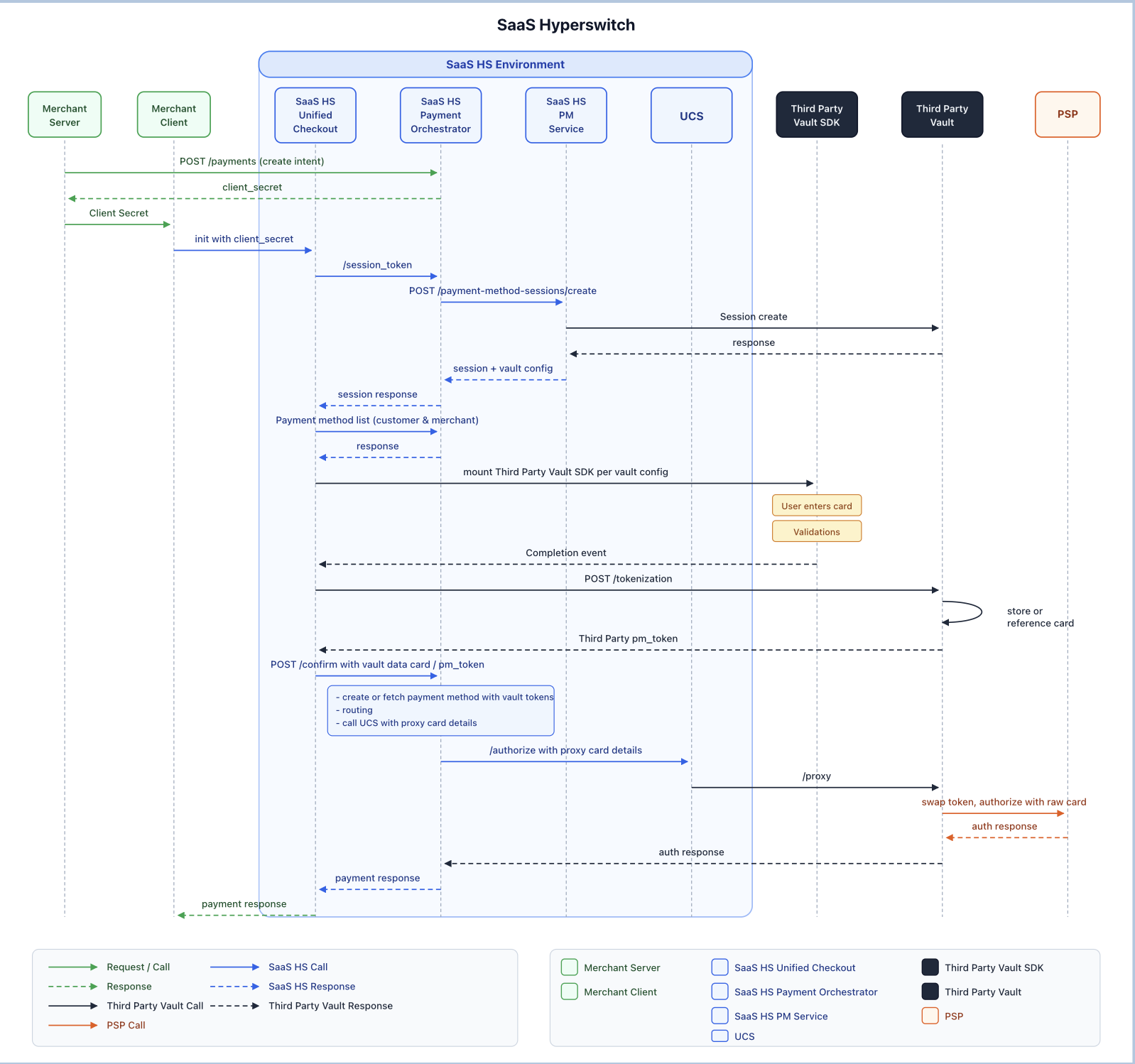
In this flow, the External Vault SDK is layered directly onto the Hyperswitch Unified Checkout SDK. The External Vault SDK captures card details and tokenizes them immediately at the vault. This ensures that sensitive card data never touches the Hyperswitch server.

New user payments flow

  1. Load the Hyperswitch Payments SDK via Payments Create API request arrow-up-right. The end-user enters their payment credentials for the selected payment option. The Hyperswitch SDK in-turn loads the external vault SDK that has been configured in the merchant account.

  2. The end-user enters their payment credentials for card payment method directly in the external vault SDK

  3. The external vault SDK returns a vault_token and associated card meta data to the Hyperswitch SDK

  4. The Payment Confirm API requestarrow-up-right containing the vault_token and associated card metadata is sent to Hyperswitch server by the Hyperswitch SDK

  5. Hyperswitch server then creates the PSP payload based on the payment providers or PSPs configured for the merchant

  6. This PSP Payload containing the vault_token is sent to the Proxy endpoint of the external vault

  7. The external vault replaces the vault_token with the raw card and sends the request the PSP

  8. Once the PSP responds with the outcome approved or declined along with the PSP token, the Proxy endpoint of the external vault sends the response back to Hyperswitch server

  9. Upon receiving the vault_token, Hyperswitch generates a payment_method_id . A payment_method_id is a versatile token and connects a lot of entities together like customer_id, psp_token, vault_token

  10. This Payment_method_id and vault_token are returned to the merchant via web hooks

Repeat user payments flow

  1. In a repeat-user the payment, the Hyperswitch SDK will load the stored payment methods of the customer based the customer_id sent as part of the Payments Create API requestarrow-up-right.

  2. The end-user can select the desired payment option and add their CVV

  3. The SDK sends the Payment Confirm API requestarrow-up-right API request to the Hyperswitch server when the user hits Pay

  4. The Hyperswitch backend resolves the payment_method_id to identify available vault_token

    1. Hyperswitch can use the detokenize flow to obtain the raw card in exchange for the vault_token . It will the send payload with the raw card credential to the payment provider or PSP downstream.

Merchant Initiated Transaction (MIT) flow

  1. The merchant can perform the MIT or Recurring transactions using payment_method_id

3. External vault SDK and storage

The merchant integrated with external vault SDK which manages the card data and user experience entirely independent of the Hyperswitch. The card is tokenized directly with the chosen vault, after which merchant will have to pass the token returned by external vault along with the card metadata to Hyperswitch to process the payment.

New user payments flow

  1. Load the external vault SDK that has been integrated directly by the merchant.

  2. The end-user enters their payment credentials for card payment method directly in the external vault SDK.

  3. The external vault SDK returns a vault_token and associated card meta data.

  4. The merchant will use Payments Create API requestarrow-up-right to send the vault_token and associated card metadata to Hyperswitch server.

  5. Hyperswitch server then creates the PSP payload based on the payment providers or PSPs configured for the merchant

  6. This PSP Payload containing the vault_token is sent to the Proxy endpoint of the external vault

  7. The external vault replaces the vault_token with the raw card and sends the request the PSP

  8. Once the PSP responds with the outcome approved or declined along with the PSP token, the Proxy endpoint of the external vault sends the response back to Hyperswitch server

  9. Upon receiving the vault_token, Hyperswitch generates a payment_method_id . A payment_method_id is a versatile token and connects a lot of entities together like customer_id, psp_token, vault_token

  10. This Payment_method_id and vault_token are returned to the merchant via web hooks

Repeat user payments flow

  1. In a repeat-user the payment, the merchant needs to load the stored payment methods of the customer based the customer_id sent as part of the Payment Method - List Customer Saved Payment Methodsarrow-up-right API request.

  2. The end-user can select the desired payment option and add their CVV . This CVV is entered directly into the elements provided by external vault.

  3. The external vault tokenizes the CVV temporarily and returns a temp_vault_token

  4. The merchant will use Payments Create API requestarrow-up-right to send the vault_token and the temp_vault_token of the card selected by the end user.

  5. Hyperswitch server then creates the PSP payload based on the payment providers or PSPs configured for the merchant

  6. This PSP Payload containing the vault_token and temp_vault_token is sent to the Proxy endpoint of the external vault

  7. The external vault replaces the vault_token with raw card, the temp_vault_token with CVV and sends the request the PSP

  8. Once the PSP responds with the outcome approved or declined along with the PSP token, the Proxy endpoint of the external vault sends the response back to Hyperswitch server

Merchant Initiated Transaction (MIT) flow

  1. The merchant can perform the MIT or Recurring transactions using vault_token

Last updated

Was this helpful?