> For the complete documentation index, see [llms.txt](https://docs.hyperswitch.io/llms.txt). Markdown versions of documentation pages are available by appending `.md` to page URLs; this page is available as [Markdown](https://docs.hyperswitch.io/integration-guide/workflows/smart-retries.md).
# Smart Retries
Automatically retry payments with an alternative processor
Smart retry is a Juspay Hyperswitch feature to improve the payment success rates in a single or multi-processor setup. If the payment fails through the primary processor due to specific reasons, the payment will be retried with the same or an alternative payment processor to increase the chances of making the payment successful.
The Auto Retry engine handles varied Retry strategy based on the type of error encountered such as:
1. **Cascading Retry** - Re-attempting an authorization request to an alternate processor with the same or enhanced payload
2. **Step-Up Retry** - Re-attempting an authorization request to the same/different processors with additional authentication data (frictionless and challenge flows)
3. **Clear PAN Retry** - Re-attempting a tokenised authorization request with a Clear PAN in case of de-tokenisation failures
4. **Global Network Retry** - Re-attempting an authorization request with a signature network in case of debit network failure
Hyperswitch's error handling engine is enriched with mappings for error codes and error messages across 100+ processors, acquirers, issuers. Processors have anywhere between 400 to 1,000 and at times more error codes. The database contains these combinations of error code and error messages for every processor and is constantly refreshed with newer codes that are encountered.
### Error code segregation
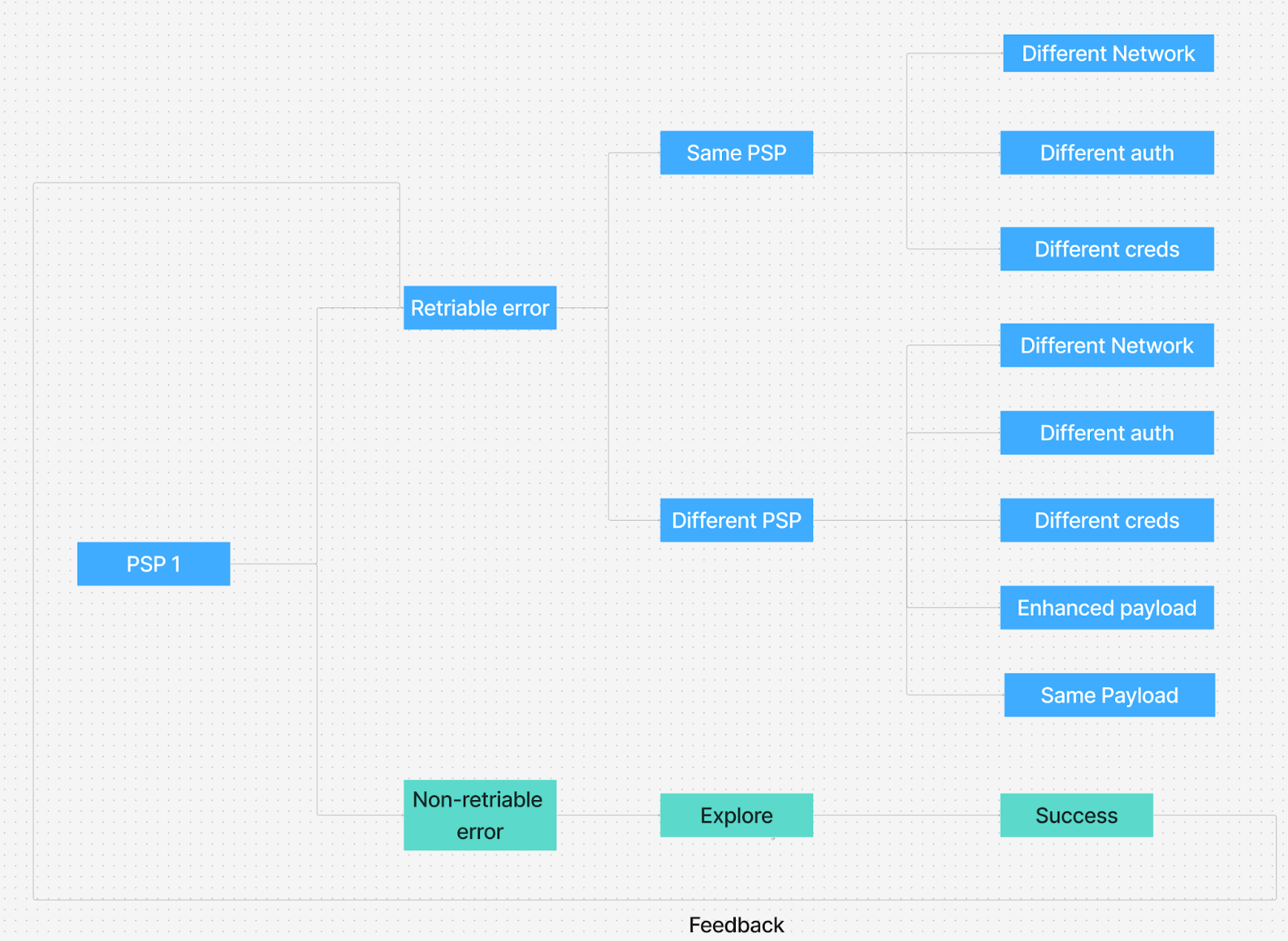
1. For each PSP all the published + encountered error codes are segregated in two categories "Retriable" and "Non-retriable"
2. This is a dynamic list and continue to grow for each PSP as they change their error mapping or introduce new errors
3. We're also implementing a feedback loop from "Non-retriable" errors to "Retriable" errors basis retry exploration *(bottom branch on the image above)*
Each of the error codes are mapped individually as to whether they are eligible for the various retry capabilities.
| Category | Example codes from a PSP |
| --------------- | ---------------------------------------------------------------------------------------------------- |
| Cascading retry | Refused, System malfunction, Processing temporarily unavailable |
| Step-up retry | 3D Secure required, Strong customer authentication required, Suspected Fraud |
| Clear PAN retry | Invalid cryptogram, Network token not supported, Payment token expired |
| Network retry | Transaction not permitted on this network, Invalid card for selected network, Function not supported |
### Merchant config enablement
1. Merchant needs to be enabled across the required flows
2. Merchant can be eligible to all 4 or some of retry flows - **Cascading Retry, Step-Up Retry, Clear PAN Retry, Global Network Retry**
3. Merchant needs to specify N = Number of retries permitted
### Retry Decision Flow
1. Payment fails → GSM lookup determines retry eligibility
2. Check retry flags:
1. *step\_up\_possible* → Attempt 3DS if no 3DS was used
2. *clear\_pan\_possible* → Retry with PAN for network tokens
3. *alternate\_network\_possible* → Try different debit network
3. Execute *retry via do\_retry()* function with SAME or ENHANCED payload
4. Exhaustion handling → Stop when retries/connectors depleted
### How it all comes together
#### Use Case 1
| Attempt | PSP | Flow | Outcome |
| ------- | ---- | --------------------------------------------- | --------------- |
| 1 | PSP1 | Original payload (non-3ds) | Suspected fraud |
| 2 | PSP1 | Step up - Independent 3DS (frictionless flow) | Generic decline |
| 3 | PSP2 | Original payload + Authentication data | Successful |
#### Use Case 2
| Attempt | PSP | Flow | Outcome |
| ------- | ---- | ------------------------------------------ | --------------- |
| 1 | PSP1 | Original payload (non-3ds) | Suspected fraud |
| 2 | PSP1 | Step up - Independent 3DS (challenge flow) | Generic decline |
| 3 | PSP2 | Original payload + Authentication data | Successful |
#### Use Case 3
| Attempt | PSP | Flow | Outcome |
| ------- | ---- | -------------------------- | --------------- |
| 1 | PSP1 | Original payload (non-3ds) | Generic decline |
| 2 | PSP2 | Original payload (non-3ds) | Successful |
#### Use Case 4
| Attempt | PSP | Flow | Outcome |
| ------- | ---- | -------------------------------------------------------------------------------------------- | --------------- |
| 1 | PSP1 | Original payload (non-3ds). Limited data fields on customer info, device/IP, product details | Generic decline |
| 2 | PSP2 | Additional payload (non-3ds) | Successful |
#### Use Case 5
| Attempt | PSP | Flow | Outcome |
| ------- | ---- | ------------------------------------ | --------------- |
| 1 | PSP1 | Original payload (Network token PAN) | Do not honor |
| 2 | PSP1 | Original payload (Clear PAN) | Generic decline |
| 3 | PSP2 | Original payload (Clear PAN) | Successful |
**User Consent-based Retries:** These retries are applicable for payment flows that need an additional level of user authentication (example: Apple Pay, Google Pay, 3DS cards, bank transfers). Such payment flows need an additional authentication from the user. Hence smart retries are not possible for such scenarios.
### How to enable Smart Retries?
**Step 1:** Ensure that you have enabled the pecking order of payment processors on the Hyperswitch dashboard. You can access the settings from Routing > Default fallback > Manage.
**Step 2:** Drop a request to with the below information.
* Confirmation on the retry flows to be enabled
* Maximum number of payment retry attempts
### FAQs
What is a primary processor?
Primary processor is the first choice of processor for the particular transaction to be processed. This is evaluated based on the smart routing rules configured in the Hyperswitch dashboard's routing module.
How can I verify if a Smart Retry was performed for a payment?
You can verify this in the Hyperswitch Control Center. Navigate to the specific transaction using the Payment ID. If a Smart Retry was triggered, you will see multiple payment attempts listed under that single ID in the transaction timeline.
Additionally, you can view aggregate data in the Analytics section under the Smart Retries tab to see overall retry performance.
Why can I not enable Automatic Retry from the Hyperswitch dashboard?
For reconciliation purposes, some merchants prefer having the same payment\_id being passed to both Hyperswitch and the Payment Processors. Smart retry would not be feasible if such a use case exists. Hence, Smart retry is as an additional configuration that can be enabled only by contacting our support ().
Since Smart retry involves multiple payment attempts for a single payment\_id, Hyperswitch appends the attempt number to the payment\_id that the merchant sends to Hyperswitch before passing it on to the processors.
For example, if the merchant had sent pay\_abcd145efg, then Hyperswitch will send the following payment\_id to the processors during each attempt:
* Payment attempt 1: pay\_abcd145efg\_1
* Payment attempt 2: pay\_abcd145efg\_2
* Payment attempt 3: pay\_abcd145efg\_3
What will the user experience look like during Smart Retry?
The user experience will not be different from a regular checkout experience, since all retry attempts will happen silently in the background. However, there is a possibility of the user receiving multiple payment attempt notifications / sms from the card issuing bank due to the card payment being attempted for more than once.
What is the difference between fallback and smart retry?
Fallback is a pecking order of all the configured processors which is used to route traffic standalone or when other smart routing rules are not applicable for the particular transaction. You can reorder the list with simple drag and drop from the Routing > Default fallback > Manage section in the dashboard.
Smart retry is a feature to improve the chances of success of a payment by silently retrying with an alternative processor.
---
# Agent Instructions
This documentation is published with GitBook. GitBook is the documentation platform designed so that both humans and AI agents can read, navigate, and reason over technical content effectively. Learn more at gitbook.com.
## Querying This Documentation
If you need additional information that is not directly available in this page, you can query the documentation by asking a question.
Perform an HTTP GET request on the following URL with the `ask` and `goal` query parameters:
```
GET https://docs.hyperswitch.io/integration-guide/workflows/smart-retries.md?ask=&goal=
```
`ask` is the immediate question: it should be specific, self-contained, and written in natural language.
`goal` is what the user is ultimately trying to achieve, the reason they need the answer. Sharing it helps GitBook give you a better, more relevant answer. A goal is most helpful when it describes the outcome the user wants rather than restating the question. For example, with `ask=how do I create an API token`, a goal like `automate deployments from our CI pipeline` lets GitBook tailor the answer to that use case.
The response will contain a direct answer to the question and relevant excerpts and sources from the documentation.
Use this mechanism when the answer is not explicitly present in the current page, you need clarification or additional context, or you want to retrieve related documentation sections.