# Managing Accounts and Profiles

{% hint style="warning" %}
If there are more than one `business_profiles` for a merchant account, then passing `profile_id` when creating a payment is mandatory.
{% endhint %}

**Hyperswitch architecture supports:**

* Creating multiple merchant accounts under an organization (Organization → Merchant → Profile model).
* Creating multiple business profiles under each merchant account.
* Creating multiple instances of payment processors (Stripe, Adyen, etc.) under each business profile.

Additionally, with the new [Platform Org and Merchant model](https://docs.hyperswitch.io/~/revisions/iPtyU5MKxmgIsGywgRhI/explore-hyperswitch/account-management/multiple-accounts-and-profiles/platform-org-and-merchant-setup), you can:

* Programmatically onboard sub‑merchant accounts via API (under a PlatformOrg).
* Automatically generate and manage API keys for each sub‑merchant.
* Maintain centralized visibility and control over payments, refunds, and settlements across all sub‑merchants.

## **1. Organization → Merchant → Profile Model**

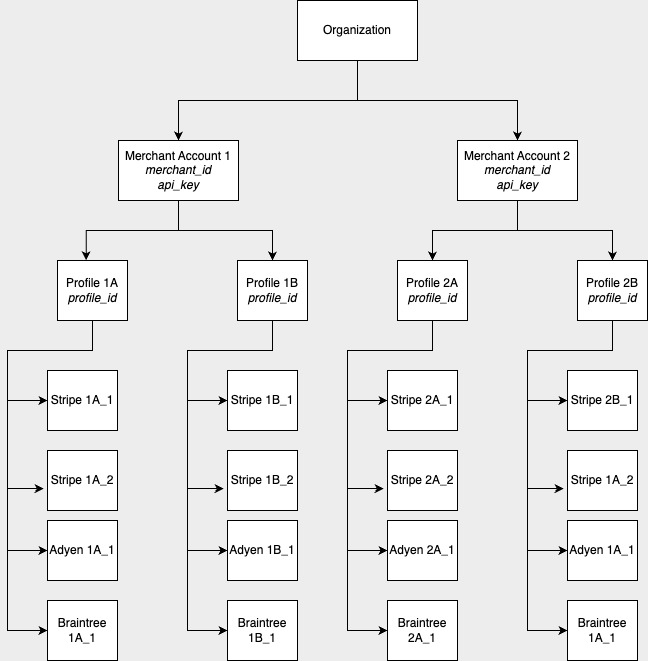
Here's how the architecture would look like.

<figure><img src="https://1943537505-files.gitbook.io/~/files/v0/b/gitbook-x-prod.appspot.com/o/spaces%2Fkf7BGdsPkCw9nalhAIlE%2Fuploads%2Fgit-blob-462e55d23bcc435c37d7bd465e6ecb66da18ff4f%2Fimage.jpg?alt=media" alt=""><figcaption><p>Architecture of Hyperswitch with one organization, two merchant accounts, two business profiles in each merchant account and five connectors in each business profile</p></figcaption></figure>

### Let's understand the hierarchy

#### Organization

Organization refers to the main business. When a new user registers, an organization is created and the user assumes the role of organization admin.

#### Merchant Account

A merchant account is associated with an `api_key` and `publishable_key` which is used for authentication. There can be many merchant accounts that can be created under an organization by an organization admin.

#### Profile

{% hint style="info" %}
Every merchant account has at least one profile. For easier integration,`profile_id` is not mandatory if there is only one business profile.
{% endhint %}

A profile can also be considered to be a business profile for practical purposes, it serves as a logical separation of businesses for seamless integration and onboarding. Every business profile is uniquely identified by a `profile_id`. All the payment settings can be configured at the profile level and will apply to all the payments make via the business profile. If there is more then one business profile, then `profile_id` has to be passed when creating the payments. Business profile allows to configure

> Roles and permissions for users can be assigned at the organization level, and merchant level.

* Routing Algorithm.

Only gateways that are available under the business profile can be used to configure the routing algorithm.

If a routing algorithm is not available, a default fallback, which consists of all the processors configured under the business profile based on priority order would be used. The priority of processors in the default fallback can be configured

* Webhook url and Return url for payments.

#### Processors

There can be multiple processors configured under a business profile. Each processor is associated with a globally unique identifier `merchant_connector_id` and unique identifier under a business profile called `label`

A processor created under one business profile cannot be used in another business profile to route payments.

### Use cases

* **Multiple merchant accounts - for merchants who need different API keys for each of their businesses**

  Consider a merchant A who has three different businesses - A\_Shoes, A\_Clothing, A\_Bags. They can create three merchant accounts (Shoes, Clothing, Bags) on Hyperswitch and get separate set of API keys for each of them.

<figure><img src="https://1943537505-files.gitbook.io/~/files/v0/b/gitbook-x-prod.appspot.com/o/spaces%2Fkf7BGdsPkCw9nalhAIlE%2Fuploads%2Fgit-blob-510052e3ab6c8532f54b16ba0412928b864dc31e%2Fimage%20(1).jpg?alt=media" alt=""><figcaption><p>A merchant with multiple merchant accounts and a single business profile in each merchant account</p></figcaption></figure>

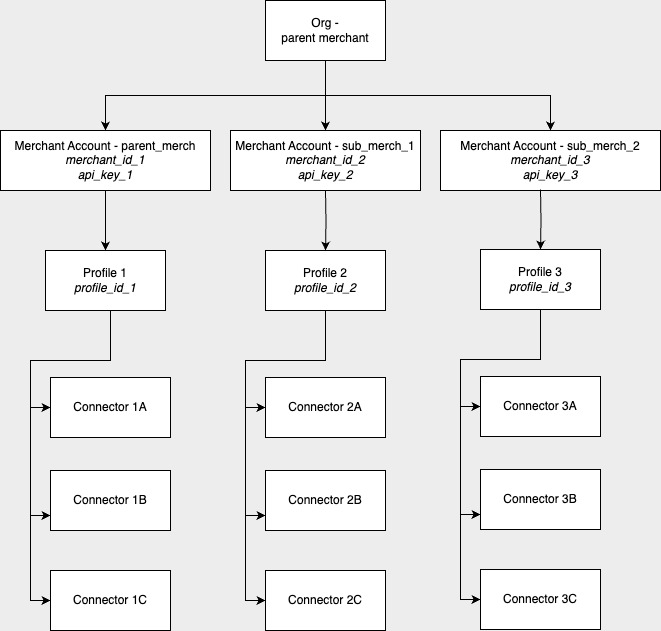
In case of Marketplace merchants with multiple sub-merchants, the parent merchant can create one Hyperswitch merchant account (with an API key) for themself and as many separate merchant accounts as they need for the sub-merchants under them with separate API keys for each of them

<figure><img src="https://1943537505-files.gitbook.io/~/files/v0/b/gitbook-x-prod.appspot.com/o/spaces%2Fkf7BGdsPkCw9nalhAIlE%2Fuploads%2Fgit-blob-ee7d40d45a25867c62d1f2816ac8274e9878da35%2Fimage.jpg?alt=media" alt=""><figcaption><p>A merchant with multiple merchant accounts and a single business profile in each merchant account</p></figcaption></figure>

* **Multiple business Profiles - For merchants who want to manage all businesses with one API key**

For a merchant A with three different businesses (A\_Clothing, A\_Shoes, A\_Bags) they can create just one merchant account on Hyperswitch with three business profiles (Clothing, Shoes, Bags) under it. This way, the merchant can use only one Hyperswitch API key to manage transactions for all three businesses.

<figure><img src="https://1943537505-files.gitbook.io/~/files/v0/b/gitbook-x-prod.appspot.com/o/spaces%2Fkf7BGdsPkCw9nalhAIlE%2Fuploads%2Fgit-blob-2acb38ac6ee1a017f8f1920b9cafd3b5e4202372%2Fimage%20(2).jpg?alt=media" alt=""><figcaption><p>A merchant with single merchant account and multiple business profile under the merchant account</p></figcaption></figure>

For Marketplace merchants with multiple sub-merchants, the parent merchant can create one Hyperswitch merchant account with an API key access and multiple business profiles under it to represent the different sub-merchants. This way the parent merchant will be able to manage their multiple sub-merchants tightly under one Hyperswitch merchant account and API key.

<figure><img src="https://1943537505-files.gitbook.io/~/files/v0/b/gitbook-x-prod.appspot.com/o/spaces%2Fkf7BGdsPkCw9nalhAIlE%2Fuploads%2Fgit-blob-76e73c67b7b02ece1218259e5ebef6b9e3579d54%2Fimage%20(3).jpg?alt=media" alt=""><figcaption><p>A merchant with single merchant account and multiple business profile under the merchant account</p></figcaption></figure>

### How to configure multiple merchant accounts

When you sign up on Hyperswitch, a merchant account and a profile is created under your organisation account by default.

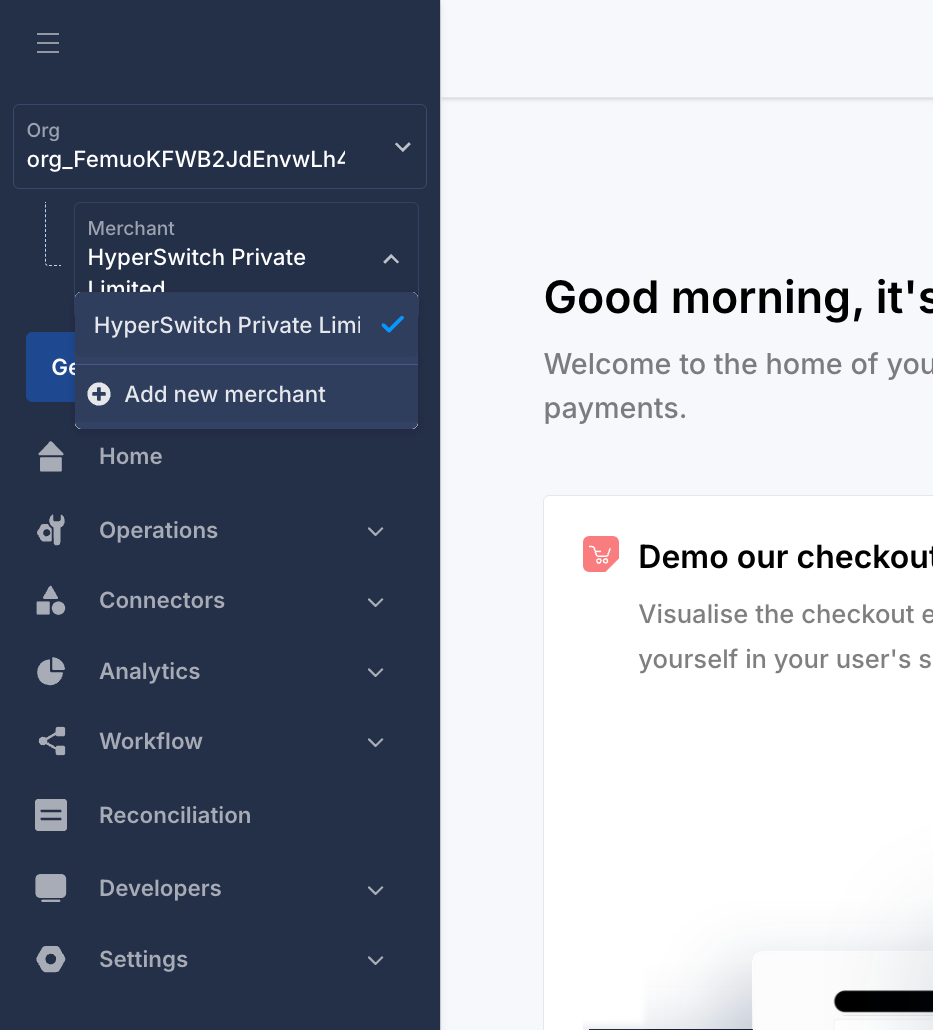
To create more merchant accounts, click the merchant account dropdown from the left top corner in your Hyperswitch dashboard, and click on the create new merchant option.

<figure><img src="https://1943537505-files.gitbook.io/~/files/v0/b/gitbook-x-prod.appspot.com/o/spaces%2Fkf7BGdsPkCw9nalhAIlE%2Fuploads%2Fgit-blob-aa6e4072e1ddd19f92e1864e7c4526f6031b9cb6%2FScreenshot%202024-09-19%20at%2011.37.33%E2%80%AFAM.png?alt=media" alt=""><figcaption></figcaption></figure>

### How to configure multiple business profiles

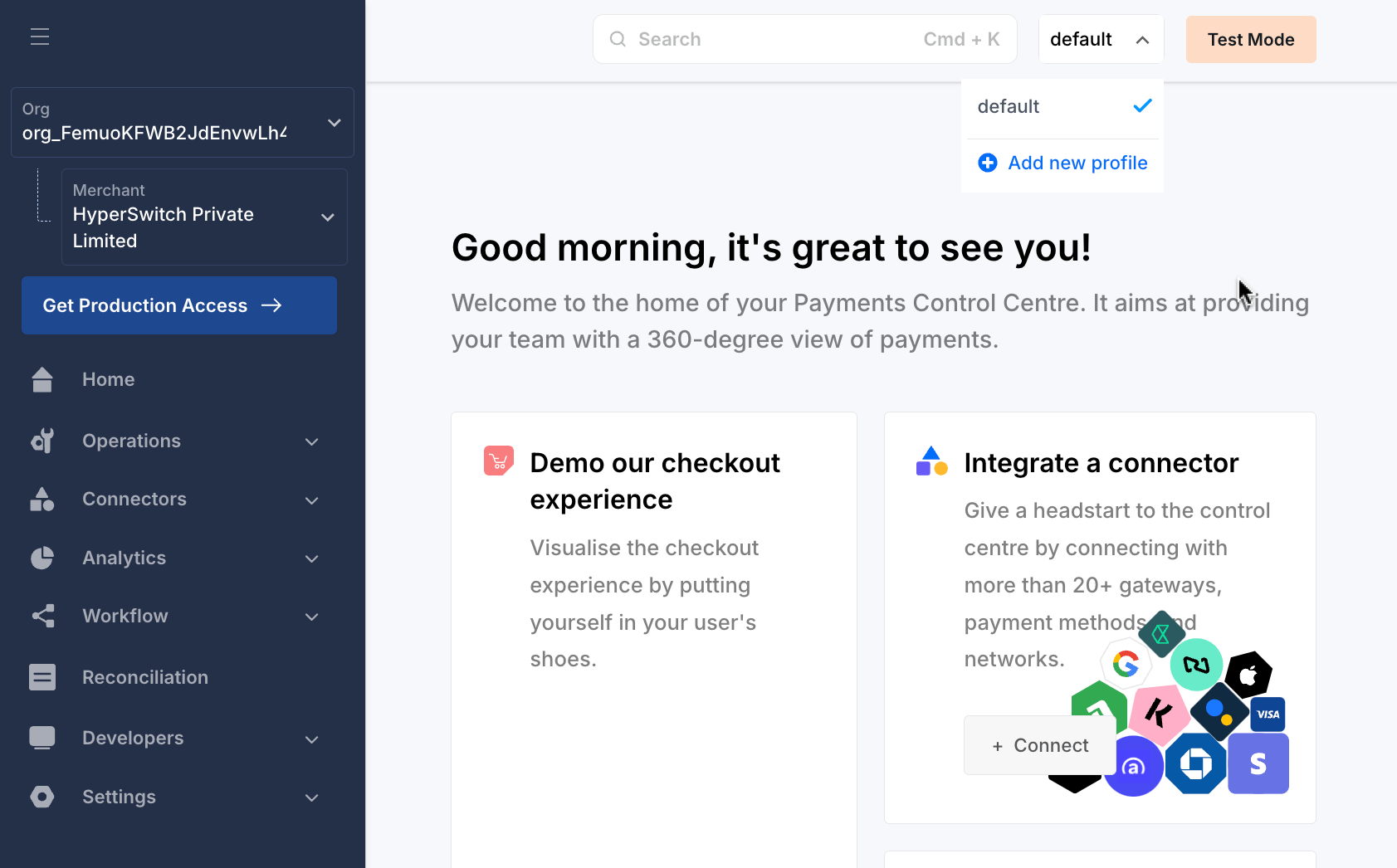
To create more profiles, click the profile dropdown from the right top corner in your Hyperswitch dashboard, and click on the create new profile option. Here you will also see a list of already configured business profiles for your merchant account.

* As mentioned already, a ‘default’ profile is already created during your merchant account creation. 'profile\_id’ of various business profiles can be found under Settings → Business Profiles.

<figure><img src="https://1943537505-files.gitbook.io/~/files/v0/b/gitbook-x-prod.appspot.com/o/spaces%2Fkf7BGdsPkCw9nalhAIlE%2Fuploads%2Fgit-blob-bf545966338d86f9af9a819bfe68b8985c37eb9d%2FScreenshot%202024-09-19%20at%2011.40.12%E2%80%AFAM.png?alt=media" alt=""><figcaption></figcaption></figure>

* Enter a name for your profile in the next pop-up screen and click ‘Add’ again. A new profile with the given ‘profile\_name’ and an automatically generated ‘profile\_id’ is created.

**How to route a payment to a particular merchant account and a particular profile?**

In order to route a payment to a specific merchant account, the [payment create API](https://api-reference.hyperswitch.io/api-reference/payments/payments--create) call has to be made from the merchant server using the correct API key attached to the required merchant account. To route the payment to a particular profile, the `profile_id` parameter of the required profile is to be passed.

<div align="center" data-full-width="true"><figure><img src="https://1943537505-files.gitbook.io/~/files/v0/b/gitbook-x-prod.appspot.com/o/spaces%2Fkf7BGdsPkCw9nalhAIlE%2Fuploads%2Fgit-blob-c81a408f6656eacf21fc0f07d5125747e47e557a%2Fapi_key?alt=media" alt="" width="563"><figcaption><p>api key to be passed in headers when creating a payment</p></figcaption></figure></div>

<div align="left" data-full-width="false"><figure><img src="https://1943537505-files.gitbook.io/~/files/v0/b/gitbook-x-prod.appspot.com/o/spaces%2Fkf7BGdsPkCw9nalhAIlE%2Fuploads%2Fgit-blob-3efc73088029ef8ef9e81ab4c45bbd2169f64c49%2Fprofile_id?alt=media" alt=""><figcaption><p>profile id to be passed in the body when creating the payment</p></figcaption></figure></div>

When a payment is created under a business profile, it would use the routing algorithm ( if available) that is configured for that business profile, to choose an appropriate gateway. All the **Refunds, Mandates** that are created for a payment will be under the same business profile as the payment.

### For the Platform Org and Merchant architecture, refer to the page below.

{% content-ref url="multiple-accounts-and-profiles/platform-org-and-merchant-setup" %}
[platform-org-and-merchant-setup](https://docs.hyperswitch.io/~/revisions/iPtyU5MKxmgIsGywgRhI/explore-hyperswitch/account-management/multiple-accounts-and-profiles/platform-org-and-merchant-setup)
{% endcontent-ref %}