> For the complete documentation index, see [llms.txt](https://docs.hyperswitch.io/llms.txt). Markdown versions of documentation pages are available by appending `.md` to page URLs; this page is available as [Markdown](https://docs.hyperswitch.io/integrations/wallets/google-pay/in-app-and-web-transactions-processed-using-hyperswitch-decryption.md).
# In-App and Web Transactions Processed Using Hyperswitch Decryption
Process Google Pay in-app and web transactions through Hyperswitch decryption for flexible routing to any downstream processor
In this flow Hyperswitch decrypts the Google Pay token using your shared keys. This allows Hyperswitch to route the payment to any downstream processor.
## **Prerequisites**
There are few prerequisites that need to be fulfilled before integrating Google Pay on Hyperswitch -
1. Configure Google Pay on your processor's dashboard
2. In order to test Google Pay integration you will need to add test cards to your google account. You can go to [Google Pay API Test Cards Allowlist](https://groups.google.com/g/googlepay-test-mode-stub-data?pli=1) and click on Join Group to automatically add test cards in your Google Developer Account
## **Configuring Google Pay on Hyperswitch**
To configure Google Pay on Hyperswitch follow the steps given below -
1. Login to [Hyperswitch dashboard](https://app.hyperswitch.io/)
2. In the Connectors tab, select your processor
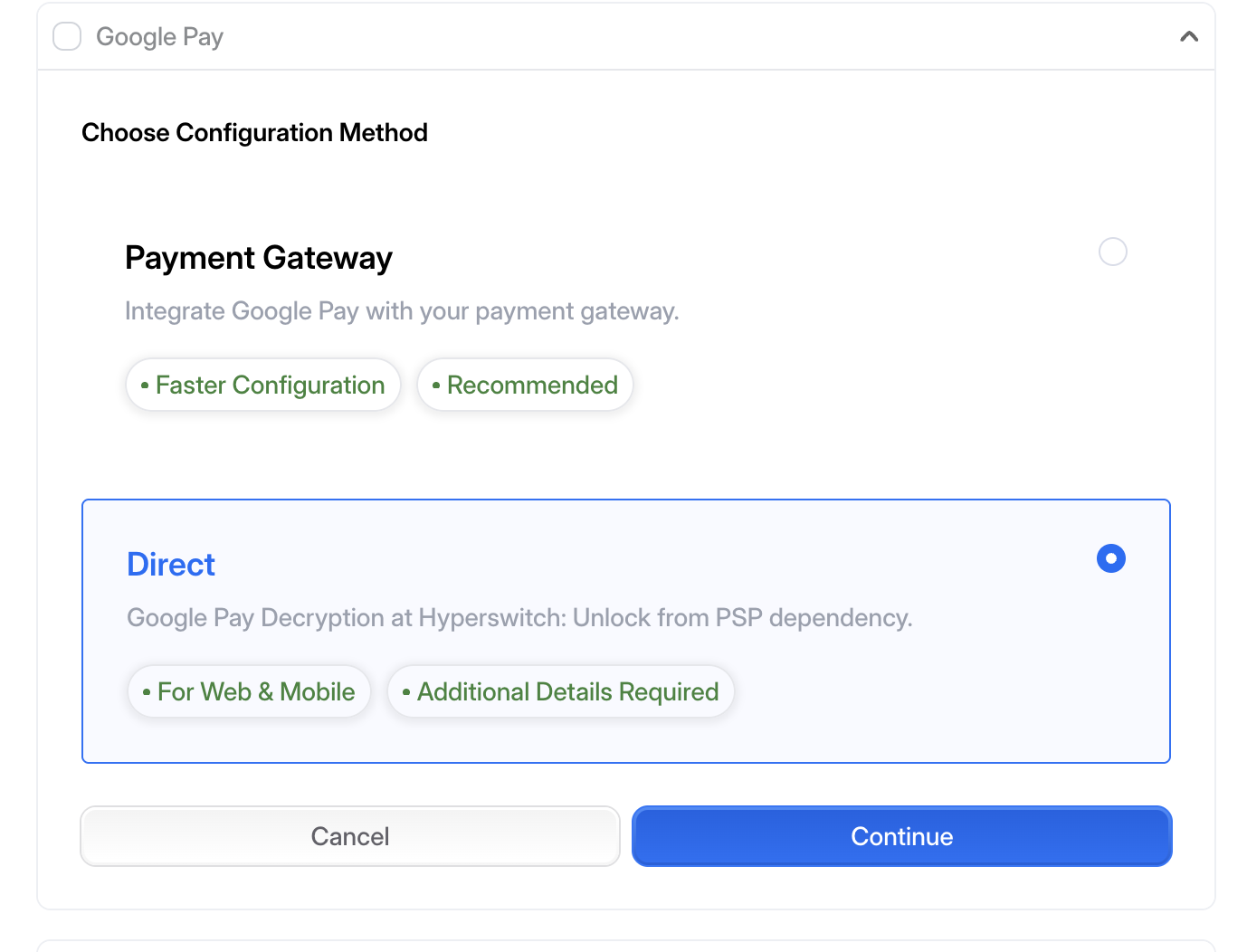
3. While selecting Payment Methods, click on Google Pay in the Wallet section, In 'Choose Configuration Method' tab select 'Direct'.
4. Enter required fields and save the changes.
5. In Google Pay Merchant Name, provide a user-visible merchant name
## **Go-Live Checklist**
Your app requires an approval from Google Pay before you go live. Please follow [Google's instructions](https://developers.google.com/pay/api/android/guides/test-and-deploy/request-prod-access) and request production access.
1. Choose integration type **Gateway** when prompted.
2. Submit your app screenshots for review.
3. Set the Google Pay Environment to Production.
4. Once the app is reviewed and approved, launch GooglePay from a signed, released build your app.
## **Google Pay Compatibility**
Google Pay is available only in certain countries or regions and on certain devices. Take a look at the [exhaustive list of countries](https://support.google.com/googlepay/answer/12429287?visit_id=638320942600397737-977605919\&rd=1#zippy=%2Cpay-online-or-in-apps) where Google Pay is available. For security reasons, Google Pay is not supported in some browsers. Please check the list below to know the supported browsers:
| Browser | Google Pay Support |
| ----------------------------------------------- | ------------------ |
| `Firefox` | Yes |
| `Chrome` | Yes |
| `Safari` | Yes |
| `Opera` | Yes |
| `Mobile-web: Firefox` | Yes |
| `Mobile-web: Chrome` | Yes |
| `Mobile-web: Safari` | Yes |
| `iOS in-app browser - Instagram` | No |
| `Android in-app browser - Instagram` | No |
| `iOS in-app browser - X (Formerly Twitter)` | Yes |
| `Android in-app browser - X (Formerly Twitter)` | Yes |
---
# Agent Instructions
This documentation is published with GitBook. GitBook is the documentation platform designed so that both humans and AI agents can read, navigate, and reason over technical content effectively. Learn more at gitbook.com.
## Querying This Documentation
If you need additional information that is not directly available in this page, you can query the documentation by asking a question.
Perform an HTTP GET request on the following URL with the `ask` and `goal` query parameters:
```
GET https://docs.hyperswitch.io/integrations/wallets/google-pay/in-app-and-web-transactions-processed-using-hyperswitch-decryption.md?ask=&goal=
```
`ask` is the immediate question: it should be specific, self-contained, and written in natural language.
`goal` is what the user is ultimately trying to achieve, the reason they need the answer. Sharing it helps GitBook give you a better, more relevant answer. A goal is most helpful when it describes the outcome the user wants rather than restating the question. For example, with `ask=how do I create an API token`, a goal like `automate deployments from our CI pipeline` lets GitBook tailor the answer to that use case.
The response will contain a direct answer to the question and relevant excerpts and sources from the documentation.
Use this mechanism when the answer is not explicitly present in the current page, you need clarification or additional context, or you want to retrieve related documentation sections.