> For the complete documentation index, see [llms.txt](https://docs.hyperswitch.io/llms.txt). Markdown versions of documentation pages are available by appending `.md` to page URLs; this page is available as [Markdown](https://docs.hyperswitch.io/integrations/connectors-integrations/payment-processor-capabilities/available-connectors/stripe.md).
# Stripe
Connect Stripe to Juspay Hyperswitch to accept payments, manage webhooks, and enable multiple payment methods through a unified API integration.
Stripe connects to Hyperswitch as a `PaymentGateway` connector using `HeaderKey` authentication — a single secret key passed as `Authorization: Bearer {secret_key}` on every request. Notably, all requests to Stripe are sent as `application/x-www-form-urlencoded` (not JSON), and Hyperswitch pins a specific Stripe API version in the `Stripe-Version` header to ensure consistent behaviour. Hyperswitch translates its unified payment intent model into Stripe's PaymentIntent and Charge objects, mapping status transitions bidirectionally on every sync and webhook event.
### Status and capabilities
**Integration status:** live
**Category:** payment gateway
**Webhook flows:** disputes, payments, refunds
| Payment method | Type | Mandates | Refunds | Capture methods | 3DS | Card networks | Countries | Currencies |
| -------------- | ------------------ | ------------- | ------------- | --------------------------------------- | ------------------- | ------------------------------------------------------------------------ | ------------------------------------------------- | ------------------------------------------------- |
| bank debit | ACH Direct Debit | supported | supported | automatic, sequential automatic | not applicable | - | USA | USD |
| bank debit | BACS Direct Debit | supported | supported | automatic, manual, sequential automatic | not applicable | - | GBR | GBP |
| bank debit | BECS Direct Debit | supported | supported | automatic, manual, sequential automatic | not applicable | - | AUS | AUD |
| bank debit | SEPA Direct Debit | supported | supported | automatic, sequential automatic | not applicable | - | 33 ([full list](https://hyperswitch.io/pm-list)) | EUR |
| bank redirect | Bancontact Card | supported | supported | automatic, sequential automatic | not applicable | - | BEL | EUR |
| bank redirect | BLIK | not supported | supported | automatic, sequential automatic | not applicable | - | POL | PLN |
| bank redirect | EPS | not supported | supported | automatic, sequential automatic | not applicable | - | AUT | EUR |
| bank redirect | Giropay | not supported | not supported | automatic, sequential automatic | not applicable | - | DEU | EUR |
| bank redirect | iDEAL | supported | supported | automatic, sequential automatic | not applicable | - | NLD | EUR |
| bank redirect | Online Banking FPX | not supported | supported | automatic, sequential automatic | not applicable | - | MYS | MYR |
| bank redirect | Przelewy24 | not supported | supported | automatic, sequential automatic | not applicable | - | POL | EUR, PLN |
| bank redirect | Sofort | supported | supported | automatic, sequential automatic | not applicable | - | 30 ([full list](https://hyperswitch.io/pm-list)) | EUR |
| bank transfer | ACH Bank Transfer | not supported | supported | automatic, sequential automatic | not applicable | - | USA | USD |
| bank transfer | BACS Bank Transfer | not supported | supported | automatic, sequential automatic | not applicable | - | GBR | GBP |
| bank transfer | Multibanco | not supported | supported | automatic, sequential automatic | not applicable | - | 32 ([full list](https://hyperswitch.io/pm-list)) | EUR |
| bank transfer | SEPA Bank Transfer | not supported | supported | automatic, sequential automatic | not applicable | - | - | - |
| card | Credit Card | supported | supported | automatic, manual, sequential automatic | supported, optional | American Express, Diners Club, Discover, JCB, Mastercard, UnionPay, Visa | 249 ([full list](https://hyperswitch.io/pm-list)) | 160 ([full list](https://hyperswitch.io/pm-list)) |
| card | Debit Card | supported | supported | automatic, manual, sequential automatic | supported, optional | American Express, Diners Club, Discover, JCB, Mastercard, UnionPay, Visa | 249 ([full list](https://hyperswitch.io/pm-list)) | 160 ([full list](https://hyperswitch.io/pm-list)) |
| pay later | Affirm | not supported | supported | automatic, manual, sequential automatic | not applicable | - | USA | USD |
| pay later | Afterpay Clearpay | not supported | supported | automatic, manual, sequential automatic | not applicable | - | 7 ([full list](https://hyperswitch.io/pm-list)) | AUD, CAD, GBP, NZD, USD |
| pay later | Klarna | not supported | supported | automatic, manual, sequential automatic | not applicable | - | 22 ([full list](https://hyperswitch.io/pm-list)) | 12 ([full list](https://hyperswitch.io/pm-list)) |
| wallet | Alipay | not supported | supported | automatic, manual, sequential automatic | not applicable | - | CHN | 11 ([full list](https://hyperswitch.io/pm-list)) |
| wallet | Amazon Pay | supported | supported | automatic, manual, sequential automatic | not applicable | - | 249 ([full list](https://hyperswitch.io/pm-list)) | 12 ([full list](https://hyperswitch.io/pm-list)) |
| wallet | Apple Pay | supported | supported | automatic, manual, sequential automatic | not applicable | - | 43 ([full list](https://hyperswitch.io/pm-list)) | - |
| wallet | Cash App | supported | supported | automatic, manual, sequential automatic | not applicable | - | USA | USD |
| wallet | Google Pay | supported | supported | automatic, manual, sequential automatic | not applicable | - | 53 ([full list](https://hyperswitch.io/pm-list)) | - |
| wallet | RevolutPay | supported | supported | automatic, manual, sequential automatic | not applicable | - | - | EUR, GBP |
| wallet | WeChat Pay | not supported | supported | automatic, sequential automatic | not applicable | - | CHN | 13 ([full list](https://hyperswitch.io/pm-list)) |
### Connector-Specific Notes
* **Stripe is the only connector in Hyperswitch** that supports incremental authorization alongside a full dispute evidence upload flow (file upload via Stripe's Files API, then evidence submission via the dispute ID) — both are part of the same connector implementation.
* **Mandates and recurring payments:** When Hyperswitch sets up a mandate via Stripe, Stripe returns a `payment_method` ID linked to a Customer object. Hyperswitch stores this ID and passes it on subsequent merchant-initiated transactions (MIT). The cardholder is never involved in subsequent charges.
* **Webhook verification:** Stripe sends a `Stripe-Signature` header with each event, formatted as `t={timestamp},v1={signature}`. Hyperswitch verifies this using HMAC-SHA256 where the message is `{timestamp}.{raw_request_body}`. The signing secret is found in Stripe under **Developers → Webhooks → your endpoint → Signing secret** — this is different from the API key and must be stored separately in Hyperswitch.
* **Webhook events processed (14):** `payment_intent.payment_failed`, `payment_intent.succeeded`, `payment_intent.canceled`, `payment_intent.amount_capturable_updated`, `charge.succeeded`, `charge.refund.updated`, `source.chargeable`, `charge.dispute.created`, `charge.dispute.updated`, `charge.dispute.closed`, `charge.dispute.funds_withdrawn`, `charge.dispute.funds_reinstated`, `payment_intent.partially_funded`, `payment_intent.requires_action`. All other Stripe event types are explicitly not processed. See [`get_webhook_event_type()`](https://github.com/juspay/hyperswitch/blob/fb4c2c8b5fa993fc104102dde8c2387202e0d19f/crates/hyperswitch_connectors/src/connectors/stripe.rs#L2938-L3004) and the [serialized event names](https://github.com/juspay/hyperswitch/blob/fb4c2c8b5fa993fc104102dde8c2387202e0d19f/crates/hyperswitch_connectors/src/connectors/stripe/transformers.rs#L5080-L5126).
* For a full list of supported payment methods, countries and currencies, visit [hyperswitch.io/pm-list](https://hyperswitch.io/pm-list).
***
### Activating Stripe via Hyperswitch
#### Prerequisites
1. You need to be registered with Stripe. Sign up at [dashboard.stripe.com/register](https://dashboard.stripe.com/register).
2. You should have a registered Hyperswitch account, accessible from the [Hyperswitch control center](https://app.hyperswitch.io/).
3. Request Stripe support to enable raw card data handling for your Stripe account (see [PCI compliance details](https://docs.hyperswitch.io/security-and-compliance/pci-compliance#docs-internal-guid-959e0903-7fff-fc13-1542-001b2640a715-1)). Without this, Hyperswitch cannot pass card data to Stripe directly — all card payments will fail at the Stripe API level before authorization.
4. Enter your Country, Business Label, and Stripe Secret Key in the Hyperswitch control center. The secret key is found in your Stripe dashboard under **Developers → API keys**. Use the **Secret Key**, which starts with `sk_`. Do not use the publishable key (`pk_`).
5. Select the payment methods you want to use with Stripe. These must match the methods enabled in your Stripe dashboard under **Settings → Payments → Payment methods**.
6. Navigate to **Developers → Webhooks** in your Stripe dashboard and create a new webhook endpoint.
[Steps to activate Stripe on the Hyperswitch control center](https://docs.hyperswitch.io/hyperswitch-cloud/connectors/activate-connector-on-hyperswitch)
***
### Configuring Webhooks
Webhook delivery works as a two-hop chain: Stripe delivers events to Hyperswitch, and Hyperswitch forwards them to your endpoint.
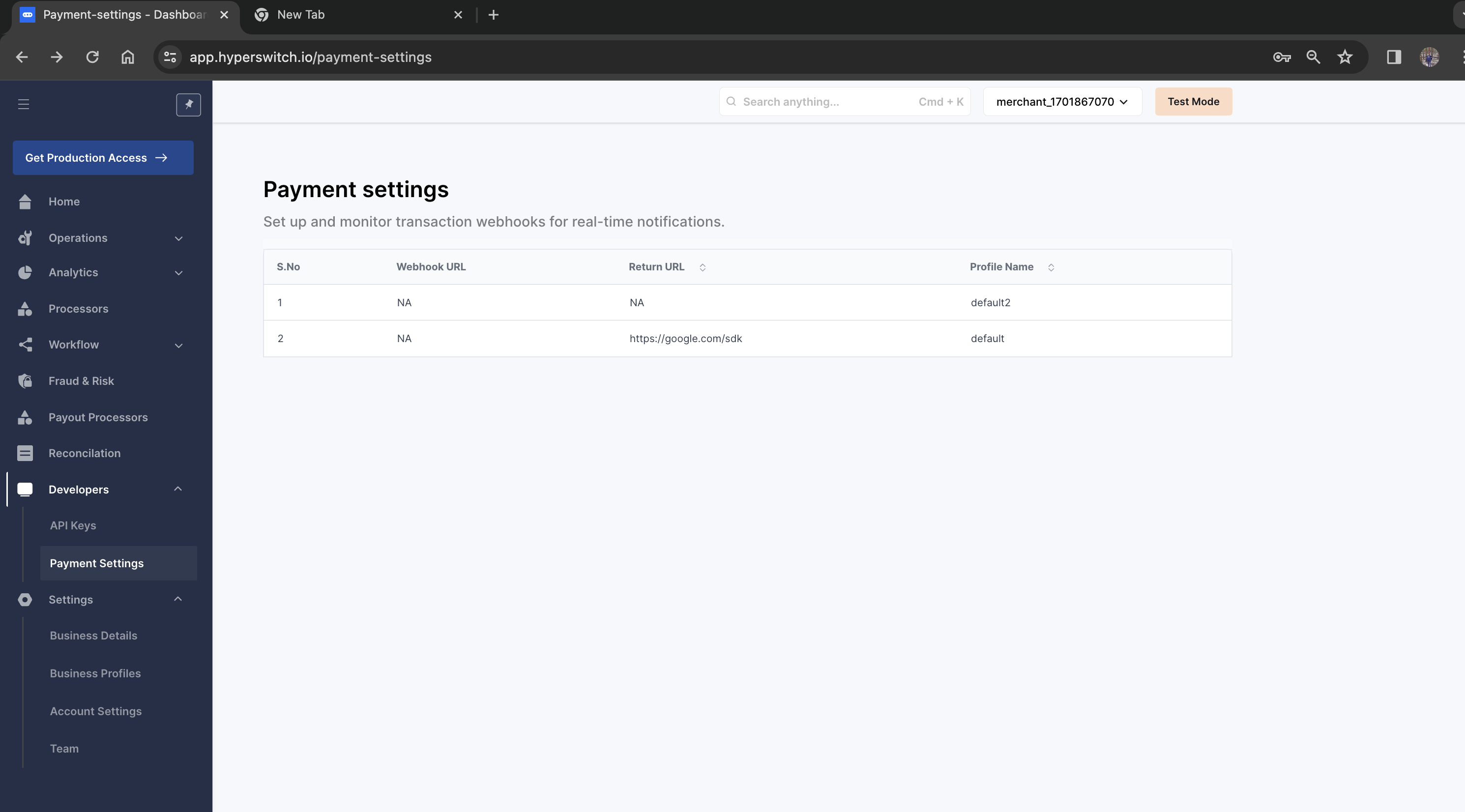
**Step 1:** Set up your webhook endpoint on the Hyperswitch dashboard under **Settings → Payment settings → Click on the profile**.
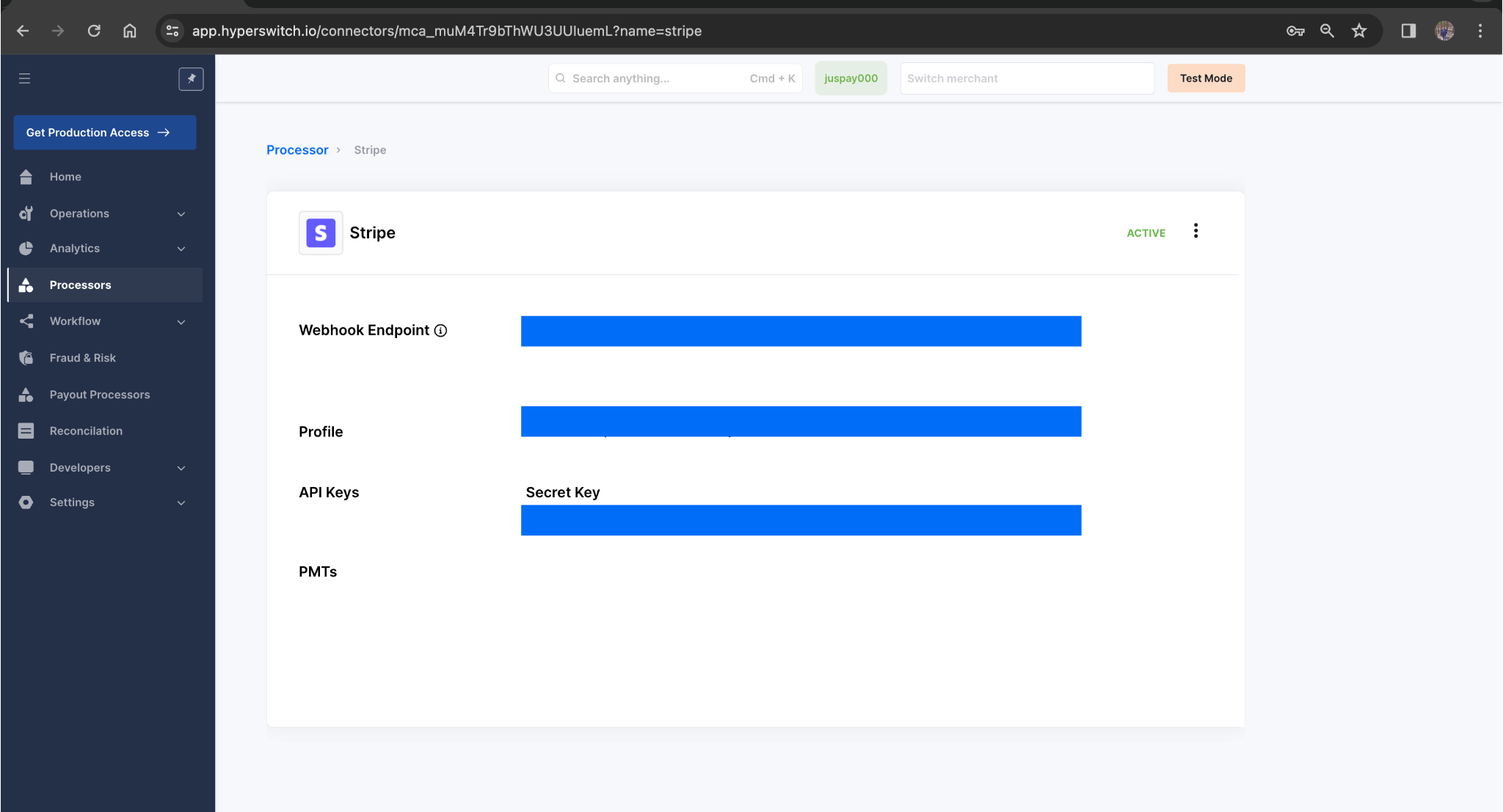
**Step 2:** Configure Hyperswitch's webhook endpoint on your Stripe dashboard. Find Hyperswitch's endpoint for your Stripe account by clicking **Processors → Stripe**.
***
### Responsibility Boundaries
**Hyperswitch owns:** routing decisions, mandate record storage, retry scheduling, webhook fan-out to your endpoint, and unified error code mapping. **Stripe owns:** charge execution, fraud evaluation (Radar), payment method storage as Customer + PaymentMethod objects, and webhook delivery to Hyperswitch's endpoint. Stripe has no visibility into Hyperswitch's routing layer.
**Hyperswitch owns:** forwarding webhook events to your configured endpoint. **Stripe owns:** delivering webhook events to Hyperswitch's registered endpoint. If Stripe's delivery fails (wrong endpoint configured, network error), Hyperswitch has no record of the event and cannot forward it — use the Hyperswitch sync API to reconcile payment status in this case.
***
### Common Failure Modes
**Raw card data not enabled on Stripe account** Symptom: Card payments are declined at Stripe before authorization. Fix: Contact Stripe support to enable raw card data handling for your account before going live.
**Publishable key used instead of secret key** Symptom: All API calls return HTTP 401 from Stripe. Fix: Replace with the secret key (`sk_live_...` or `sk_test_...`). The publishable key (`pk_...`) cannot authorize server-side payment operations.
**Webhook signing secret mismatch** Symptom: Stripe webhooks arrive at Hyperswitch but are rejected — payment and refund statuses do not update. Fix: The signing secret in Hyperswitch must match **Developers → Webhooks → your endpoint → Signing secret** in Stripe. This rotates independently of the API key.
**Payment method enabled in Hyperswitch but not active in Stripe** Symptom: Payments fail with `payment_method_not_available` from Stripe. Fix: Cross-check methods selected in the Hyperswitch connector configuration against **Settings → Payments → Payment methods** in your Stripe dashboard.
**Incremental authorization attempted with automatic capture** Symptom: Incremental authorization call fails. Fix: Incremental authorization requires `capture_method: manual` on the original payment. Stripe does not support incremental authorization on automatically-captured payments.
***
Connector implementation: `crates/hyperswitch_connectors/src/connectors/stripe.rs`. Webhook signature verification, Stripe Connect header handling, and the full payment method matrix are defined in the same file and its `transformers/` submodule.
---
# Agent Instructions
This documentation is published with GitBook. GitBook is the documentation platform designed so that both humans and AI agents can read, navigate, and reason over technical content effectively. Learn more at gitbook.com.
## Querying This Documentation
If you need additional information that is not directly available in this page, you can query the documentation by asking a question.
Perform an HTTP GET request on the following URL with the `ask` and `goal` query parameters:
```
GET https://docs.hyperswitch.io/integrations/connectors-integrations/payment-processor-capabilities/available-connectors/stripe.md?ask=&goal=
```
`ask` is the immediate question: it should be specific, self-contained, and written in natural language.
`goal` is what the user is ultimately trying to achieve, the reason they need the answer. Sharing it helps GitBook give you a better, more relevant answer. A goal is most helpful when it describes the outcome the user wants rather than restating the question. For example, with `ask=how do I create an API token`, a goal like `automate deployments from our CI pipeline` lets GitBook tailor the answer to that use case.
The response will contain a direct answer to the question and relevant excerpts and sources from the documentation.
Use this mechanism when the answer is not explicitly present in the current page, you need clarification or additional context, or you want to retrieve related documentation sections.