> For the complete documentation index, see [llms.txt](https://docs.hyperswitch.io/llms.txt). Markdown versions of documentation pages are available by appending `.md` to page URLs; this page is available as [Markdown](https://docs.hyperswitch.io/integration-guide/workflows/vault/deployment-models/vault-standalone-saas-vault-pci.md).
# Vault Standalone with SaaS Hyperswitch Vault (PCI)
Deploy Vault Standalone with SaaS Hyperswitch Vault for PCI-compliant merchants to store and retrieve raw payment method data for use with their own payment engine
This deployment model enables PCI-compliant merchants to leverage Hyperswitch's SaaS Vault to securely store raw payment method data and retrieve it when needed. Merchants can use this raw data with their own payment processing engine, maintaining full control over how and when payment data is used while benefiting from Hyperswitch's robust vault infrastructure.
**Use Case**: Financial institutions, payment facilitators, and enterprises that need to store sensitive card data and retrieve it in its original form to process payments through their proprietary payment engine or multiple payment providers.
## Key Features
* **PCI-Compliant Merchant Access**: This feature is exclusively available for merchants who have achieved and maintain PCI DSS compliance certification
* **Raw Payment Method Data Storage & Retrieval**: Store complete card details (including card number and CVV) and retrieve them via API for use with your own payment processing systems
* **PCI Verification Required**: Access to raw payment method data (`raw_payment_method_data` field) is only granted after Hyperswitch verifies your PCI compliance documentation
* **Enhanced Security Controls**: Built-in security measures including encryption at rest, TLS encryption in transit, and audit logging for all raw data access
* **Network Tokenization Support**: Leverage network tokens from card networks (Visa, Mastercard) for enhanced security and higher approval rates
* **Data Sovereignty**: Maintain control over your payment data while using Hyperswitch's managed vault infrastructure
## Prerequisites
* **PCI DSS Compliance**: Your organization must be PCI DSS compliant with a valid certification
* **PCI Audit Documentation**: Complete PCI audit reports (SAQ or ROC) and compliance certificates
* **Hyperswitch Account**: Active Hyperswitch account with API access
* **Security Infrastructure**: Secure systems and processes for handling raw payment data
## Configuration
### Step 1: Generate API Key
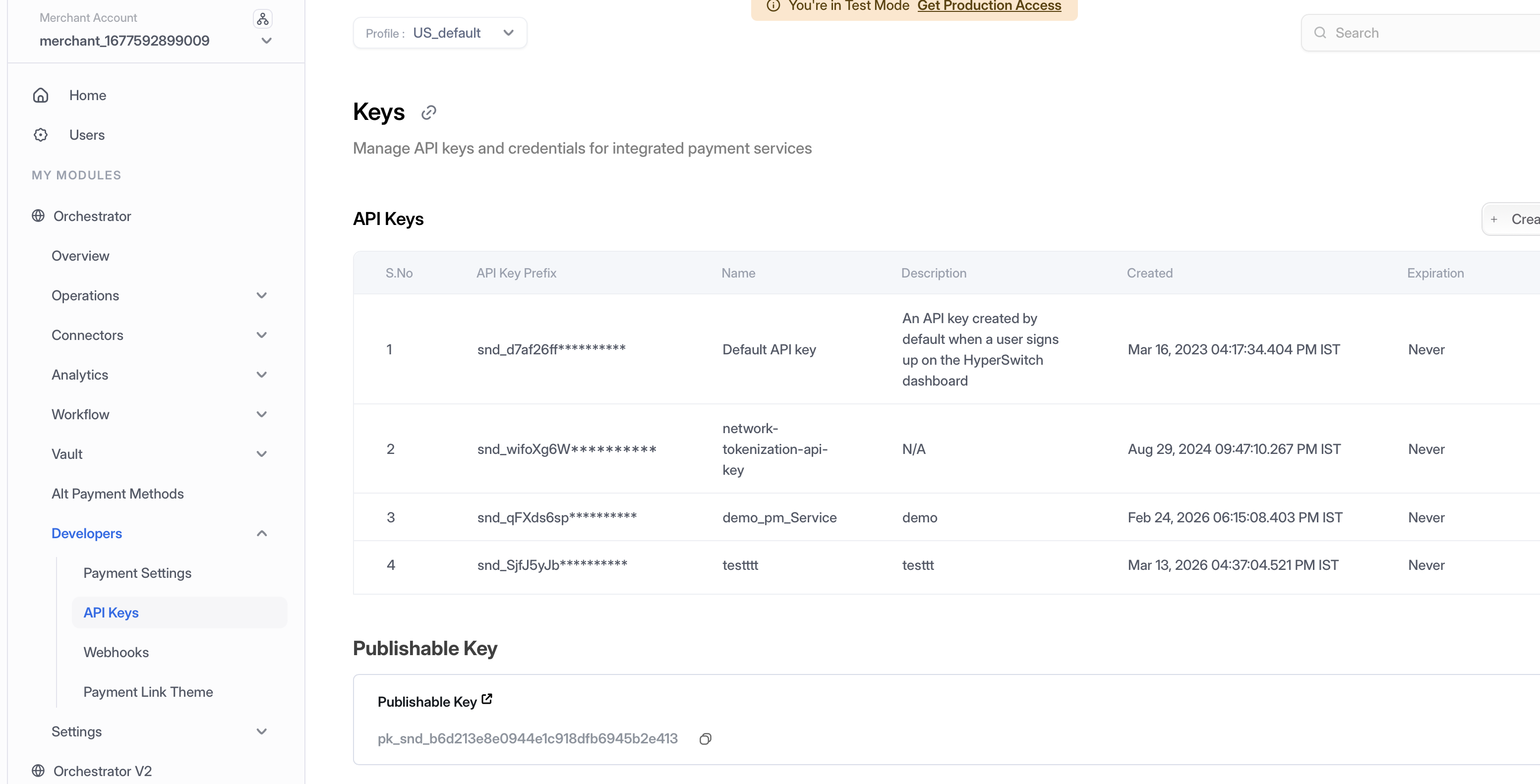
1. **Access Dashboard** — Log into the Hyperswitch Control Centre.
2. **Navigate to API Keys** — In the left-hand navigation menu, select **Developers > API Keys**.
3. **Create Key** — Click **Create New API Key**.
4. **Secure Storage** — Copy the generated key immediately and store it securely (it will not be shown again). Use this key in the `api-key` header for all Vault API calls.
Navigate to Developers > API Keys to create and manage your API credentials
### Step 2: Access Your Profile ID
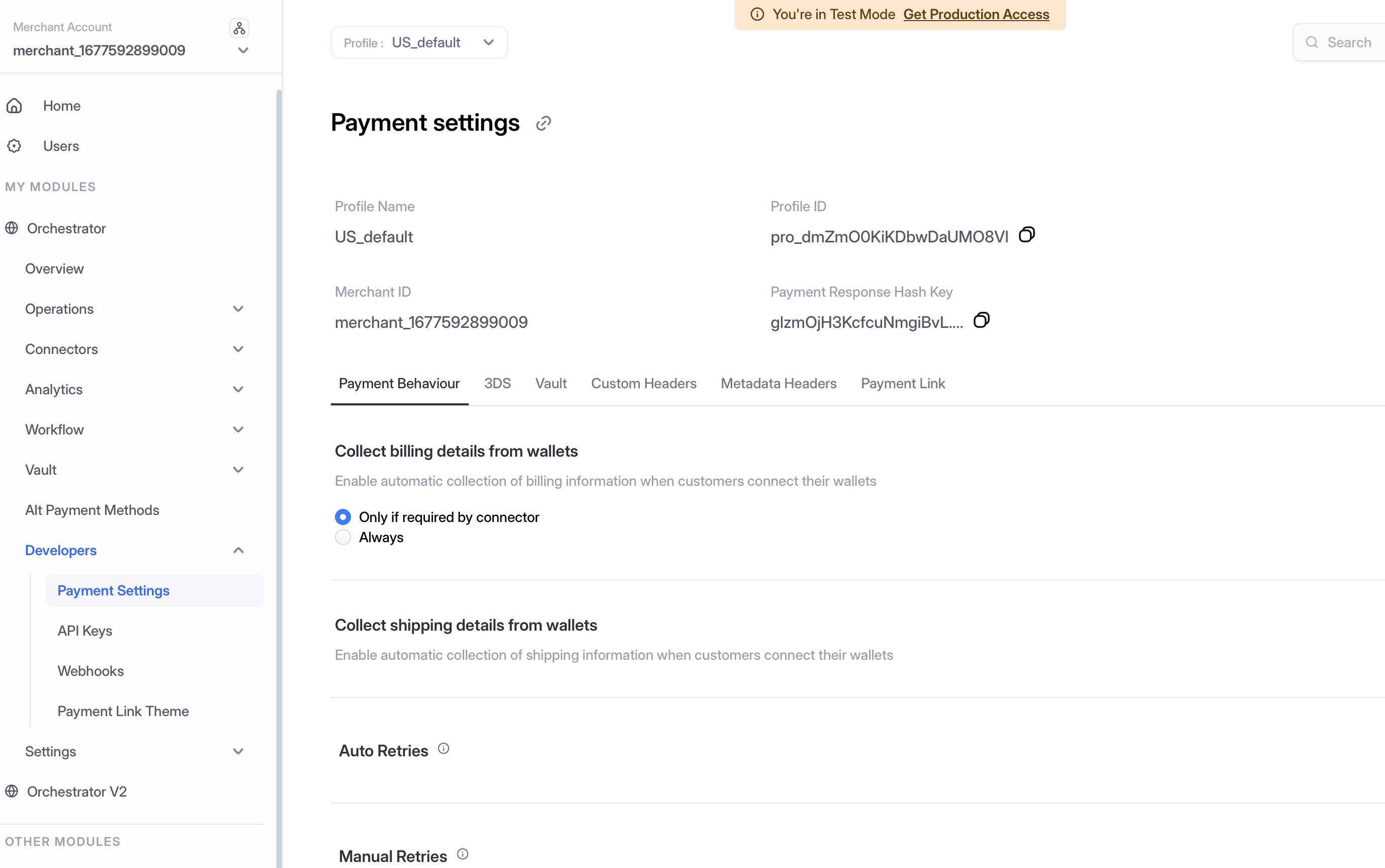
1. **Navigate to Payment Settings** — In the left-hand navigation menu, select **Developers > Payment Settings**.
2. **Copy Profile ID** — Locate and copy your **Profile ID** from the Payment Settings page. This ID is required for API calls that need to specify which merchant profile to use.
Navigate to Developers > Payment Settings to access your Profile ID
### Step 3: Request PCI-Compliant Merchant Status
Contact Hyperswitch support to enable your merchant account for PCI-compliant operations:
1. Submit your PCI audit documentation and compliance certificates
2. Provide proof of PCI DSS compliance (SAQ or ROC)
3. Wait for Hyperswitch team to review and approve your request
4. Once approved, your account will be enabled to access raw payment method data
> **Important**: Access to raw payment method data is only granted after successful verification of your PCI compliance status.
## Server-to-Server Vault Tokenization
Once your PCI-compliant merchant status is enabled, you can use the following APIs to tokenize and manage payment methods with access to raw payment data.
### Create a Customer
Create a customer profile before tokenizing payment methods.
**API Reference**: [Create Customer API](https://api-reference.hyperswitch.io/v2/api-reference/customers/customers--create)
```bash
curl --location 'https://sandbox.hyperswitch.io/customers' \
--header 'Content-Type: application/json' \
--header 'api-key: YOUR_API_KEY' \
--data-raw '{
"customer_id": "cust_12345",
"name": "John Doe",
"email": "john.doe@example.com",
"phone": "+1234567890",
"phone_country_code": "+1"
}'
```
### Create Payment Method (Tokenize)
Tokenize a payment method and store it securely in the vault.
**API Reference**: [Create Payment Method API](https://api-reference.hyperswitch.io/v2/api-reference/payment-methods/payment-methods--create)
```bash
curl --location 'https://sandbox.hyperswitch.io/payment_methods' \
--header 'Content-Type: application/json' \
--header 'api-key: YOUR_API_KEY' \
--header 'x-profile-id: YOUR_PROFILE_ID' \
--data '{
"customer_id": "cust_12345",
"payment_method": "card",
"payment_method_type": "credit",
"payment_method_data": {
"card": {
"card_number": "4111111111111111",
"card_exp_month": "12",
"card_exp_year": "2025",
"card_holder_name": "John Doe",
"card_cvc": "123"
}
},
"billing": {
"address": {
"line1": "123 Main St",
"city": "San Francisco",
"state": "CA",
"zip": "94111",
"country": "US"
}
}
}'
```
**Response**:
```json
{
"payment_method_id": "pm_1234567890abcdef",
"customer_id": "cust_12345",
"payment_method": "card",
"payment_method_type": "credit",
"card": {
"last4": "1111",
"card_type": "CREDIT",
"card_network": "Visa",
"card_exp_month": "12",
"card_exp_year": "2025"
}
}
```
### Retrieve Payment Method (with Raw Data)
Retrieve a tokenized payment method including raw payment method data. This endpoint returns the complete card details for PCI-compliant merchants.
**API Reference**: [Retrieve Payment Method API](https://api-reference.hyperswitch.io/v2/api-reference/payment-methods/payment-methods--retrieve)
```bash
curl --location 'https://sandbox.hyperswitch.io/payment_methods/pm_1234567890abcdef' \
--header 'api-key: YOUR_API_KEY' \
--header 'x-profile-id: YOUR_PROFILE_ID'
```
**Response** (PCI-Compliant Merchants):
```json
{
"payment_method_id": "pm_1234567890abcdef",
"customer_id": "cust_12345",
"payment_method": "card",
"payment_method_type": "credit",
"card": {
"last4": "1111",
"card_type": "CREDIT",
"card_network": "Visa",
"card_exp_month": "12",
"card_exp_year": "2025",
"card_holder_name": "John Doe"
},
"raw_payment_method_data": {
"card_number": "4111111111111111",
"card_exp_month": "12",
"card_exp_year": "2025",
"card_holder_name": "John Doe",
"card_cvc": "123"
},
"billing": {
"address": {
"line1": "123 Main St",
"city": "San Francisco",
"state": "CA",
"zip": "94111",
"country": "US"
}
}
}
```
> **Note**: The `raw_payment_method_data` field is only available for PCI-compliant merchants. Non-PCI merchants will not receive this field in the response.
### Update Payment Method
Update details of a saved payment method.
**API Reference**: [Update Payment Method API](https://api-reference.hyperswitch.io/v2/api-reference/payment-methods/payment-methods--update)
```bash
curl --location --request PUT 'https://sandbox.hyperswitch.io/payment_methods/pm_1234567890abcdef/update_saved_payment_method' \
--header 'Content-Type: application/json' \
--header 'api-key: YOUR_API_KEY' \
--header 'x-profile-id: YOUR_PROFILE_ID' \
--data '{
"payment_method_data": {
"card": {
"card_exp_month": "06",
"card_exp_year": "2026",
"card_holder_name": "John Doe Updated"
}
},
"billing": {
"address": {
"line1": "456 New St",
"city": "Los Angeles",
"state": "CA",
"zip": "90001",
"country": "US"
}
}
}'
```
### Delete Payment Method
Remove a payment method from the vault.
**API Reference**: [Delete Payment Method API](https://api-reference.hyperswitch.io/v2/api-reference/payment-methods/payment-methods--delete)
```bash
curl --location --request DELETE 'https://sandbox.hyperswitch.io/payment_methods/pm_1234567890abcdef' \
--header 'api-key: YOUR_API_KEY' \
--header 'x-profile-id: YOUR_PROFILE_ID'
```
## Use Cases
This deployment model is ideal for:
* **Financial Institutions**: Banks and financial services requiring complete control over sensitive payment data
* **Payment Facilitators**: PayFacs needing to store and access raw card data for sub-merchants
* **Large Enterprises**: Organizations with existing PCI infrastructure wanting to leverage Hyperswitch's vault capabilities
* **Compliance-Heavy Industries**: Healthcare, government, or other regulated industries with strict data sovereignty requirements
## Security Considerations
* Maintain your PCI DSS compliance certification and conduct regular audits
* Implement proper access controls and monitoring for raw payment data access
* Use encrypted connections (TLS 1.2+) for all API communications
* Rotate API keys regularly and follow security best practices
* Implement proper logging and audit trails for raw data access
## Next Steps
* [Process payments using saved tokens](/integration-guide/payment-suite/payment-method-card.md)
* [Implement SDK integration for seamless user experience](/integration-guide/workflows/vault/integration/sdk-integration.md)
* [Set up webhooks for payment notifications](/integration-guide/webhooks.md)
---
# Agent Instructions
This documentation is published with GitBook. GitBook is the documentation platform designed so that both humans and AI agents can read, navigate, and reason over technical content effectively. Learn more at gitbook.com.
## Querying This Documentation
If you need additional information that is not directly available in this page, you can query the documentation by asking a question.
Perform an HTTP GET request on the following URL with the `ask` and `goal` query parameters:
```
GET https://docs.hyperswitch.io/integration-guide/workflows/vault/deployment-models/vault-standalone-saas-vault-pci.md?ask=&goal=
```
`ask` is the immediate question: it should be specific, self-contained, and written in natural language.
`goal` is what the user is ultimately trying to achieve, the reason they need the answer. Sharing it helps GitBook give you a better, more relevant answer. A goal is most helpful when it describes the outcome the user wants rather than restating the question. For example, with `ask=how do I create an API token`, a goal like `automate deployments from our CI pipeline` lets GitBook tailor the answer to that use case.
The response will contain a direct answer to the question and relevant excerpts and sources from the documentation.
Use this mechanism when the answer is not explicitly present in the current page, you need clarification or additional context, or you want to retrieve related documentation sections.