> For the complete documentation index, see [llms.txt](https://docs.hyperswitch.io/llms.txt). Markdown versions of documentation pages are available by appending `.md` to page URLs; this page is available as [Markdown](https://docs.hyperswitch.io/integration-guide/workflows/vault/deployment-models/vault-standalone-saas-vault-non-pci.md).
# Vault Standalone with SaaS Hyperswitch Vault (Non-PCI)
Standalone vaulting service for non-PCI merchants with their own payment engine using tokenization and proxy payments
This deployment model is designed for merchants who want to avoid PCI compliance scope entirely while maintaining their own payment processing infrastructure. Hyperswitch Vault acts as a standalone tokenization service, allowing merchants to securely store payment methods and use them with their existing payment engine through proxy API calls.
## Overview
**For Non-PCI Merchants with Own Payment Engine**
Merchants who have their own payment processing relationships and infrastructure but want to:
* Avoid the burden of PCI DSS compliance
* Securely tokenize and store customer payment methods
* Continue using their existing PSP (Payment Service Provider) relationships
* Maintain control over payment processing logic
Hyperswitch Vault provides a PCI-compliant tokenization layer that sits between your checkout and your payment engine, ensuring raw card data never touches your servers.
## Requirements
* **Hyperswitch Account**: Active Hyperswitch account with Vault API access
* **Access to PSP API Keys**: Valid API credentials for your payment service provider(s)
* **Merchant's Own Payment Engine**: Existing payment processing infrastructure or direct PSP integration
## Configuration
Before you can start using the Vault service, you need to configure your API credentials.
### Step 1: Generate API Key
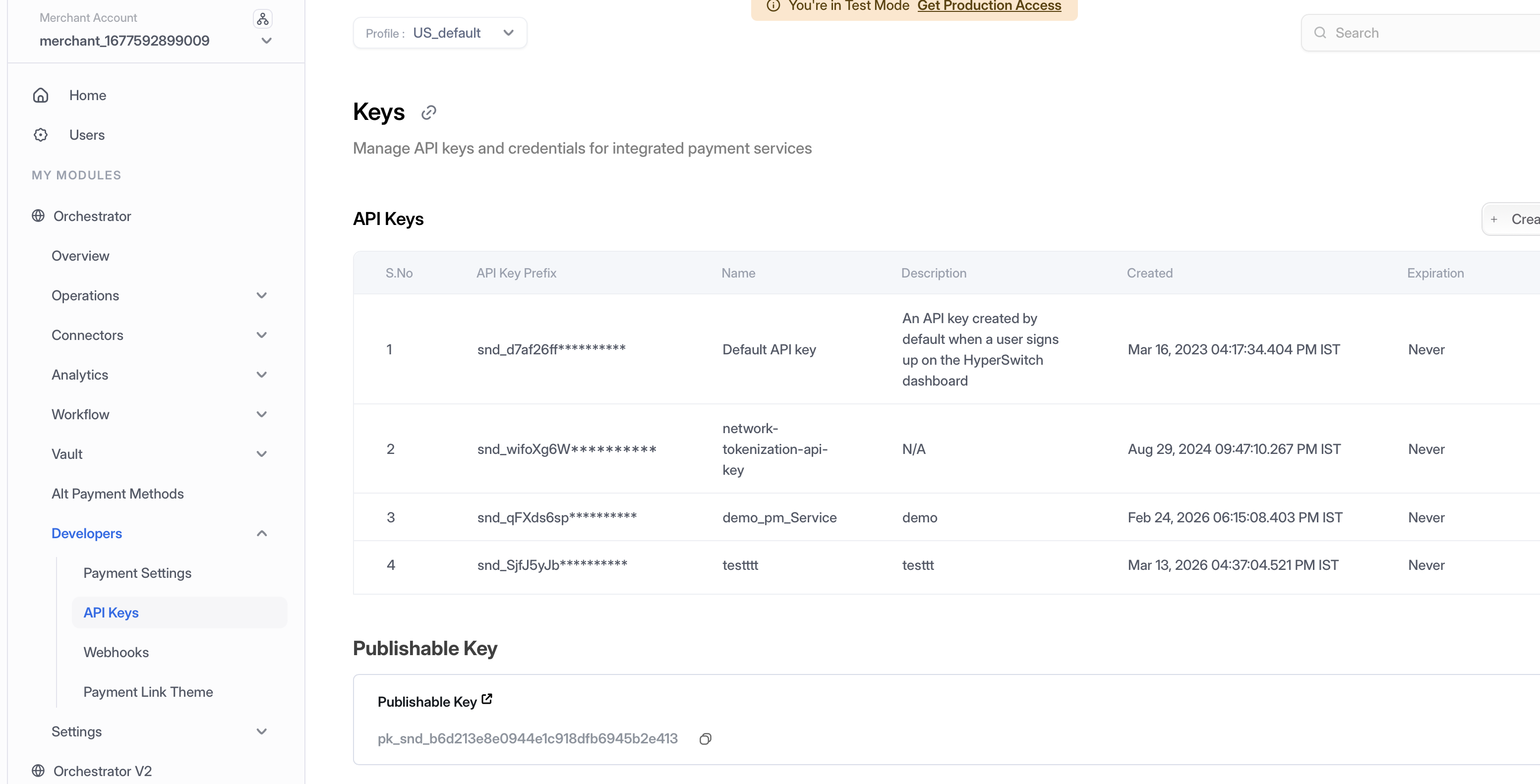
1. **Access Dashboard** — Log into the Hyperswitch Control Centre.
2. **Navigate to API Keys** — In the left-hand navigation menu, select **Developers > API Keys**.
3. **Create Key** — Click **Create New API Key**.
4. **Secure Storage** — Copy the generated key immediately and store it securely (it will not be shown again). Use this key in the `api-key` header for all Vault API calls.
Navigate to Developers > API Keys to create and manage your API credentials
### Step 2: Access Profile ID
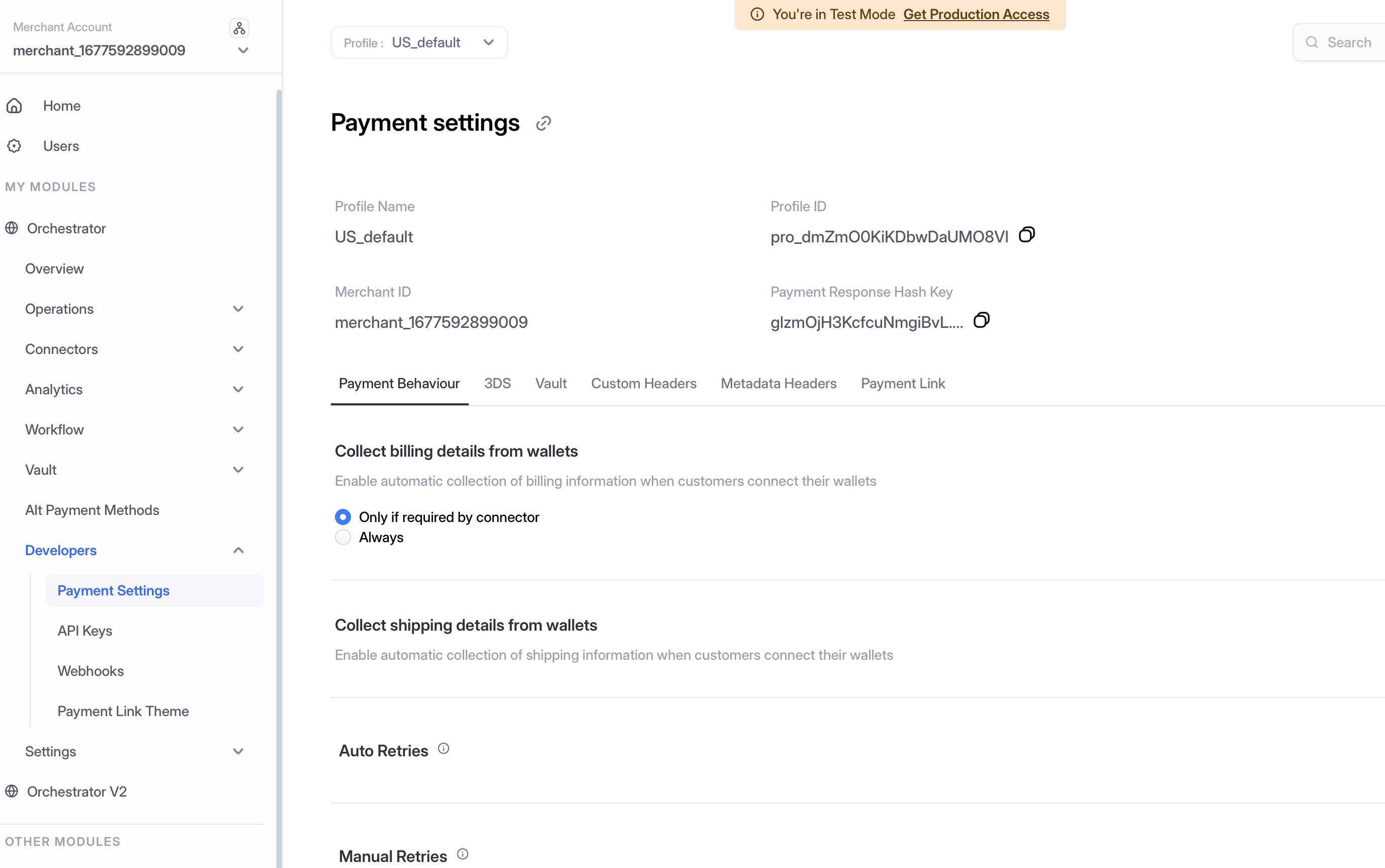
1. **Navigate to Payment Settings** — In the left-hand navigation menu, select **Developers > Payment Settings**.
2. **Copy Profile ID** — Locate and copy your **Profile ID** from the Payment Settings page. This ID is required for API calls that need to specify which merchant profile to use.
Navigate to Developers > Payment Settings to access your Profile ID
## How It Works
### Step 1: Tokenize Cards with Vault SDK
Use the [Vault SDK Integration](/integration-guide/workflows/vault/integration/sdk-integration.md) to collect and tokenize customer payment methods securely. The Vault SDK handles all card data collection in a PCI-compliant manner, returning a `payment_method_id` token to your application.
```javascript
// Example: Tokenize card using Vault SDK
const paymentMethodId = await hyperswitchVault.tokenize({
card_number: "4111111111111111",
card_exp_month: "12",
card_exp_year: "2025",
card_holder_name: "John Doe",
card_cvc: "123"
});
// Returns: payment_method_id (e.g., "pm_1234567890abcdef")
```
### Step 2: Make Proxy Payments with Token
Once you have the `payment_method_id`, use it to make payment requests through the Hyperswitch Vault Proxy API. The proxy service:
1. Receives your PSP payment request with the `payment_method_id` token
2. Detokenizes the payment method to retrieve raw card data
3. Forwards the request with actual card details to your PSP
4. Returns the PSP response back to your system
```bash
# Example: Proxy payment request
curl --location 'https://sandbox.hyperswitch.io/v1/proxy' \
--header 'api-key: YOUR_API_KEY' \
--header 'x-profile-id: YOUR_PROFILE_ID' \
--data '{
"token": "pm_1234567890abcdef",
"token_type": "payment_method_id",
"destination_url": "https://api.your-psp.com/payments",
"method": "POST",
"request_body": {
"amount": 1000,
"currency": "USD",
"card": {
"number": "{{$card_number}}",
"exp_month": "{{$card_exp_month}}",
"exp_year": "{{$card_exp_year}}",
"cvc": "{{$card_cvc}}"
}
}
}'
```
The placeholders `{{$card_number}}`, `{{$card_exp_month}}`, `{{$card_exp_year}}`, and `{{$card_cvc}}` are automatically replaced with actual card data by the Vault Proxy.
## Key Benefits
* **Zero PCI Scope**: Raw card data never enters your infrastructure
* **Keep Your PSP**: No need to change existing payment processor relationships
* **Simple Integration**: Just tokenize with SDK and proxy your existing API calls
* **Data Security**: All card data is encrypted and stored in Hyperswitch's PCI-compliant vault
* **Payment Method Portability**: Use the same `payment_method_id` across multiple PSPs
## Detailed Documentation
For comprehensive details on proxy payment implementation, request formats, response handling, and advanced use cases, please refer to:
[**Hyperswitch Vault: Pass Through Proxy Payments**](https://github.com/juspay/hyperswitch-docs/tree/main/integration-guide/workflows/vault/hyperswitch-vault-pass-through-proxy-payments.md)
This documentation includes:
* Complete proxy payment request examples
* Sample responses from PSPs
* Configuration setup with screenshots
* Step-by-step integration guide
* Security best practices
## Use Cases
This deployment model is ideal for:
* **Growing Businesses**: Companies wanting to avoid PCI compliance costs while scaling
* **Multi-PSP Merchants**: Businesses working with multiple payment processors
* **International Merchants**: Organizations with regional PSP requirements
* **Existing Infrastructure**: Teams with established payment systems wanting to add secure tokenization
## Next Steps
1. [Set up your Vault SDK Integration](/integration-guide/workflows/vault/integration/sdk-integration.md) to start tokenizing payment methods
2. Review the [Pass Through Proxy Payments guide](https://github.com/juspay/hyperswitch-docs/tree/main/integration-guide/workflows/vault/hyperswitch-vault-pass-through-proxy-payments.md) for detailed proxy implementation
3. [Configure your API credentials](/integration-guide/workflows/vault/configuration.md) to enable vault and proxy services
---
# Agent Instructions
This documentation is published with GitBook. GitBook is the documentation platform designed so that both humans and AI agents can read, navigate, and reason over technical content effectively. Learn more at gitbook.com.
## Querying This Documentation
If you need additional information that is not directly available in this page, you can query the documentation by asking a question.
Perform an HTTP GET request on the following URL with the `ask` and `goal` query parameters:
```
GET https://docs.hyperswitch.io/integration-guide/workflows/vault/deployment-models/vault-standalone-saas-vault-non-pci.md?ask=&goal=
```
`ask` is the immediate question: it should be specific, self-contained, and written in natural language.
`goal` is what the user is ultimately trying to achieve, the reason they need the answer. Sharing it helps GitBook give you a better, more relevant answer. A goal is most helpful when it describes the outcome the user wants rather than restating the question. For example, with `ask=how do I create an API token`, a goal like `automate deployments from our CI pipeline` lets GitBook tailor the answer to that use case.
The response will contain a direct answer to the question and relevant excerpts and sources from the documentation.
Use this mechanism when the answer is not explicitly present in the current page, you need clarification or additional context, or you want to retrieve related documentation sections.