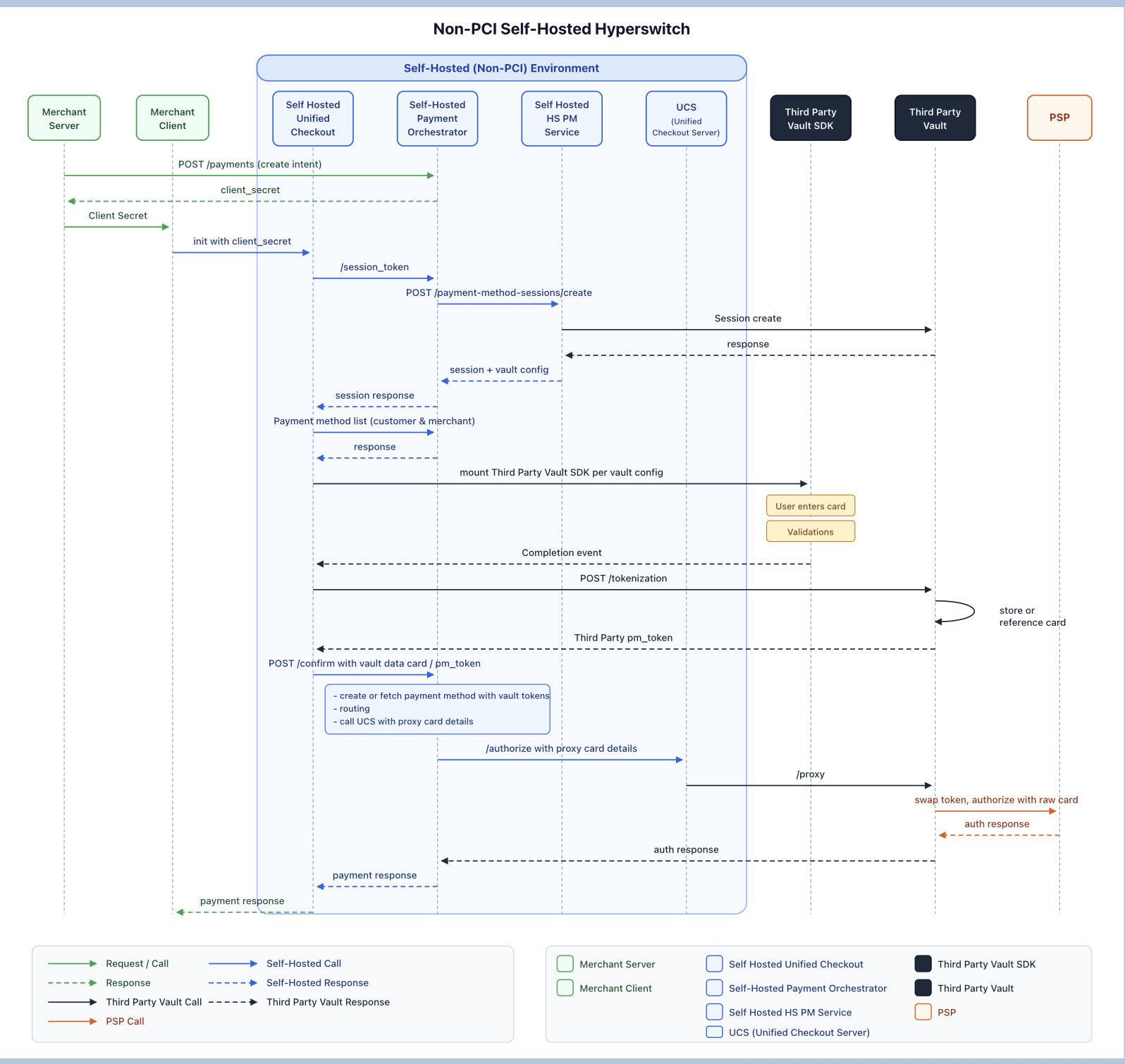
Self-hosted & Outsourced PCI
Self-host Hyperswitch orchestration while outsourcing PCI compliance to an external vault provider like VGS or Tokenex
Deployment Model: Merchant self-hosts Hyperswitch Orchestration Layer
PCI Scope: Outsourced to an external vault provider like VGS, TokenEx
Overview
In this deployment model, merchants self-host the Juspay Hyperswitch orchestration layer on their own infrastructure while outsourcing all PCI DSS responsibilities to an external, PCI-compliant vault provider. Sensitive cardholder data (PAN, CVV, expiry) never touches the merchant's servers.
This architecture gives merchants full control over orchestration logic, routing rules, and business configurations while eliminating the burden of achieving and maintaining PCI DSS Level 1 compliance in-house
Why This Model?
PCI Compliance
Fully offloaded to the vault provider (VGS, Tokenex, etc.)
Hosting Independence
Merchant retains complete control of the Hyperswitch deployment
Sensitive Data Exposure
Raw card data never enters the merchant's environment
Token Portability
payment_method_id unifies vault_token + psp_token + customer_id for cross-platform use
Operational Simplicity
No need to manage HSMs, key rotation, or cardholder data environments
Supported providers include (but are not limited to):
VGS (Very Good Security) — Provides inbound/outbound proxy routes for card data. Hyperswitch sends PSP payloads through VGS's forward proxy, which replaces tokens with raw card data in transit.
Tokenex — Offers a transparent gateway proxy. Hyperswitch sends tokenized payloads to Tokenex's proxy, which detokenizes and forwards to the PSP.
Any vault that supports SDK to accept PCI raw info and have proxy API for detokenizing and making call to PSP — Hyperswitch's modular vault architecture supports any vault that provides an SDK for secure card collection and a proxy/detokenize API.
Hyperswitch's modular vault architecture supports configuring multiple vault connectors simultaneously. You can route different merchants or payment methods to different vaults based on your business logic.
Integration Steps
Self-Hosted Hyperswitch Managed Merchant Client
The merchant loads the Hyperswitch Unified Checkout SDK, which embeds the Third Party Vault SDK to collect card information for tokenization via Third Party vault.
New User Payment Flow
The merchant loads the Hyperswitch Payments SDK via a Payments Create API request. The Hyperswitch SDK in turn loads the external vault SDK configured in the merchant account.
The end user enters their card details directly into the external vault SDK's secure iframe/fields.
The external vault SDK tokenizes the card and returns a
vault_tokenalong with card metadata (last four digits, card brand, expiry) to the Hyperswitch SDK.The Hyperswitch SDK sends a Payment Confirm API request containing the
vault_tokenand card metadata to the self-hosted Hyperswitch backend.Hyperswitch constructs the PSP payload using the
vault_token.The PSP payload (containing the
vault_token) is sent to the Proxy endpoint of the external vault.The external vault replaces the
vault_tokenwith the raw card data and forwards the request to the PSP.The PSP responds with
approvedordeclinedalong with apsp_token. The vault proxy relays this response back to Hyperswitch.Hyperswitch generates a
payment_method_idlinkingcustomer_id,vault_token, andpsp_token.The
payment_method_idandvault_tokenare returned to the merchant via webhooks.
Repeat User Payment Flow
The Hyperswitch SDK loads stored payment methods using the
customer_idfrom the Payments Create API request.The end user selects a saved card
The SDK sends a Payment Confirm API request and sends the corresponding
payment_method_idHyperswitch resolves the
payment_method_idto identify the associatedpsp_tokenand processes the payment by sending the transaction to the corresponding PSP as a MIT
Merchant-Initiated Transaction (MIT) Flow
The merchant triggers an MIT or Recurring transaction using the
payment_method_id.Hyperswitch resolves the
payment_method_idto identify the associatedpsp_tokenand processes the payment by sending the transaction to the corresponding PSP as a MIT

Key Concepts
payment_method_id
payment_method_idA universal, portable token generated by Hyperswitch that serves as the single reference for a stored payment method. It connects:
customer_id
The Hyperswitch customer identifier
vault_token
The token issued by the external vault representing the stored card
psp_token
The token issued by the PSP after a successful transaction
This abstraction allows merchants to:
Switch PSPs without re-collecting card data.
Switch vault providers without breaking existing customer references.
Use a single identifier across all payment flows (first-time, repeat, MIT/recurring).
Configuration Guide
Configuring the External Vault in Juspay Hyperswitch
To enable an external vault with your self-hosted Hyperswitch instance, follow these configuration steps:
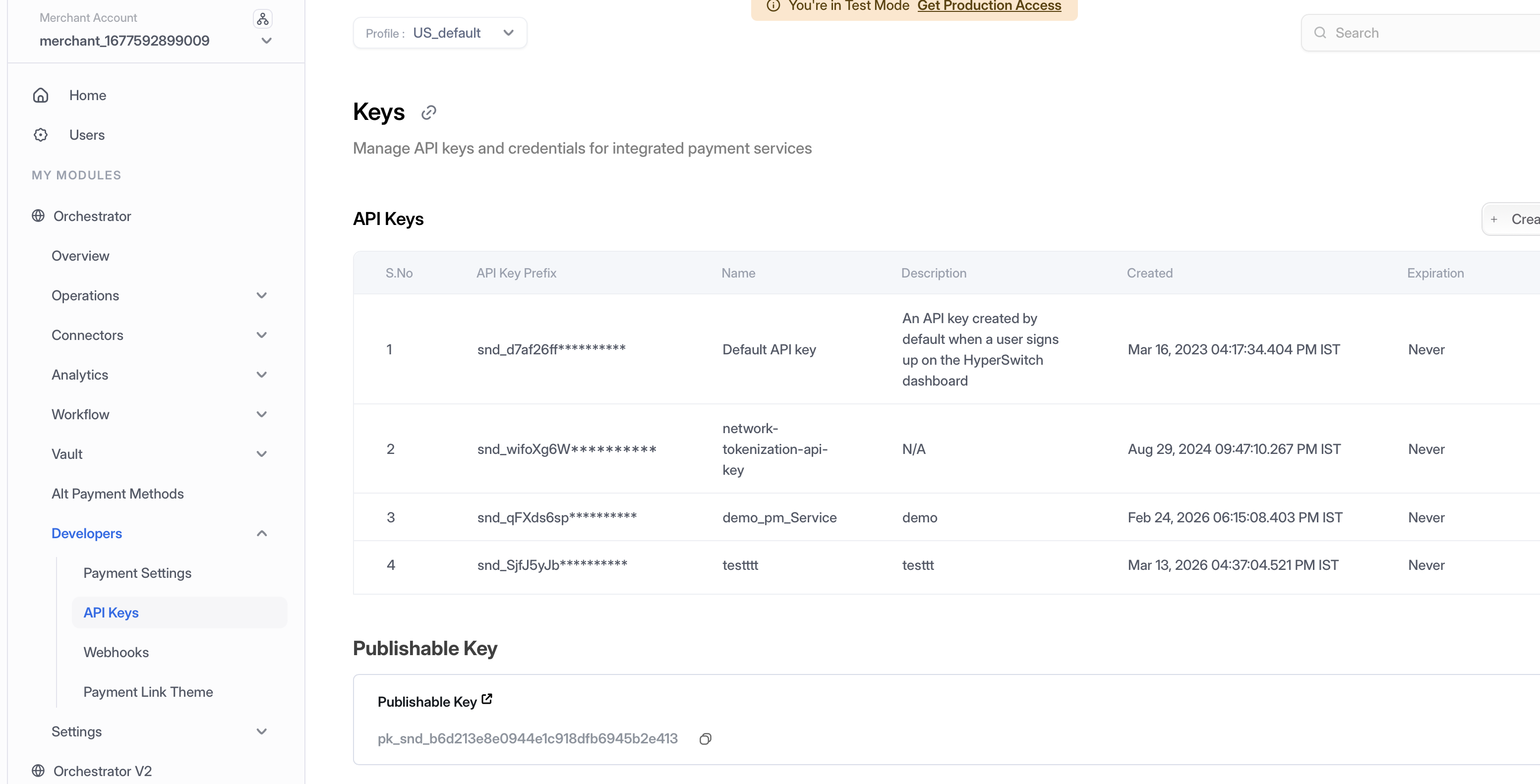
Step 1: Generate API Key
Access Dashboard — Log into the Hyperswitch Control Centre.
Navigate to API Keys — In the left-hand navigation menu, select Developers > API Keys.
Create Key — Click Create New API Key.
Secure Storage — Copy the generated key immediately and store it securely (it will not be shown again). Use this key in the
api-keyheader for all Vault API calls.

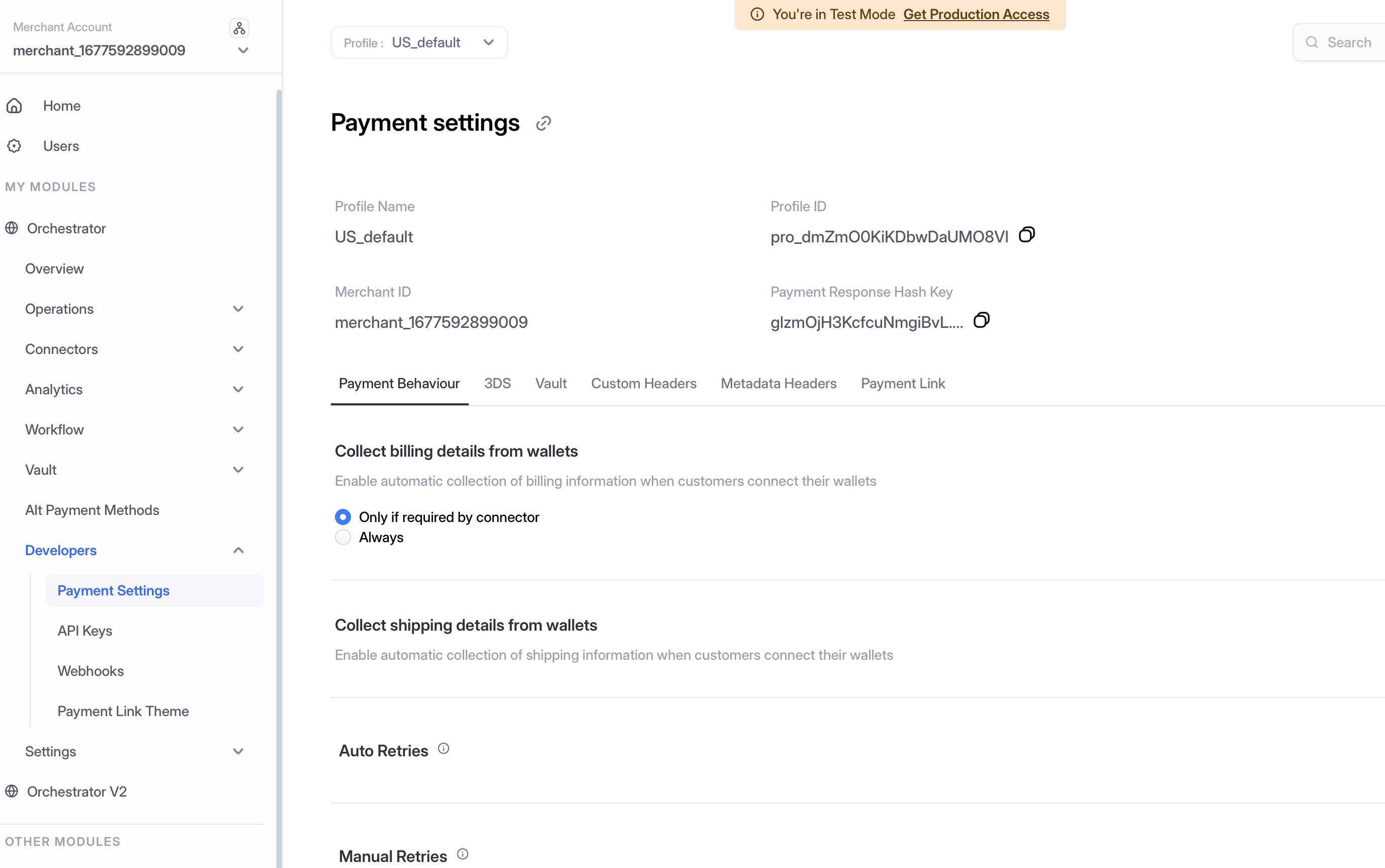
Step 2: Access Profile ID
Navigate to Payment Settings — In the left-hand navigation menu, select Developers > Payment Settings.
Copy Profile ID — Locate and copy your Profile ID from the Payment Settings page. This ID is required for API calls that need to specify which merchant profile to use.

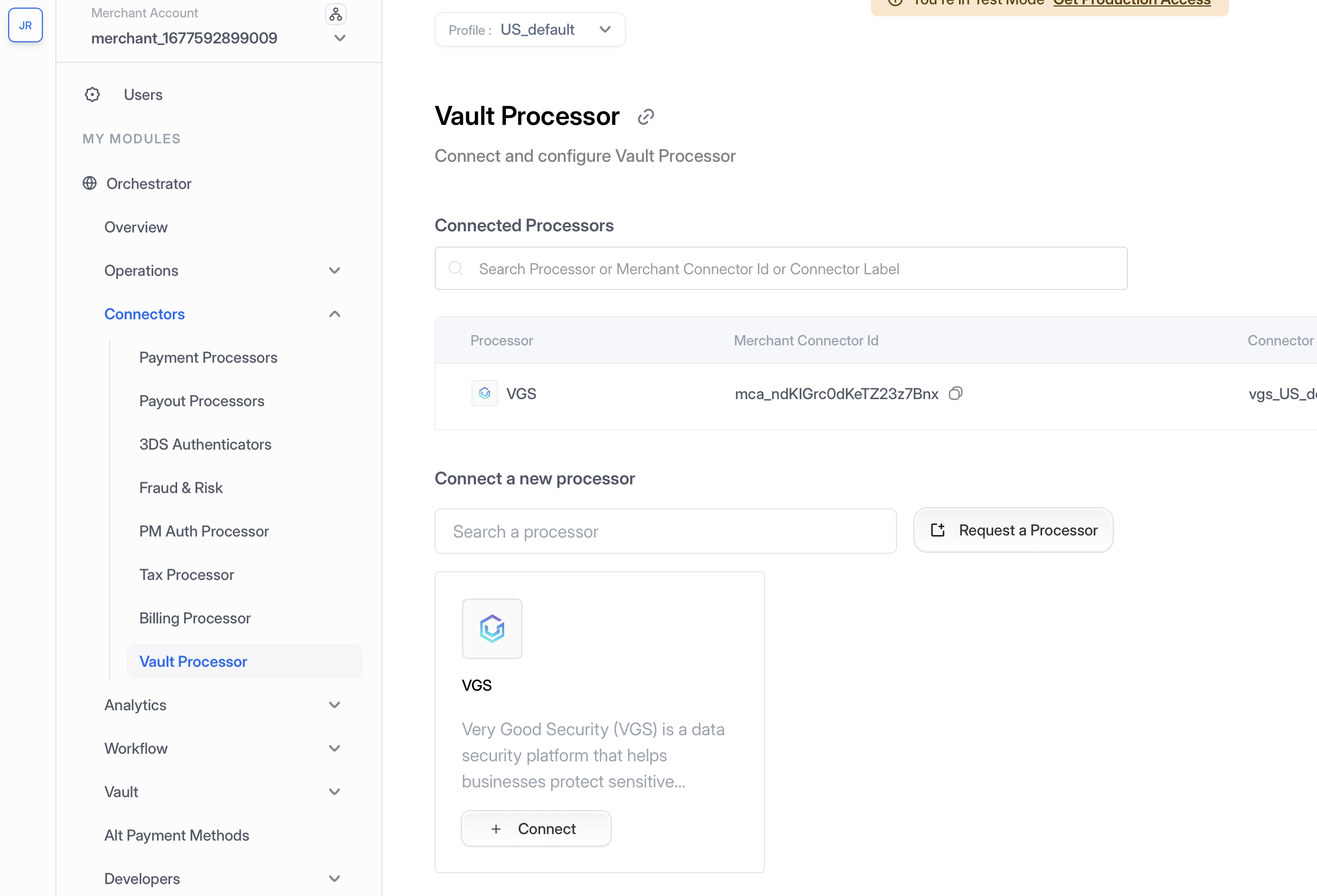
Step 3: Enable Vault Connector
Navigate to Vault Processor — In the left-hand navigation menu, select Connectors > Vault Processor.
Configure Vault Provider — Add your vault provider credentials and configuration:

Required Credentials by Provider:
VGS
Vault ID, Client Secret, Client ID
Tokenex
Token Scheme, API Key, Tokenex ID
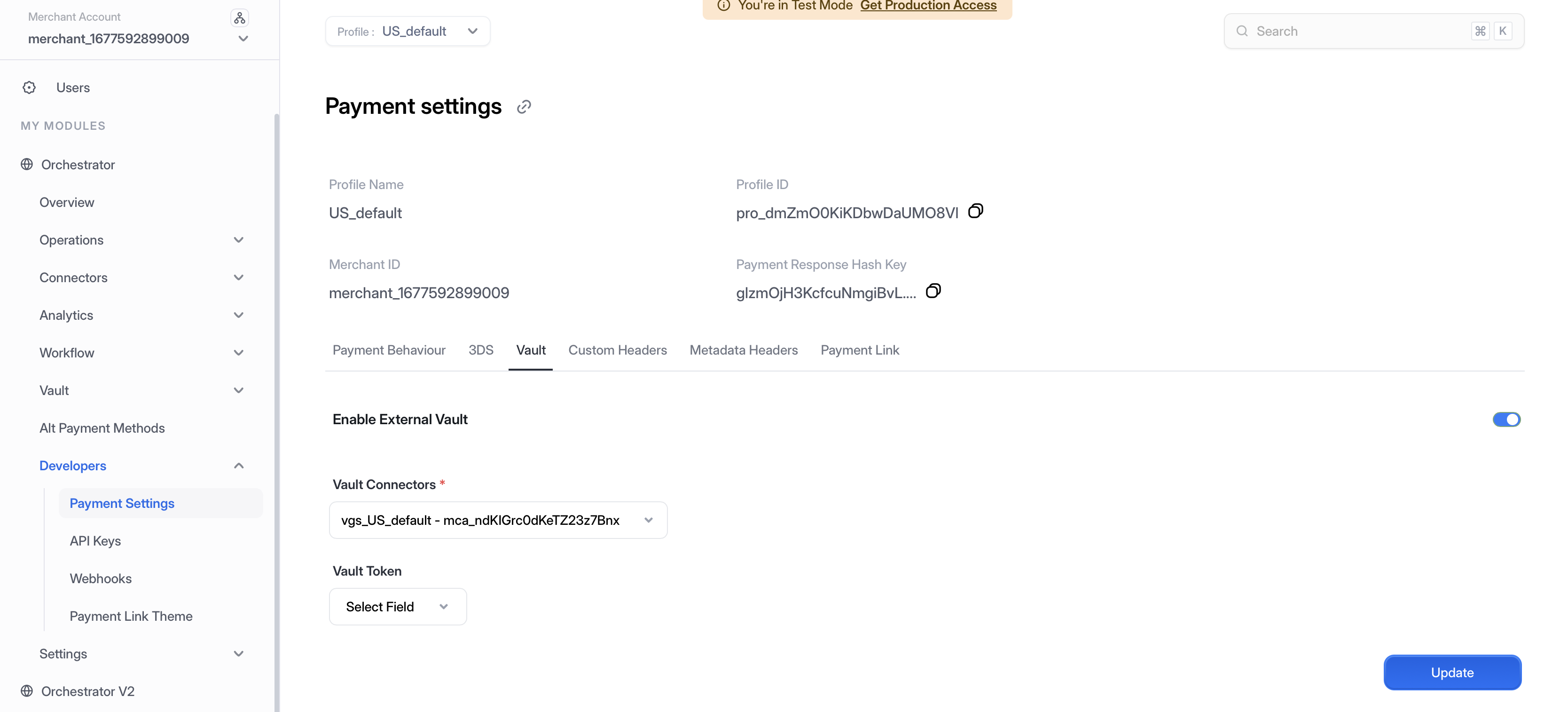
Enable in Payment Settings — Navigate to Developers > Payment Settings, under Vault tab, enable the vault and choose the vault processor from the dropdown, then click Update.

Comparison: Self-Hosted Vault Deployment Models
Hosting
Merchant
Merchant
Juspay (SaaS)
PCI Scope
Merchant (Level 1)
Vault Provider
Juspay + Vault Provider
Vault
Merchant's own vault
VGS / Tokenex
VGS / Tokenex
Card Data on Server
Yes
No
No
Orchestration Control
Full
Full
Managed
Setup Complexity
High
Medium
Low
Compliance Maintenance
High
None
None
Token Portability
Depends
Yes (payment_method_id)
Security Considerations
TLS Everywhere: All communication between Hyperswitch, the vault, and PSPs must use TLS 1.2+.
Credential Rotation: Regularly rotate vault API keys and proxy credentials.
Audit Logging: Enable Hyperswitch audit logs for all vault operations (tokenize, detokenize, proxy calls) to maintain compliance evidence.
Network Segmentation: Even though PCI is outsourced, restrict network access between your Hyperswitch deployment and the vault to only the required endpoints and ports.
Webhook Verification: Always verify webhook signatures for
payment_method_idcallbacks to prevent spoofing.
FAQ
Q: Does raw card data ever touch my self-hosted Hyperswitch server? A: No, the card is tokenized on the client side or by the vault SDK before it reaches your server.
Q: Can I switch vault providers without affecting existing customers? A: Yes. Since Hyperswitch uses payment_method_id as the universal reference, you can migrate vault tokens between providers. Hyperswitch will update the internal mapping from payment_method_id → new vault_token.
Q: What PCI SAQ level applies to me in this model? A: Typically SAQ A-EP (if you host the checkout page) or SAQ A (if the vault SDK iframe handles all card input). Consult your QSA for a definitive assessment.
Q: Can I use multiple vault providers simultaneously? A: Hyperswitch's modular vault architecture supports configuring multiple vault connectors. You can route different merchants or payment methods to different vaults based on your business logic.
Related Documentation
Last updated
Was this helpful?