> For the complete documentation index, see [llms.txt](https://docs.hyperswitch.io/llms.txt). Markdown versions of documentation pages are available by appending `.md` to page URLs; this page is available as [Markdown](https://docs.hyperswitch.io/integration-guide/workflows/intelligent-routing/self-deployment-guide.md).
# Self-Deployment Guide
Self-deploy the routing service used by Hyperswitch Intelligent Routing
Self-hosted Hyperswitch deployments can run the routing service in their own infrastructure. Hyperswitch remains the payment orchestrator; the routing service is used by Hyperswitch to evaluate dynamic routing decisions.
{% hint style="info" %}
Hosted Hyperswitch merchants usually do not need this setup. Use this guide only when you are running Hyperswitch yourself.
{% endhint %}
## Run The Routing Service
Clone the routing service repository:
```bash
git clone https://github.com/juspay/decision-engine.git
cd decision-engine
```
## Install Docker
Make sure Docker is installed on your system.
* Mac: [Docker Desktop for Mac](https://docs.docker.com/desktop/setup/install/mac-install/)
* Windows: [Docker Desktop for Windows](https://docs.docker.com/desktop/setup/install/windows-install/)
* Linux: [Docker Engine for Linux](https://docs.docker.com/desktop/setup/install/linux/)
Start the API with Docker Compose:
```bash
docker compose --profile postgres-ghcr up -d
```
For the API, dashboard, and local docs together:
```bash
docker compose --profile dashboard-postgres-ghcr up -d
```
## Repository Make Targets
You can also use the repository Make targets:
```bash
make init-pg-ghcr
make run-pg-ghcr
```
Legacy aliases are also available:
```bash
make init
make run
```
The init targets start the backing services, apply database setup, and load routing configuration from the repository config files. The run targets start only the routing API container for an already initialized setup.
Verify the service:
```bash
curl http://localhost:8080/health
```
Plan for approximately 2 GB of disk space. After the service starts, refer to the [Hyperswitch API reference](https://api-reference.hyperswitch.io/) for the payment APIs that use routing.
## Connect With Hyperswitch
Configure the routing service URL in Hyperswitch:
```toml
[open_router]
dynamic_routing_enabled = true
static_routing_enabled = true
url = "http://localhost:8080"
```
When you are ready for Hyperswitch to use the external routing service, set the routing result source to `decision_engine`. Keep it as `hyperswitch_routing` while validating or migrating.
## How Hyperswitch Uses It
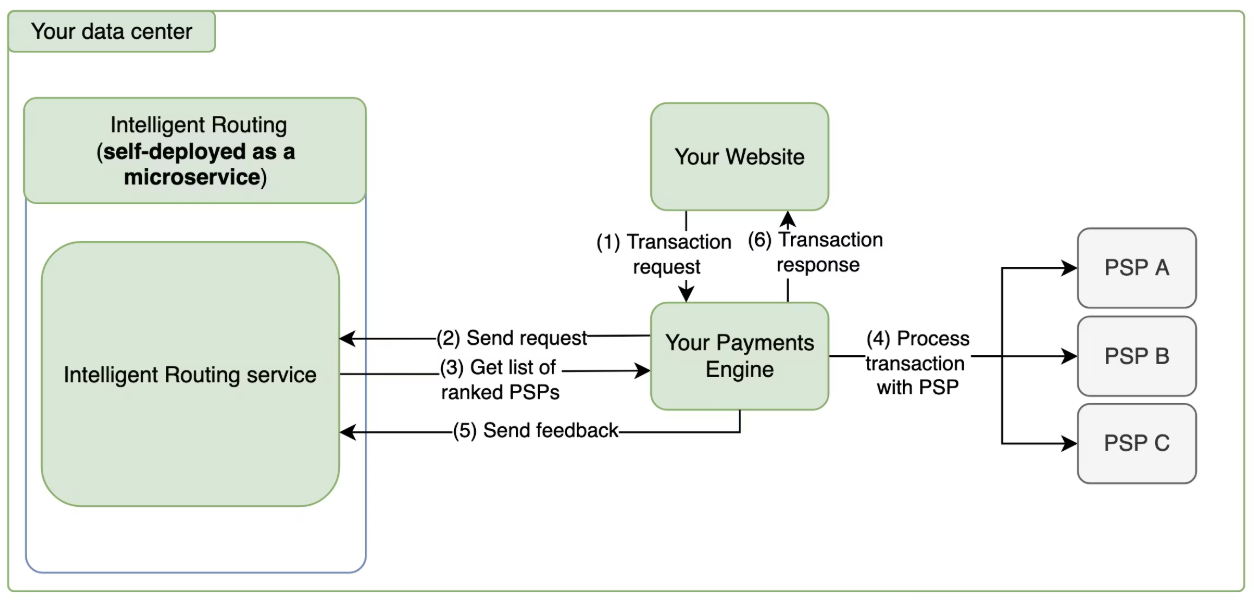
Hyperswitch calls the routing service during the payment flow, receives the selected processor, performs eligibility and fallback checks, and then continues the payment with the chosen connector. After the payment outcome is known, Hyperswitch sends feedback so auth-rate routing and analytics stay accurate.
## Production Checklist
Before sending live traffic, confirm:
* Redis and database persistence are configured.
* Health and readiness checks are monitored.
* Default Fallback Routing is configured in Hyperswitch.
* Payment outcomes are being reported for successful and failed attempts.
* Routing decisions are visible in Hyperswitch analytics or logs.
---
# Agent Instructions
This documentation is published with GitBook. GitBook is the documentation platform designed so that both humans and AI agents can read, navigate, and reason over technical content effectively. Learn more at gitbook.com.
## Querying This Documentation
If you need additional information that is not directly available in this page, you can query the documentation by asking a question.
Perform an HTTP GET request on the following URL with the `ask` and `goal` query parameters:
```
GET https://docs.hyperswitch.io/integration-guide/workflows/intelligent-routing/self-deployment-guide.md?ask=&goal=
```
`ask` is the immediate question: it should be specific, self-contained, and written in natural language.
`goal` is what the user is ultimately trying to achieve, the reason they need the answer. Sharing it helps GitBook give you a better, more relevant answer. A goal is most helpful when it describes the outcome the user wants rather than restating the question. For example, with `ask=how do I create an API token`, a goal like `automate deployments from our CI pipeline` lets GitBook tailor the answer to that use case.
The response will contain a direct answer to the question and relevant excerpts and sources from the documentation.
Use this mechanism when the answer is not explicitly present in the current page, you need clarification or additional context, or you want to retrieve related documentation sections.