> For the complete documentation index, see [llms.txt](https://docs.hyperswitch.io/llms.txt). Markdown versions of documentation pages are available by appending `.md` to page URLs; this page is available as [Markdown](https://docs.hyperswitch.io/integration-guide/workflows/intelligent-routing/routing-strategies/multi-objective-routing.md).
# Multi-Objective Routing
Balancing Auth Rate and Cost Savings
In Multi-Objective Routing, the transactions are routed across PSPs based on the Economic Value.
**Economic value:** the expected value of routing a transaction to a given PSP, calculated as **auth rate × settlement value, where settlement value = transaction amount − cost of processing**. Cost of processing is the sum of issuer, network, and acquirer fees for that PSP on that transaction, read from settlement data rather than estimated.
### Configurations
#### Autopilot: auto-tuning the routing parameters per cluster
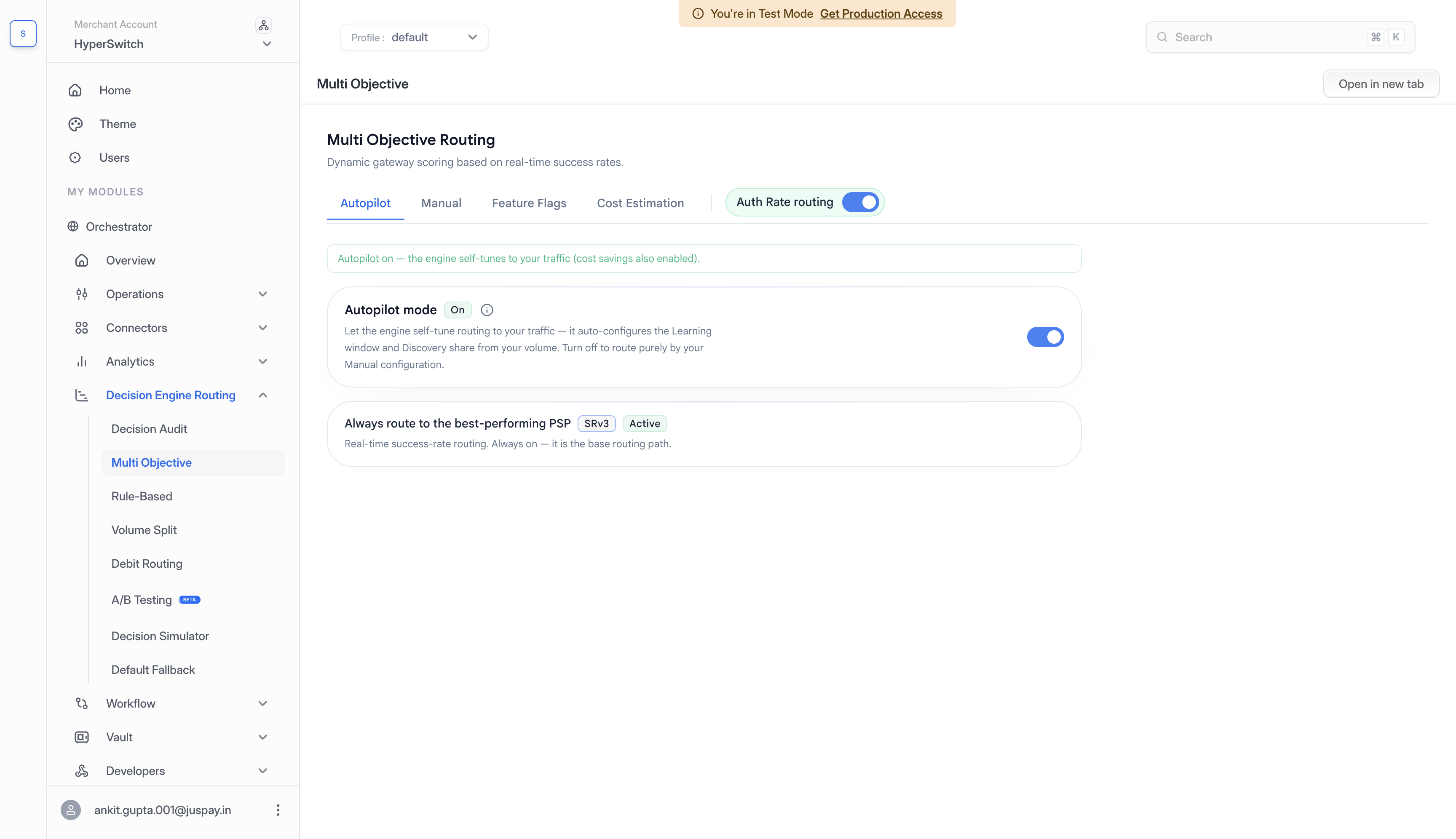
The routing module derives its routing parameters from each cluster's own data and refreshes them continuously. Every hour, it auto-updates bucket size and hedging percentage based on the previous hour's transactions, keeping routing decisions statistically reliable while still reacting quickly to PSP performance changes.
Bucket size balances confidence against agility. It has to be large enough to trust the auth-rate comparison, but lean enough to react quickly when a PSP's performance shifts. Bucket size scales with transaction volume: to detect a 2% net-auth-rate difference, a cluster needs roughly 150 transactions per hour of history at 500 transactions/hour, rising to around 900 at 4,000 transactions/hour. More traffic affords a wider, more accurate window that's still fresh.
Hedging percentage balances learning against exploitation. It has to be large enough to keep PSP comparisons fresh, so the engine notices when a lagging provider recovers but controlled enough not to give back net-auth-rate gains from the top performer by over-sampling weaker ones.
The high-level goal a merchant sets is deliberately small: a single business preference on whether the system should optimize for cost at all. Everything underneath - bucket size, hedging, and the economic-value comparison itself - is derived automatically from the merchant's own historical data and updates as success-rate estimates and settlement costs change.
See [Autopilot](/integration-guide/workflows/intelligent-routing/autopilot.md) for setup details and tuning controls.
### Cost Data Inputs
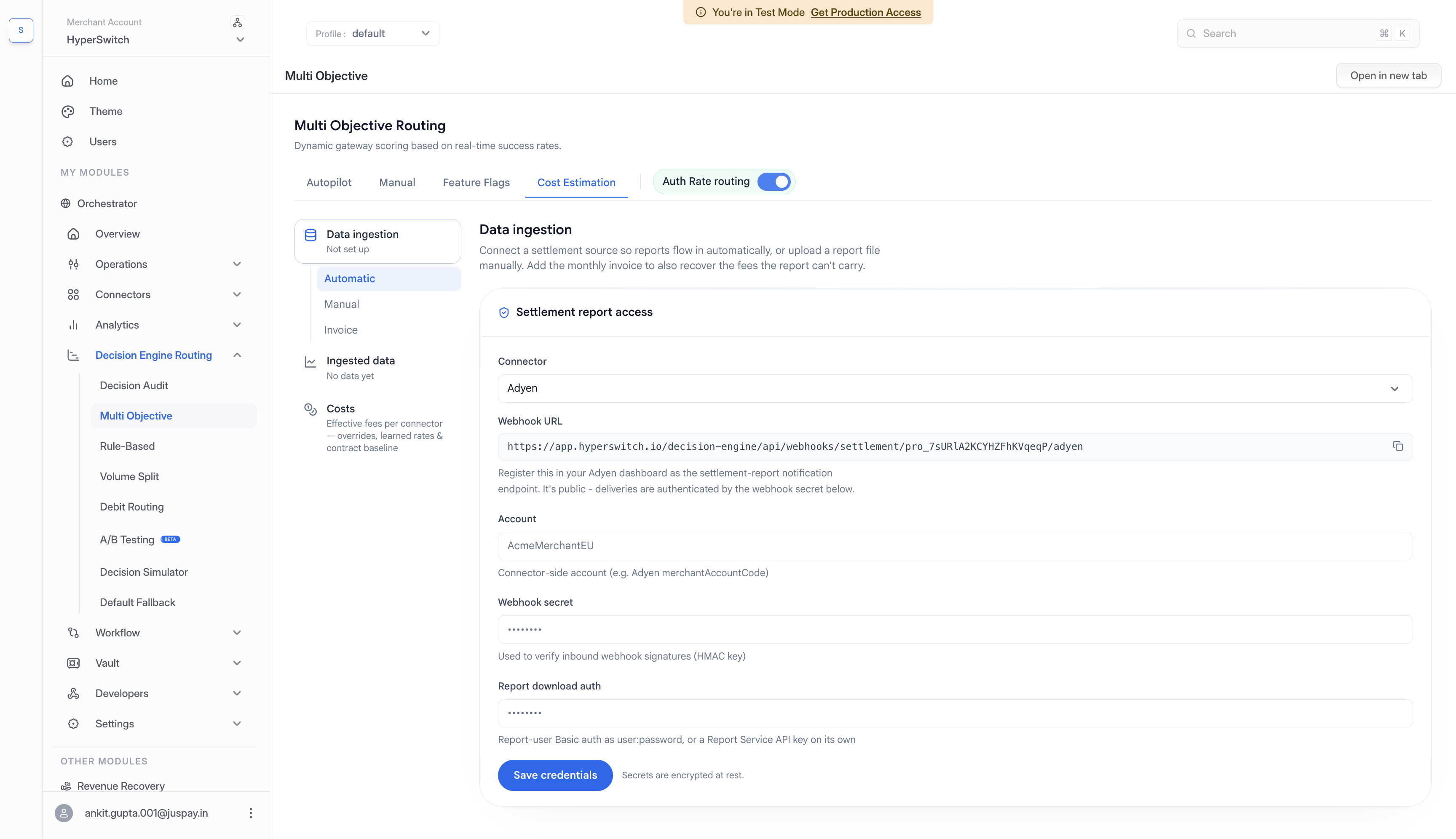
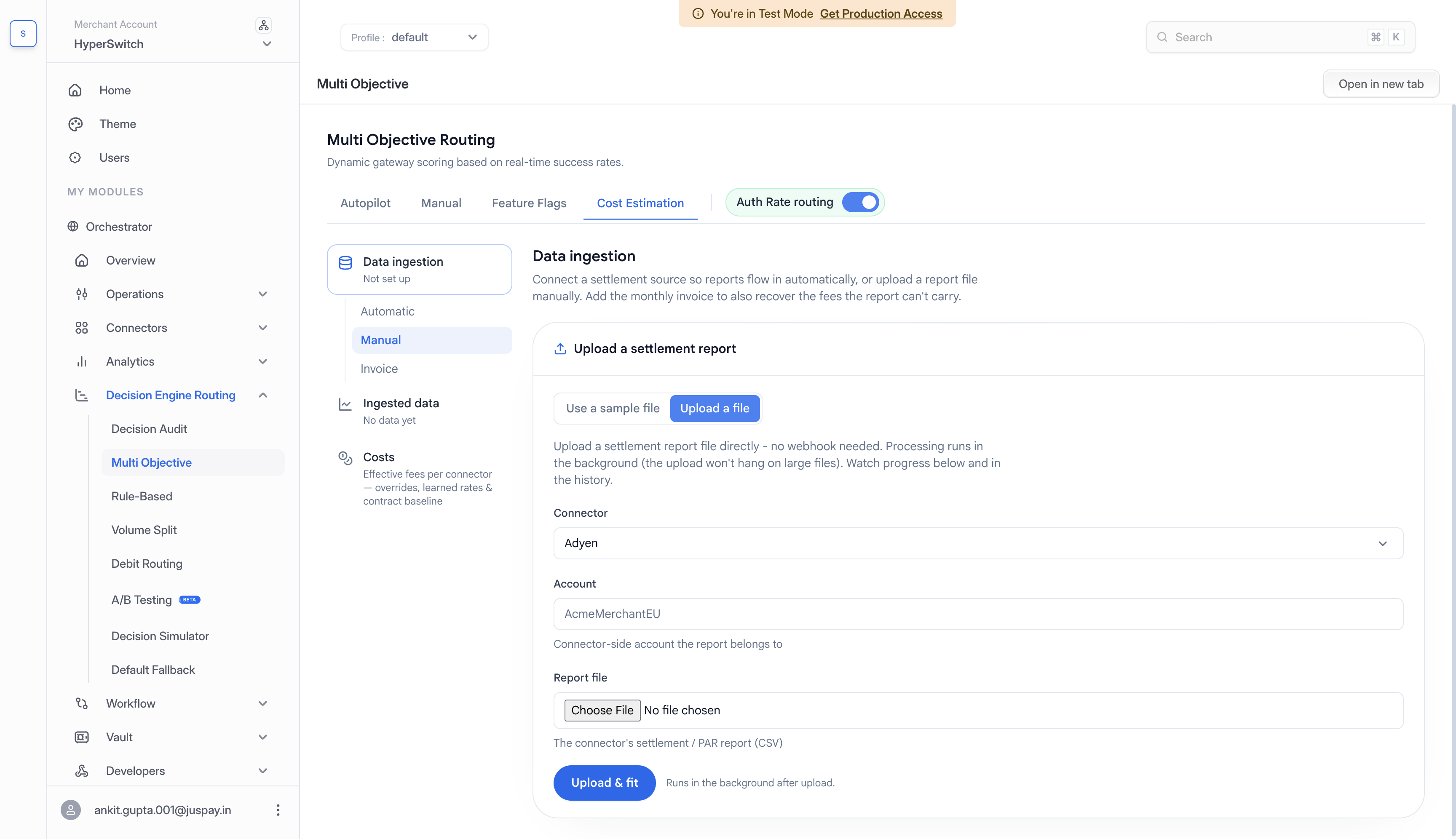
Hyperswitch learns your true per-transaction fee from your own settlement reports and prices every routing decision on it. How that data gets in is covered in [Cost Ingestion](/integration-guide/workflows/intelligent-routing/routing-strategies/multi-objective-routing/cost-ingestion.md), and what Hyperswitch does with it - the cost model, trust grades, and coverage - is covered in [Cost Estimation](/integration-guide/workflows/intelligent-routing/routing-strategies/multi-objective-routing/cost-estimation.md).
There are two ways in which you can provide the cost data:
1. **Automatic:** Connect to your PSP account by entering the credentials and Hyperswitch will receive the Cost Fee Reports at the set cadence
2. **Manual:** Upload the fee report as a .csv file as per the expected template (which can be downloaded from the dashboard). In case of data field mismatch resolve by manually mapping the columns in the data with the expected fields. In sandbox there are also sample files available to try it out.
Follow this video guide to learn more:
{% embed url="" %}
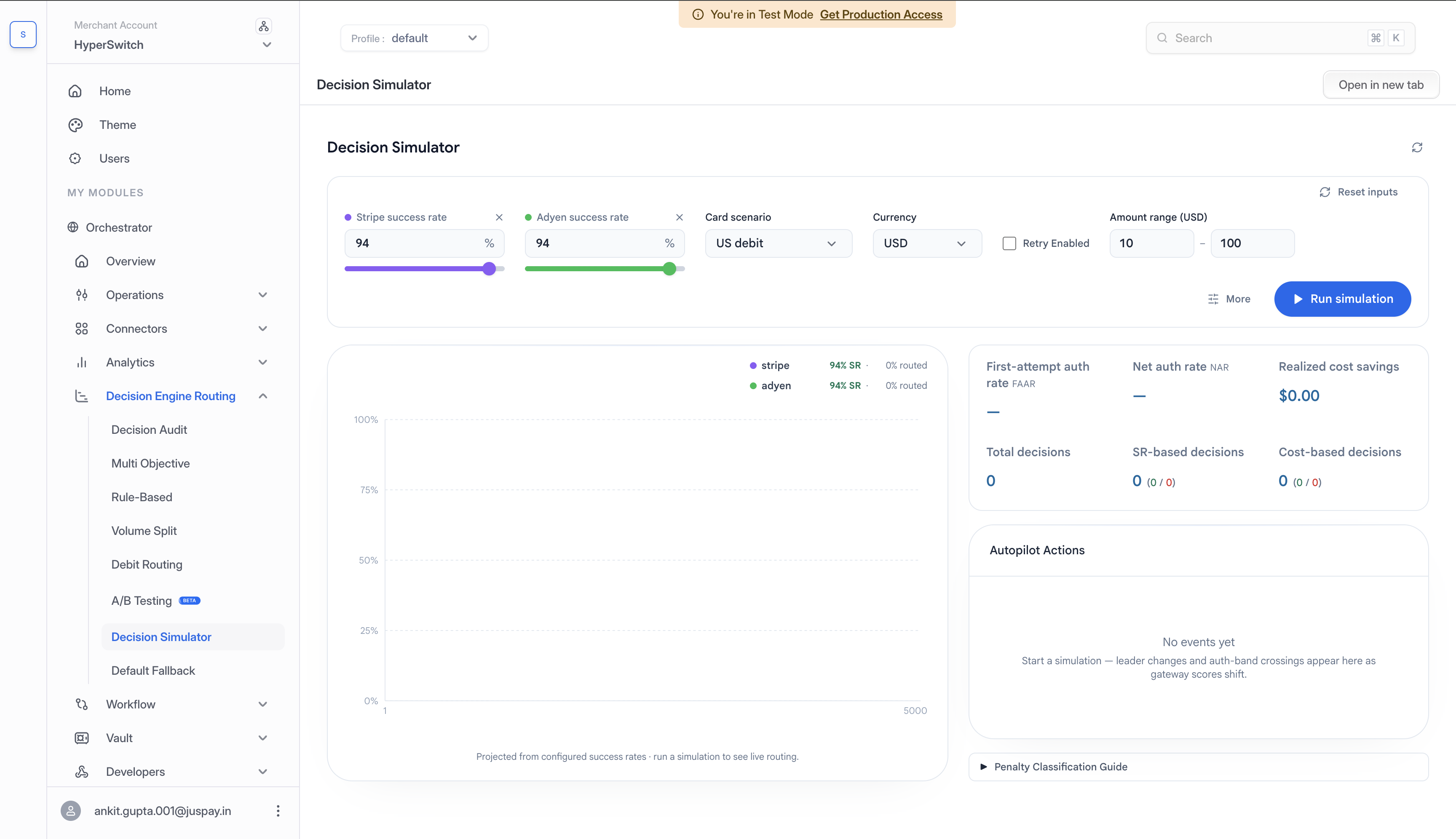
### Demo Playground
You can use the Decision Simulator to run various scenarios to see the behaviour of the routing module under the set configurations
Follow this video guide to learn more:
{% embed url="" %}
### FAQs
#### What's next on multi-objective payment routing?
Economic value is the first non-auth objective folded into routing; the roadmap adds three more, each a new lever on business impact.
Volume-discount constraints steer enough GMV to a PSP within a period to qualify for invoice-level discounts that never appear in per-transaction pricing.
Multi-currency support normalizes costs to one preferred currency and folds forex into the economic-value calculation, so cross-border routing decisions account for conversion cost.
Fraud-dilution constraints track a merchant's standing in the Visa Acquirer Monitoring Program (VAMP) and Mastercard's Excessive Chargeback Merchant (ECM) program, read dispute webhooks, and cut volume to a PSP before a monitoring breach.
#### Will multi-objective routing reduce my authorization rate or lose revenue?
Net Auth Rate is designed to hold, and First Attempt Auth Rate typically eases only \~20 bps on cost-optimized clusters. Cost is an additional constraint, not the engine's objective - the primary goal is still improving the First Attempt Auth Rate - and smart retry provides a fallback on retry-eligible failures whether a transaction was routed to the highest-auth PSP or a cheaper one.
#### How much configuration does multi-objective routing need?
Configuration is fully self-managed in autopilot mode. Bucket size and hedging percentage are derived automatically from each cluster's own historical data and refreshed hourly. The only mandatory high-level input is a single business preference: whether the system should optimize for cost at all. There are no per-transaction tolerances for a merchant to set.
#### What cost data does Hyperswitch need to run economic-value routing?
A single report with the cost breakdown at the transaction level - the Payment Accounting Report for Adyen, or the equivalent for other PSPs. Setup is one-time with zero ongoing effort; cost data refreshes automatically each time new settlement reports are ingested. Hyperswitch's cost observability layer derives the true per-transaction processing fee from these reports rather than estimating it.
#### How does the system decide whether a cost saving is worth the auth-rate impact?
Through the economic-value comparison itself. Because a PSP's score is auth rate × (amount − cost), a lower-cost PSP only wins when its cost advantage outweighs its authorization disadvantage. On a $60 sale, for example, a $0.40 fee gap is offset at an auth-rate lead of about 0.61 percentage points - below that lead the cheaper PSP wins, above it the higher-auth PSP does.
---
# Agent Instructions
This documentation is published with GitBook. GitBook is the documentation platform designed so that both humans and AI agents can read, navigate, and reason over technical content effectively. Learn more at gitbook.com.
## Querying This Documentation
If you need additional information that is not directly available in this page, you can query the documentation by asking a question.
Perform an HTTP GET request on the following URL with the `ask` and `goal` query parameters:
```
GET https://docs.hyperswitch.io/integration-guide/workflows/intelligent-routing/routing-strategies/multi-objective-routing.md?ask=&goal=
```
`ask` is the immediate question: it should be specific, self-contained, and written in natural language.
`goal` is what the user is ultimately trying to achieve, the reason they need the answer. Sharing it helps GitBook give you a better, more relevant answer. A goal is most helpful when it describes the outcome the user wants rather than restating the question. For example, with `ask=how do I create an API token`, a goal like `automate deployments from our CI pipeline` lets GitBook tailor the answer to that use case.
The response will contain a direct answer to the question and relevant excerpts and sources from the documentation.
Use this mechanism when the answer is not explicitly present in the current page, you need clarification or additional context, or you want to retrieve related documentation sections.