> For the complete documentation index, see [llms.txt](https://docs.hyperswitch.io/llms.txt). Markdown versions of documentation pages are available by appending `.md` to page URLs; this page is available as [Markdown](https://docs.hyperswitch.io/integration-guide/workflows/intelligent-routing/routing-strategies/auth-rate-based-routing.md).
# Auth-Rate Routing
Improve successful payments by routing traffic to processors with stronger recent authorization performance
Auth-Rate Routing uses recent payment outcomes to choose the processor most likely to authorize the next payment. It is useful when you have multiple processors for the same payment method and want routing to adapt as processor performance changes.
## How It Works
Hyperswitch tracks processor performance across payment attributes such as payment method, payment method type, transaction amount, currency, country, card network, and authentication type. The routing engine then ranks eligible processors by recent success rate.
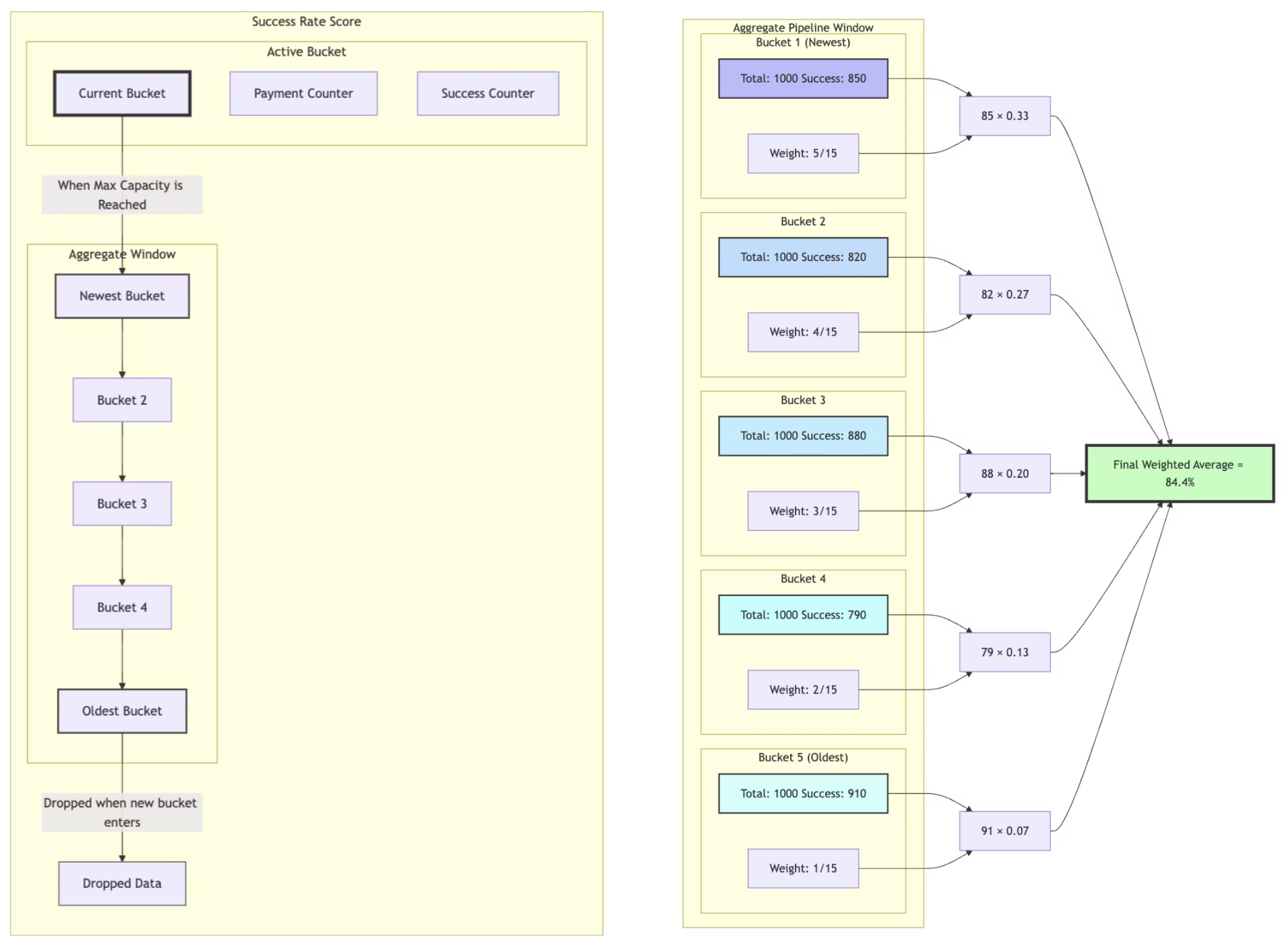
The model treats each processor as a changing option in a non-stationary multi-armed bandit with delayed feedback. That means it accounts for both fluctuating success rates and the delay between sending a payment and receiving its final outcome.
The strategy balances two behaviors:
* **Exploitation:** Send most traffic to the processor with the best recent performance.
* **Exploration:** Send a smaller share of traffic to other eligible processors so the model keeps fresh performance data.
Hyperswitch uses a sliding window of recent attempts so routing can react to processor behavior without waiting for a manual configuration change. Downtime or repeated technical failures can deprioritize a processor before the final decision is made.
## Merchant Controls
| Control | Why it matters |
| --------------------- | ---------------------------------------------------------------------------- |
| Traffic split | Roll out auth-rate routing gradually before using it for all payments. |
| Bucket size | Controls how much recent traffic is used to calculate processor performance. |
| Hedging percentage | Controls the exploration share sent to alternate eligible processors. |
| Elimination threshold | Controls when a poorly performing processor is temporarily deprioritized. |
## Key Configurations
* **Bucket size:** Number of payments included in a block, limited by count or time period.
* **Aggregate pipeline size:**
* **Max:** Number of buckets used to calculate scores in FIFO order. This determines reaction time.
* **Min:** Number of buckets after which scores are used. This acts as the offset for error tolerance.
* **Exploration percentage:** Share of traffic sent to alternate eligible processors to keep scoring data fresh.
## Dashboard Setup
Before you start, configure at least two processors that support the payment methods and currencies you want to route. Review the selected profile's [Default Fallback Routing](/integration-guide/workflows/intelligent-routing/routing-strategies/default-fallback-routing.md).
### 1. Open The Routing Settings
1. Select your merchant account and **Profile** in the dashboard.
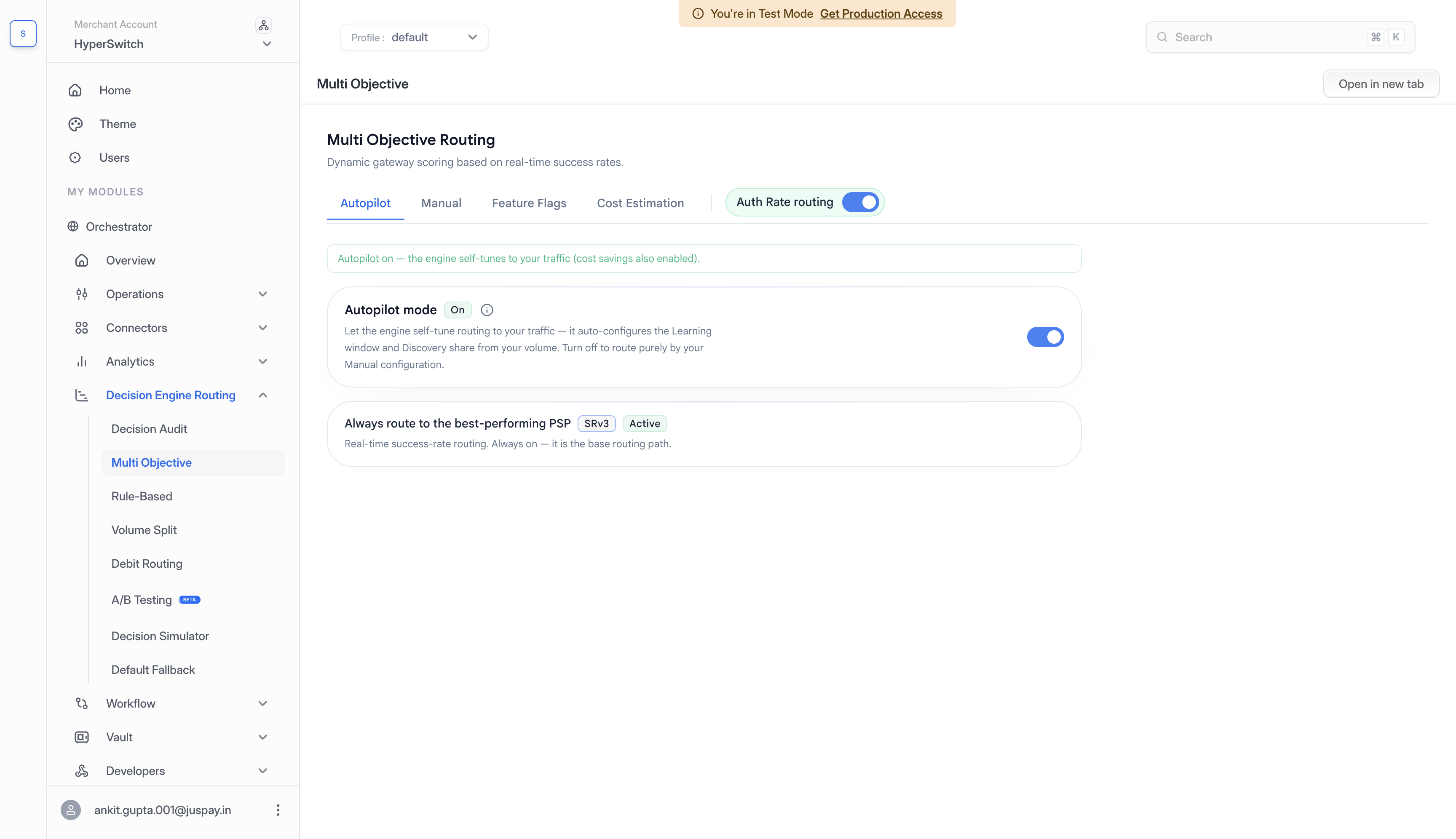
2. Go to **Decision Engine Routing** > **Multi Objective**.
3. Locate the **Auth Rate routing** switch beside the page tabs. You can configure Manual settings while this switch is off.
Auth-rate routing settings are managed on the Multi Objective page.
### 2. Configure Manual Settings
1. If you want to manage scoring yourself, open **Autopilot** and turn **Autopilot mode** off if it is currently on.
2. Open **Manual** > **Scoring defaults**.
3. Review **Bucket size**, **Hedging %**, and **Latency threshold (s)**.
4. Add **Sub-level overrides** if a payment type needs different settings. Otherwise, the defaults apply.
5. Click **Save changes** and check for the **Configuration saved** message.
Autopilot manages scoring for automatically tuned traffic groups while it is on. Turning it off returns routing to your Manual configuration and also disables Cost savings and Elimination. Review **Feature Flags** if you want to enable either feature again.
For automatic tuning instead, see [Autopilot](/integration-guide/workflows/intelligent-routing/autopilot.md).
### 3. Review Features And Enable Routing
1. Open **Feature Flags** and enable **Explore-exploit on SRv3 (Card)** if you want the card routing model to use your **Hedging %** for exploration.
2. If you want to exclude processors with low recent authorization rates, configure **Manual** > **Elimination**, click **Save Elimination Config**, and enable **Elimination (pause PSPs with low auth rate)** under **Feature Flags**.
3. Turn **Auth Rate routing** on when you are ready to use the configuration.
Saved Manual settings apply while Auth Rate routing is on. If it is already on, saving changes updates the settings used for routing.
For cost-aware routing, see [Multi-Objective Routing](/integration-guide/workflows/intelligent-routing/routing-strategies/multi-objective-routing.md). To compare a change on a portion of traffic before a wider rollout, see [A/B Testing](/integration-guide/workflows/intelligent-routing/ab-testing.md).
## Test Routing Behavior
Use the routing playground to simulate payment scenarios and review routing choices:
1. Create a merchant on Juspay Hyperswitch Control Center.
2. Configure at least two payment processors for the merchant profile.
3. Enter the sandbox API key, merchant ID, and profile ID when the simulator prompts for them.
4. Go to the `Routing` tab and toggle Success Based Routing.
5. Select the routing configuration settings.
6. Go to the `General` tab and enter the number of payments to trigger in batches.
7. Click `Start Simulation` to see the results.
8. Use `Test Payment Data` to modify processor auth rates and observe how routing choices change.
For automatic tuning of bucket size and exploration settings, see [Autopilot](/integration-guide/workflows/intelligent-routing/autopilot.md).
---
# Agent Instructions
This documentation is published with GitBook. GitBook is the documentation platform designed so that both humans and AI agents can read, navigate, and reason over technical content effectively. Learn more at gitbook.com.
## Querying This Documentation
If you need additional information that is not directly available in this page, you can query the documentation by asking a question.
Perform an HTTP GET request on the following URL with the `ask` and `goal` query parameters:
```
GET https://docs.hyperswitch.io/integration-guide/workflows/intelligent-routing/routing-strategies/auth-rate-based-routing.md?ask=&goal=
```
`ask` is the immediate question: it should be specific, self-contained, and written in natural language.
`goal` is what the user is ultimately trying to achieve, the reason they need the answer. Sharing it helps GitBook give you a better, more relevant answer. A goal is most helpful when it describes the outcome the user wants rather than restating the question. For example, with `ask=how do I create an API token`, a goal like `automate deployments from our CI pipeline` lets GitBook tailor the answer to that use case.
The response will contain a direct answer to the question and relevant excerpts and sources from the documentation.
Use this mechanism when the answer is not explicitly present in the current page, you need clarification or additional context, or you want to retrieve related documentation sections.