> For the complete documentation index, see [llms.txt](https://docs.hyperswitch.io/llms.txt). Markdown versions of documentation pages are available by appending `.md` to page URLs; this page is available as [Markdown](https://docs.hyperswitch.io/integration-guide/workflows/intelligent-routing.md).
# Intelligent Routing
Route every payment to the best processor based on business rules, live performance, cost, and fallback preferences
Hyperswitch Intelligent Routing helps merchants decide where each payment should be processed. You can use it to improve authorization rates, reduce processing cost, shift traffic across processors, and keep payments moving when a processor is unavailable.
## What You Can Do
| Goal | Use this |
| ---------------------------------------------------------- | --------------------------------------------------------------------------------------------------------------------------- |
| Route specific traffic to specific processors | [Rule-Based Routing](/integration-guide/workflows/intelligent-routing/routing-strategies/rule-based-routing.md) |
| Split traffic by percentage | [Volume-Based Routing](/integration-guide/workflows/intelligent-routing/routing-strategies/volume-based-routing.md) |
| Send more traffic to better-performing processors | [Auth-Rate Routing](/integration-guide/workflows/intelligent-routing/routing-strategies/auth-rate-based-routing.md) |
| Balance authorization rate with processing cost | [Multi-Objective Routing](/integration-guide/workflows/intelligent-routing/routing-strategies/multi-objective-routing.md) |
| Route supported debit payments through lower-cost networks | [Least Cost Routing](/integration-guide/workflows/intelligent-routing/routing-strategies/least-cost-routing.md) |
| Define the backup processor order | [Default Fallback Routing](/integration-guide/workflows/intelligent-routing/routing-strategies/default-fallback-routing.md) |
| Compare two routing setups before rollout | [A/B Testing](/integration-guide/workflows/intelligent-routing/ab-testing.md) |
| Let Hyperswitch tune auth-rate routing automatically | [Autopilot](/integration-guide/workflows/intelligent-routing/autopilot.md) |
## Strategy Types
Hyperswitch supports both merchant-defined routing and performance-based routing:
* **Rule-Based Routing:** Route payments using explicit business conditions such as payment method, amount, currency, country, card type, or customer context.
* **Volume-Based Routing:** Split traffic across processors by percentage for planned distribution or gradual rollout.
* **Auth-Rate Routing:** Use recent authorization performance to route most traffic to the best-performing processor while keeping a small exploration share.
* **Multi-Objective Routing:** Re-rank auth-rate results using processor cost, so a lower-cost processor can win only when expected value is better.
* **Least Cost Routing:** Route supported debit payments through the lowest-cost eligible debit network.
* **Default Fallback Routing:** Define the backup processor order when no routing rule applies or the selected processor is not eligible.
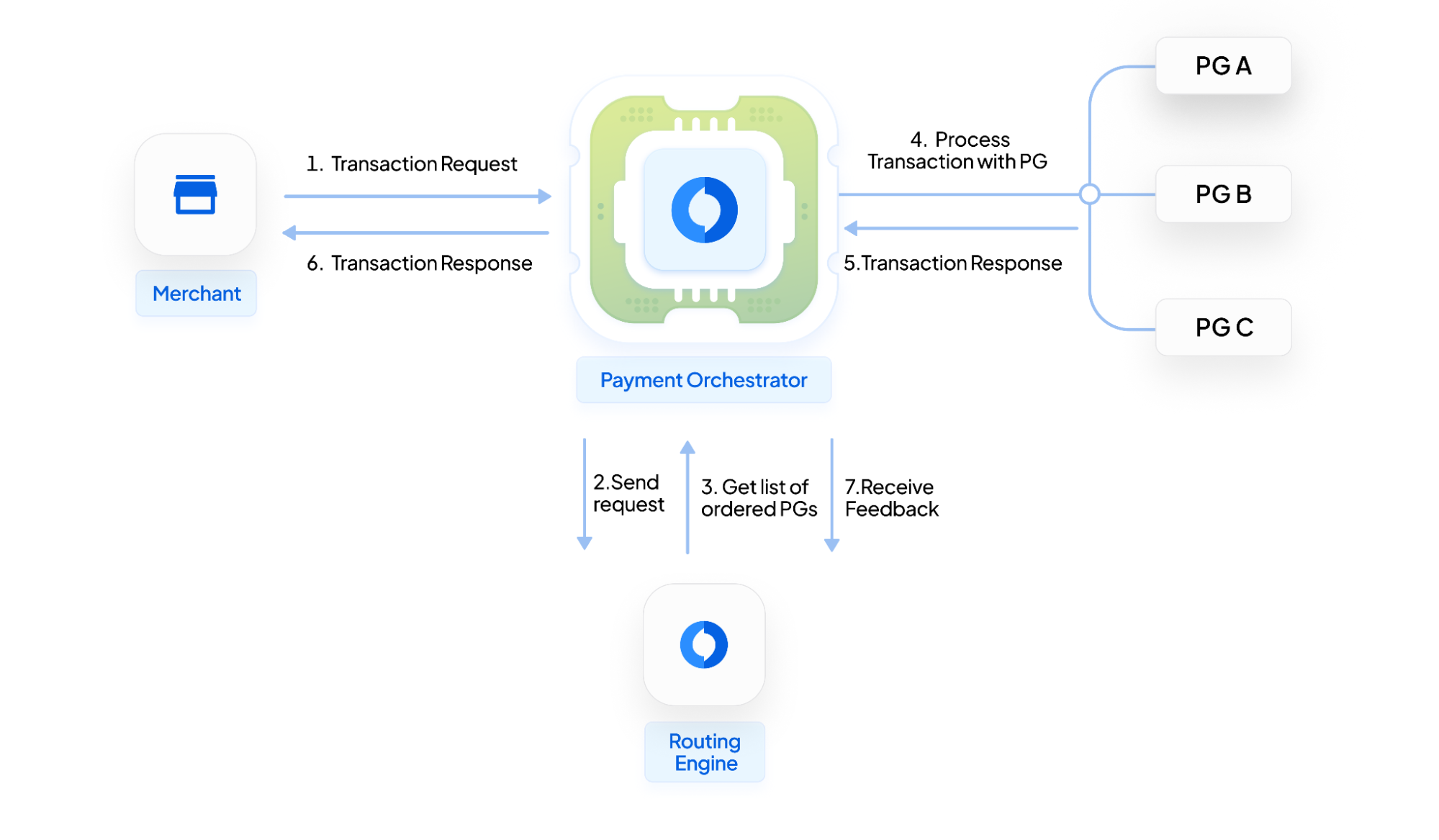
## How A Payment Is Routed
1. Hyperswitch checks which processors are eligible for the payment method, currency, country, and connector configuration.
2. The active routing strategy ranks or filters those processors.
3. Optional optimization layers, such as downtime elimination, multi-objective ranking, or debit network routing, refine the choice.
4. If the selected processor is not eligible or available, Hyperswitch uses Default Fallback Routing.
5. The decision is logged so your team can review the selected processor, routing approach, and outcome.
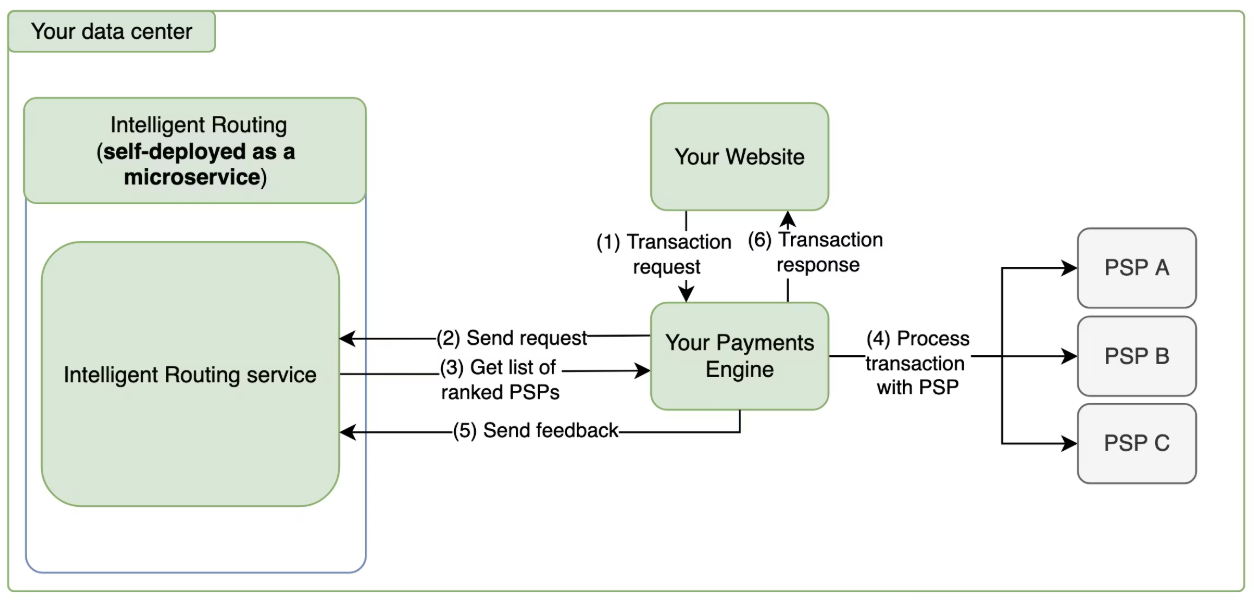
## Architecture Diagram
## Recommended Rollout
Start with Default Fallback Routing, then add Rule-Based or Volume-Based Routing for business controls. Use Auth-Rate Routing once multiple processors handle meaningful traffic for the same payment segment. Add Multi-Objective Routing only after cost coverage is available, and use A/B Testing before moving a new strategy to all traffic.
For self-hosted Hyperswitch deployments, see the [Self-Deployment Guide](/integration-guide/workflows/intelligent-routing/self-deployment-guide.md).
---
# Agent Instructions
This documentation is published with GitBook. GitBook is the documentation platform designed so that both humans and AI agents can read, navigate, and reason over technical content effectively. Learn more at gitbook.com.
## Querying This Documentation
If you need additional information that is not directly available in this page, you can query the documentation by asking a question.
Perform an HTTP GET request on the following URL with the `ask` and `goal` query parameters:
```
GET https://docs.hyperswitch.io/integration-guide/workflows/intelligent-routing.md?ask=&goal=
```
`ask` is the immediate question: it should be specific, self-contained, and written in natural language.
`goal` is what the user is ultimately trying to achieve, the reason they need the answer. Sharing it helps GitBook give you a better, more relevant answer. A goal is most helpful when it describes the outcome the user wants rather than restating the question. For example, with `ask=how do I create an API token`, a goal like `automate deployments from our CI pipeline` lets GitBook tailor the answer to that use case.
The response will contain a direct answer to the question and relevant excerpts and sources from the documentation.
Use this mechanism when the answer is not explicitly present in the current page, you need clarification or additional context, or you want to retrieve related documentation sections.