> For the complete documentation index, see [llms.txt](https://docs.hyperswitch.io/llms.txt). Markdown versions of documentation pages are available by appending `.md` to page URLs; this page is available as [Markdown](https://docs.hyperswitch.io/integration-guide/payment-suite/payments/save-a-payment-method/saved-card.md).
# Saved Card
Secure card vaulting with Hyperswitch SDK for PCI-DSS compliant payment processing
In this approach, the Juspay Hyperswitch SDK is used on the frontend to capture card details. Card data is securely sent to the Hyperswitch backend and stored in Hyperswitch Vault. Payment orchestration, routing, and connector logic are handled entirely by the Hyperswitch backend.
The merchant uses the Hyperswitch Dashboard to configure connectors, routing rules, and orchestration logic. All payment requests are initiated using vault tokens, and raw card data never reaches merchant systems. Since card details are handled entirely by Hyperswitch, merchants are not required to be PCI DSS compliant for card data handling.
### **New User (Payments SDK)**
#### **1. Create Payment (Server-Side)**
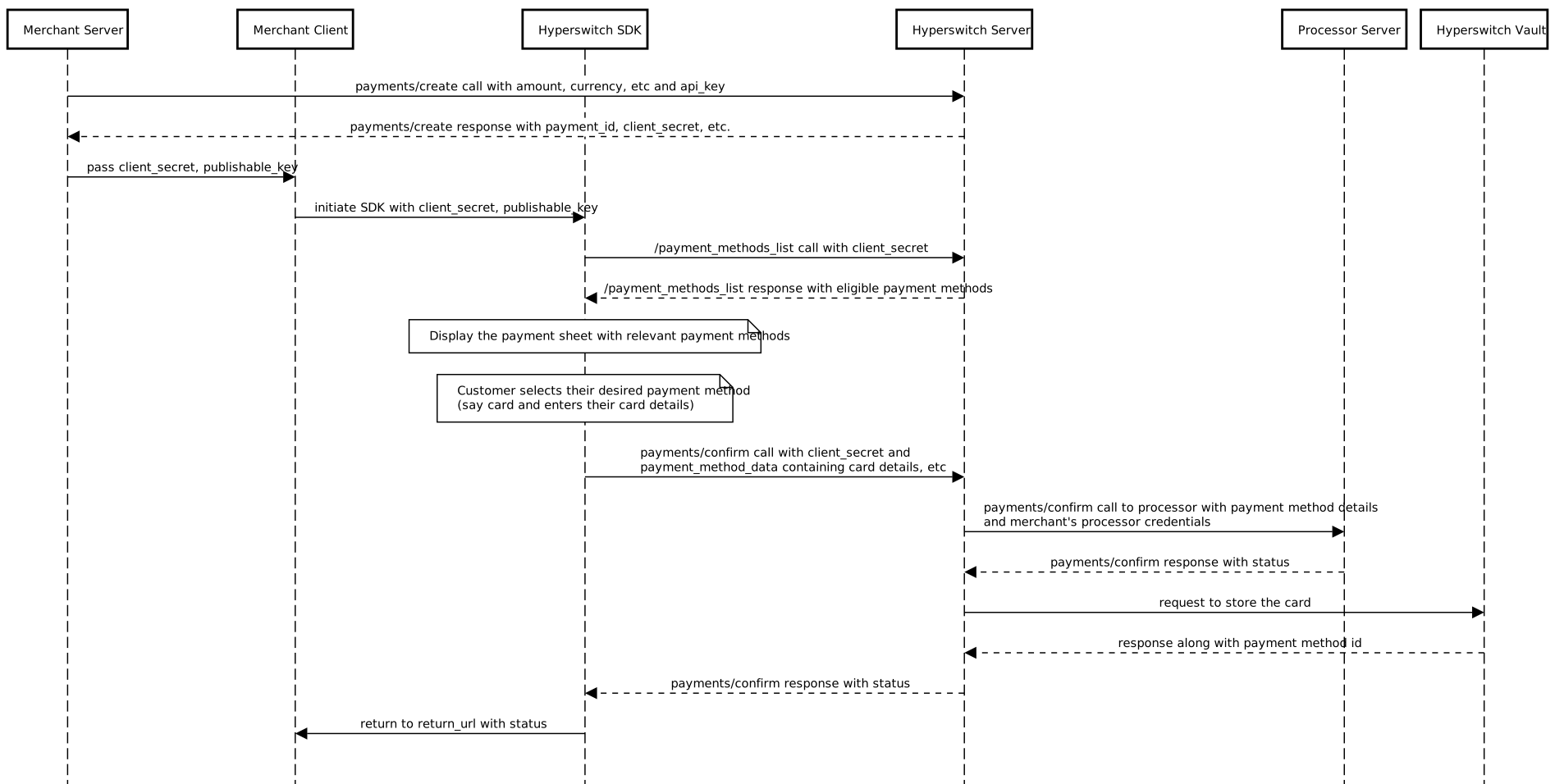
The merchant server creates a payment by calling the Hyperswitch [`payments/create`](https://api-reference.hyperswitch.io/v1/payments/payments--create) API with transaction details such as amount and currency. Hyperswitch responds with a `payment_id` , `customer_id` and `client_secret`, which are required for client-side processing.
```bash
curl --location 'https://sandbox.hyperswitch.io/payments' \
--header 'Content-Type: application/json' \
--header 'Accept: application/json' \
--header 'api-key: ' \
--data-raw '{
"amount": 6540,
"currency": "USD",
"profile_id": ,
"customer_id": "customer123",
"description": "Its my first payment request",
"return_url": "https://example.com", //
}'
```
{% hint style="info" %}
Note - In case the merchant does not pass the customer ID, then the transaction is treated as a Guest customer checkout
{% endhint %}
#### **2. Initialize SDK (Client-Side)**
The merchant client initializes the Hyperswitch SDK using the `client_secret` and `publishable_key`. The SDK fetches eligible payment methods from Hyperswitch and renders a secure payment UI.
```js
// Fetches a payment intent and captures the client secret
async function initialize() {
const response = await fetch("/create-payment", {
method: "POST",
headers: { "Content-Type": "application/json" },
body: JSON.stringify({currency: "USD",amount: 100}),
});
const { clientSecret } = await response.json();
// Initialise Hyperloader.js
var script = document.createElement('script');
script.type = 'text/javascript';
script.src = "https://beta.hyperswitch.io/v1/HyperLoader.js";
let hyper;
script.onload = () => {
hyper = window.Hyper("YOUR_PUBLISHABLE_KEY",{
customBackendUrl: "YOUR_BACKEND_URL",
//You can configure this as an endpoint for all the api calls such as session, payments, confirm call.
})
const appearance = {
theme: "midnight",
};
const widgets = hyper.widgets({ appearance, clientSecret });
const unifiedCheckoutOptions = {
layout: "tabs",
wallets: {
walletReturnUrl: "https://example.com/complete",
//Mandatory parameter for Wallet Flows such as Googlepay, Paypal and Applepay
},
};
const unifiedCheckout = widgets.create("payment", unifiedCheckoutOptions);
unifiedCheckout.mount("#unified-checkout");
};
document.body.appendChild(script);
}
```
#### **3. Collect Card Details**
The customer selects a card payment method and enters their card details directly within the SDK-managed interface, ensuring sensitive data never passes through merchant systems.
#### **4. Authorize and Store Card**
The SDK submits a [`payments/confirm`](https://api-reference.hyperswitch.io/v1/payments/payments--confirm) request to Hyperswitch. Hyperswitch authorizes the payment with the processor and securely stores the card in the Hyperswitch Vault, generating a reusable `payment_method_id`.
#### **5. Return Status**
The final payment and vaulting status is returned to the SDK, which redirects the customer to the merchant's configured `return_url`.
### **Returning or Repeat User (Payments SDK)**
#### **1. Create Payment (Server-Side)**
The merchant server initiates the payment by calling the [`payments/create`](https://api-reference.hyperswitch.io/v1/payments/payments--create) API with transaction details such as amount and currency. Hyperswitch responds with a `payment_id` , `customer_id` and `client_secret`, which are required for client-side processing.
```json
curl --location 'https://sandbox.hyperswitch.io/payments' \
--header 'Content-Type: application/json' \
--header 'Accept: application/json' \
--header 'api-key: ' \
--data-raw '{
"amount": 6540,
"currency": "USD",
"profile_id": ,
"customer_id": "customer123",
"description": "Its my first payment request",
"return_url": "https://example.com", //
}'
```
{% hint style="info" %}
Note -The merchant needs to pass the same customer ID for the SDK to fetch the saved customer payment methods and display them\
\
In case the merchant is not using the SDK then they need to use the List Customer Saved Payment Methods API to fetch the stored payment methods against a customer
{% endhint %}
#### **2. Initialize SDK and Fetch Saved Cards**
The merchant client initializes the Hyperswitch SDK. The SDK requests eligible payment methods from Hyperswitch, including any saved cards associated with the customer.
```js
// Fetches a payment intent and captures the client secret
async function initialize() {
const response = await fetch("/create-payment", {
method: "POST",
headers: { "Content-Type": "application/json" },
body: JSON.stringify({currency: "USD",amount: 100}),
});
const { clientSecret } = await response.json();
// Initialise Hyperloader.js
var script = document.createElement('script');
script.type = 'text/javascript';
script.src = "https://beta.hyperswitch.io/v1/HyperLoader.js";
let hyper;
script.onload = () => {
hyper = window.Hyper("YOUR_PUBLISHABLE_KEY",{
customBackendUrl: "YOUR_BACKEND_URL",
//You can configure this as an endpoint for all the api calls such as session, payments, confirm call.
})
const appearance = {
theme: "midnight",
};
const widgets = hyper.widgets({ appearance, clientSecret });
const unifiedCheckoutOptions = {
layout: "tabs",
wallets: {
walletReturnUrl: "https://example.com/complete",
//Mandatory parameter for Wallet Flows such as Googlepay, Paypal and Applepay
},
};
const unifiedCheckout = widgets.create("payment", unifiedCheckoutOptions);
unifiedCheckout.mount("#unified-checkout");
};
document.body.appendChild(script);
}
```
#### **3. Customer Selects a Saved Card**
The SDK displays the saved cards in the payment UI, customer enters the CVV.
#### **4. Retrieve Card Data and Authorize**
The SDK sends a [`payments/confirm`](https://api-reference.hyperswitch.io/v1/payments/payments--confirm) request with the selected `payment_method_id`. Hyperswitch securely retrieves the card data from the Hyperswitch Vault and submits the authorization request to the processor via the Hyperswitch Connector.
#### **5. Return Status**
The processor returns the authorization result to Hyperswitch, which forwards the final status to the SDK. The customer is redirected to the merchant's `return_url` with the payment outcome.
#### Integration Guide :
[Unified Checkout](https://docs.hyperswitch.io/~/revisions/DXTxY8PvOykOfdbFcGmW/explore-hyperswitch/payment-experience/payment/web)
[Payments API](https://api-reference.hyperswitch.io/v1/payments/payments--create)
---
# Agent Instructions
This documentation is published with GitBook. GitBook is the documentation platform designed so that both humans and AI agents can read, navigate, and reason over technical content effectively. Learn more at gitbook.com.
## Querying This Documentation
If you need additional information that is not directly available in this page, you can query the documentation by asking a question.
Perform an HTTP GET request on the following URL with the `ask` and `goal` query parameters:
```
GET https://docs.hyperswitch.io/integration-guide/payment-suite/payments/save-a-payment-method/saved-card.md?ask=&goal=
```
`ask` is the immediate question: it should be specific, self-contained, and written in natural language.
`goal` is what the user is ultimately trying to achieve, the reason they need the answer. Sharing it helps GitBook give you a better, more relevant answer. A goal is most helpful when it describes the outcome the user wants rather than restating the question. For example, with `ask=how do I create an API token`, a goal like `automate deployments from our CI pipeline` lets GitBook tailor the answer to that use case.
The response will contain a direct answer to the question and relevant excerpts and sources from the documentation.
Use this mechanism when the answer is not explicitly present in the current page, you need clarification or additional context, or you want to retrieve related documentation sections.