> For the complete documentation index, see [llms.txt](https://docs.hyperswitch.io/llms.txt). Markdown versions of documentation pages are available by appending `.md` to page URLs; this page is available as [Markdown](https://docs.hyperswitch.io/integration-guide/account-management/multiple-accounts-and-profiles/platform-organization-concepts.md).
# Platform Organization
Conceptual reference for Platform Organizations, Platform Merchants, and Connected and Standard merchants.
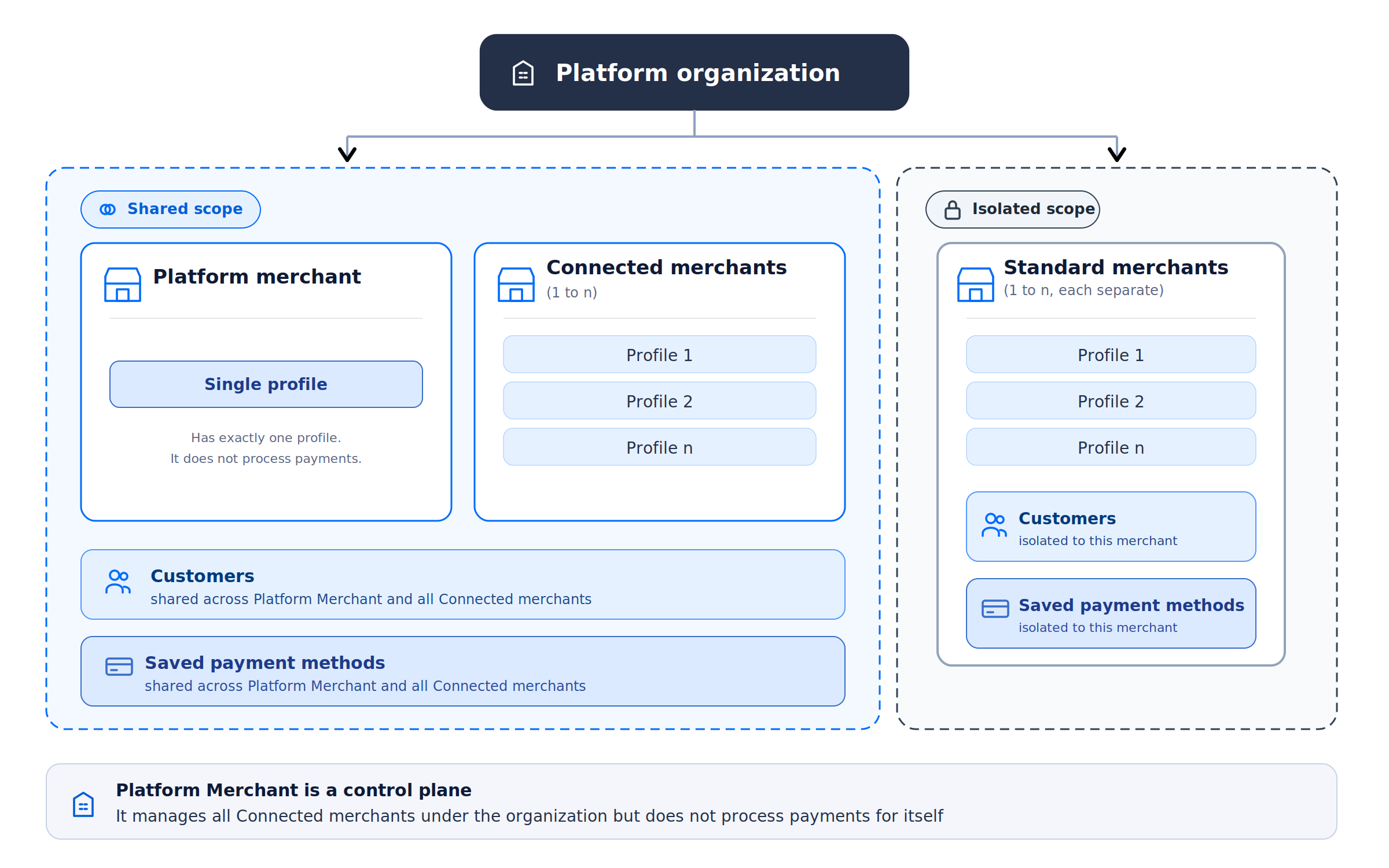
A Platform Organization is an organization whose platform merchant can create and manage merchant accounts programmatically. The backend represents organization type with `organization_type: "platform"` and merchant type with `merchant_account_type: "platform"`, `"connected"`, or `"standard"`.
The platform merchant is the control-plane merchant. A Connected merchant can be operated on behalf of through the platform authorization path. A Standard merchant cannot be operated on that path and uses its own merchant API key for payment operations.
### Programmatic onboarding flow
The exact v1 sequence is:
1. Create or convert the organization. These are not equally available to you. A **new** platform organization is self-service: an Org Admin creates one from the dashboard under Settings then Organization Settings, which calls `POST /user/create_platform` and needs the `OrganizationAccountWrite` permission. **Converting an existing organization is not.** Both `POST /organization/{id}/convert_to_platform` and the admin-API `POST /organization` authenticate with the deployment's admin API key, not with any merchant, platform or dashboard credential, so conversion has to be done by whoever operates your Hyperswitch deployment. See [Setting Up a Platform Organization](/integration-guide/account-management/multiple-accounts-and-profiles/platform-organization-concepts/setting-up-platform-organization.md).
2. Generate the Platform API Key. The first merchant account created in a platform organization is forced to type `platform` whatever the request asks for, and that merchant is the control-plane account. Switch to it in the dashboard and create an API key on the [API keys page](https://app.hyperswitch.io/dashboard/developer-api-keys). Step 3 authenticates with this key, and steps 4 to 6 may, depending on the merchant type; see the note under the list. Generate it before continuing.
3. Create the merchant account with `POST /accounts`. The `merchant_account_type` field decides what you get. Omit it and it defaults to `standard`, an isolated merchant. Send `connected` for a merchant the platform will operate on behalf of; that request is rejected unless `platform.allow_connected_merchants` is enabled in configuration. Creating the account also creates a default Business Profile and records it as the merchant's `default_profile`.
4. Only if the merchant needs more than the default profile, create another with `POST /account/{account_id}/business_profile`. Keep the returned `profile_id` for step 6; otherwise use the default profile's id.
5. Create an API key for that merchant with `POST /api_keys/{merchant_id}`.
6. Create the merchant connector account with `POST /account/{merchant_id}/connectors`, putting the processor credentials in `connector_account_details` and the `profile_id` from step 4 in the request body. The path carries only the merchant ID, so `profile_id` is what attaches the connector to the right profile. It is optional on v1 and required on v2, but leave it out on v1 and the handler falls back to the merchant's `default_profile`, which for a merchant with more than one profile is unlikely to be the profile you just created.
7. Use the new merchant API key for the merchant's payment operations. For a Connected merchant, the platform authorization path can also perform permitted operations on behalf of that merchant. A Standard merchant has no such path: its payments run only under its own key.
Which credential steps 4 to 6 accept depends on the merchant type, and this is the main practical difference between the two.
For a **Connected** merchant the Platform API Key works, but only with an `X-Connected-Merchant-Id` header naming that merchant. Without the header the platform key is read as operating on the platform merchant itself, and the call fails because the merchant in the route does not match.
For a **Standard** merchant there is no platform path at all. Those calls take the merchant's own API key, or a dashboard session. Create the merchant's API key first, so run step 5 before steps 4 and 6; the API key route also accepts the deployment's admin API key, which is how the first key gets created when the merchant has none.
The Platform API Key is privileged but not universal. It authorizes creating and managing merchant accounts in the organization, and it can act on behalf of Connected merchants. It does not run payments for Standard merchants; those use their own merchant API key. The administrative routes accept it through `PlatformOrgAdminAuth`, which rejects the key unless it belongs to a platform merchant account and platform support is enabled in configuration.
For v2, the corresponding routes are `POST /v2/merchant-accounts`, `POST /v2/profiles`, `POST /v2/api-keys`, and `POST /v2/connector-accounts`. The v2 route uses the authenticated merchant context rather than putting the merchant ID in each of those paths. Check the versioned request schema before sending fields because v1 and v2 use different identifier placement and profile request shapes.
The profile remains the boundary for payment configuration. Processor credentials belong to the merchant connector account created for that profile, not to the platform organization or the merchant account.
### Resource boundaries
Connected merchants share the platform resource model only where the backend permits it. Standard merchants keep isolated customer and payment-method data. Both merchant types have their own merchant account and profiles. The classification is set by the merchant-account type and is not a dashboard label that changes the API scope.
Platform Organization - shared scope for Platform and Connected merchants, isolated scope for Standard merchants
### Dashboard profile identifier
The control center's payment-settings profile view shows `Profile ID` next to `Profile Name` and `Merchant ID`, with a copy control. Where that identifier goes depends on the API version: on v1 pass it as `profile_id` in the payment request body, and on v2 send it in the `X-Profile-Id` header, because the v2 `PaymentsRequest` has no `profile_id` field. In profile APIs it is the profile path parameter on both versions. See [Selecting a profile for a payment](/integration-guide/account-management/multiple-accounts-and-profiles/hyperswitch-account-structure.md#selecting-a-profile-for-a-payment).
### Related pages
* [Organization, Merchant Account, and Business Profile](/integration-guide/account-management/multiple-accounts-and-profiles/hyperswitch-account-structure.md)
* [Setting Up a Platform Organization](/integration-guide/account-management/multiple-accounts-and-profiles/platform-organization-concepts/setting-up-platform-organization.md)
* [On-Behalf-of Operations](/integration-guide/account-management/multiple-accounts-and-profiles/platform-organization-concepts/on-behalf-of-operations.md)
---
# Agent Instructions
This documentation is published with GitBook. GitBook is the documentation platform designed so that both humans and AI agents can read, navigate, and reason over technical content effectively. Learn more at gitbook.com.
## Querying This Documentation
If you need additional information that is not directly available in this page, you can query the documentation by asking a question.
Perform an HTTP GET request on the following URL with the `ask` and `goal` query parameters:
```
GET https://docs.hyperswitch.io/integration-guide/account-management/multiple-accounts-and-profiles/platform-organization-concepts.md?ask=&goal=
```
`ask` is the immediate question: it should be specific, self-contained, and written in natural language.
`goal` is what the user is ultimately trying to achieve, the reason they need the answer. Sharing it helps GitBook give you a better, more relevant answer. A goal is most helpful when it describes the outcome the user wants rather than restating the question. For example, with `ask=how do I create an API token`, a goal like `automate deployments from our CI pipeline` lets GitBook tailor the answer to that use case.
The response will contain a direct answer to the question and relevant excerpts and sources from the documentation.
Use this mechanism when the answer is not explicitly present in the current page, you need clarification or additional context, or you want to retrieve related documentation sections.