> For the complete documentation index, see [llms.txt](https://docs.hyperswitch.io/llms.txt). Markdown versions of documentation pages are available by appending `.md` to page URLs; this page is available as [Markdown](https://docs.hyperswitch.io/integration-guide/account-management/multiple-accounts-and-profiles/pick-the-right-setup.md).
# Pick the Right Setup for Your Business
Decide between a Standard Organization and a Platform Organization based on how your business operates.
Hyperswitch supports two account setups: a **Standard Organization** and a **Platform Organization**. The right choice depends on whether you're running payments for a single business (with one or more brands or sub-merchants) or operating as a parent that wants to onboard and manage other merchants programmatically.
This page lays out both paths and helps you pick.
### Two Setups, One Decision
| Setup | Use this when |
| ------------------------- | ------------------------------------------------------------------------------------------------------------------------------------------------------------------------------ |
| **Standard Organization** | You run payments for your own business, or onboard a small set of sub-merchants whose accounts you administer from the dashboard. |
| **Platform Organization** | You manage payments for multiple sub-merchants and want to onboard them programmatically, with optional shared customers and saved payment methods across the connected group. |
***
### When to Choose a Standard Organization
A Standard Organization is the default when you sign up. It fits these scenarios:
* **Single merchant.** One business, one brand, one set of API keys.
* **Multiple brands or business units.** A single business operating multiple storefronts (e.g. a retailer with separate clothing, shoes, and accessories lines). Use multiple **merchant accounts** under the same Standard Org, each with its own API keys, or multiple **profiles** under one merchant account if you want to share an API key across business units.
* **Sub-merchants administered from the dashboard.** A Standard Organization can also support sub-merchants where the parent administers each sub-merchant manually from the dashboard. Day-to-day governance is handled by user roles and permissions. See [Manage Your Team](/integration-guide/account-management/manage-your-team.md) for how to grant role-based access at the org, merchant, or profile level.
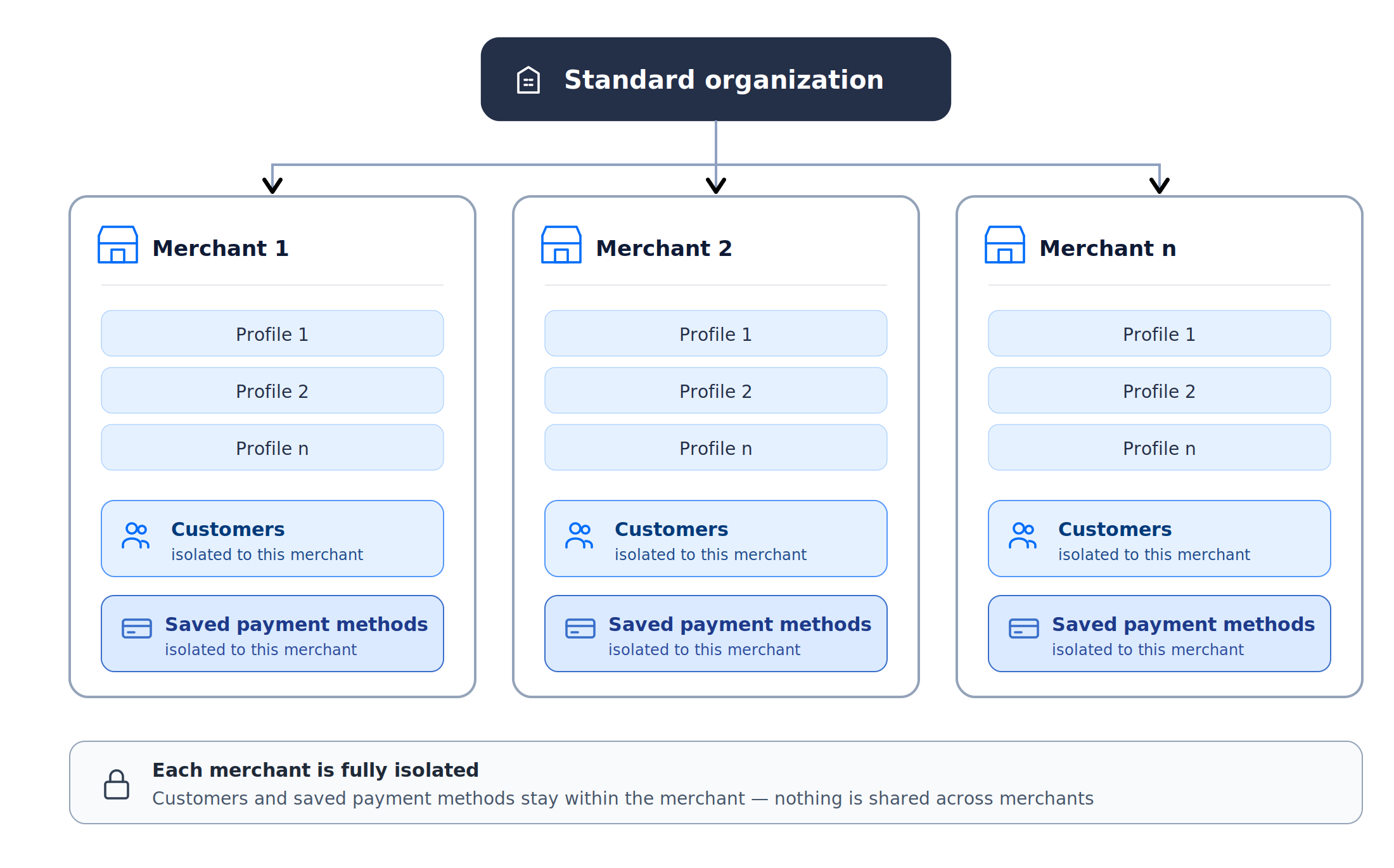
In a Standard Organization, customers and saved payment methods are scoped at the **merchant** level. All profiles under the same merchant account share the same customer and payment-method data; different merchant accounts in the same org are isolated from each other.
Standard Organization - each merchant is fully isolated with its own customers and saved payment methods
For setup details, see [Standard Organization](/integration-guide/account-management/multiple-accounts-and-profiles/standard-organization.md).
***
### When to Choose a Platform Organization
A Platform Organization is for businesses that want **programmatic management of sub-merchants** through the Platform API Key. It also unlocks two resource-sharing models you can mix in the same Platform Org: shared customers and payment methods across a connected group, or full isolation per sub-merchant.
#### Connected Merchants (shared resources)
Use **Connected Merchants** when you want sub-merchants to share customers and saved payment methods across the connected group. Choose this if:
* You operate a **marketplace** where the same end-customer might pay multiple sellers (e.g. booking platforms, multi-vendor commerce).
* You want a **unified customer experience** across your sub-merchants. A customer who saves their card with Sub-Merchant A can reuse it with Sub-Merchant B.
* You want the **platform to initiate operations on behalf of** a sub-merchant: payments, refunds, captures, disputes, connector configuration. The Platform API Key acts as a privileged credential across the connected group.
#### Standard Merchants under a Platform Org (isolated)
Use **Standard Merchants** under a Platform Org when you want central account management plus programmatic onboarding, but **no resource sharing** between sub-merchants. Choose this if:
* You're a **VSaaS or franchise operator** where each sub-merchant must keep its customers and saved cards isolated for compliance, contractual, or data-boundary reasons.
* You want the platform to **provision accounts and generate API keys** for sub-merchants programmatically, but day-to-day payment operations stay with the sub-merchant.
For concepts and setup, see [Platform Organization](/integration-guide/account-management/multiple-accounts-and-profiles/platform-organization-concepts.md) followed by [Setting Up a Platform Organization](/integration-guide/account-management/multiple-accounts-and-profiles/platform-organization-concepts/setting-up-platform-organization.md).
***
### Quick Comparison
| Capability | Standard Organization | Platform Organization |
| -------------------------------------------------------------- | ---------------------------- | -------------------------------------------------------------------- |
| Manage merchants and profiles via the Dashboard | Yes (governed by user roles) | Yes (governed by user roles) |
| Onboard sub-merchants programmatically via API | No | Yes (Platform API Key) |
| Generate sub-merchant API keys via API | No | Yes (Platform API Key) |
| Customers and payment methods shared across the merchant group | No (scoped per merchant) | Yes for **Connected Merchants**; isolated for **Standard Merchants** |
| Platform initiates operations on behalf of a sub-merchant | No | Yes (Connected Merchants only) |
| Multiple merchant accounts under one organization | Yes | Yes |
| Multiple profiles per merchant account | Yes | Yes |
Both setups support full dashboard-based management of merchants, profiles, connectors, and team access. The Platform Organization adds programmatic management on top: a Platform API Key that can onboard sub-merchants and operate on their behalf where allowed.
***
### Examples by Business Type
| Business type | Recommended setup |
| ----------------------------------------------------------------------------------- | ----------------------------------------------------------------------- |
| Single-business e-commerce store | Standard Organization |
| Retailer with multiple brand storefronts | Standard Organization, multiple merchants or profiles |
| VSaaS where each sub-merchant must stay fully isolated | Standard Organization, or Platform Organization with Standard Merchants |
| Marketplace with a shared customer view (e.g. multi-vendor commerce) | Platform Organization with Connected Merchants |
| VSaaS that wants a unified saved-card experience across its sub-merchants | Platform Organization with Connected Merchants |
| Franchise operator centralising onboarding while keeping sub-merchant data isolated | Platform Organization with Standard Merchants |
***
### Still Not Sure?
Start with a Standard Organization and convert to a Platform Organization later if your business model evolves. Conversion requires assistance from your administrator. If you're already certain about the platform model, set up a Platform Organization from the start to avoid migration overhead.
### Next Steps
* For a Standard setup: [Standard Organization](/integration-guide/account-management/multiple-accounts-and-profiles/standard-organization.md).
* For a Platform setup: [Platform Organization](/integration-guide/account-management/multiple-accounts-and-profiles/platform-organization-concepts.md), then [Setting Up a Platform Organization](/integration-guide/account-management/multiple-accounts-and-profiles/platform-organization-concepts/setting-up-platform-organization.md).
* To understand the building blocks first: [Organization, Merchant Account, and Business Profile](/integration-guide/account-management/multiple-accounts-and-profiles/hyperswitch-account-structure.md).
---
# Agent Instructions
This documentation is published with GitBook. GitBook is the documentation platform designed so that both humans and AI agents can read, navigate, and reason over technical content effectively. Learn more at gitbook.com.
## Querying This Documentation
If you need additional information that is not directly available in this page, you can query the documentation by asking a question.
Perform an HTTP GET request on the following URL with the `ask` and `goal` query parameters:
```
GET https://docs.hyperswitch.io/integration-guide/account-management/multiple-accounts-and-profiles/pick-the-right-setup.md?ask=&goal=
```
`ask` is the immediate question: it should be specific, self-contained, and written in natural language.
`goal` is what the user is ultimately trying to achieve, the reason they need the answer. Sharing it helps GitBook give you a better, more relevant answer. A goal is most helpful when it describes the outcome the user wants rather than restating the question. For example, with `ask=how do I create an API token`, a goal like `automate deployments from our CI pipeline` lets GitBook tailor the answer to that use case.
The response will contain a direct answer to the question and relevant excerpts and sources from the documentation.
Use this mechanism when the answer is not explicitly present in the current page, you need clarification or additional context, or you want to retrieve related documentation sections.